Vodi – Video WordPress Theme for Movies & TV Shows
Antivirus scan
Powered by ClamAV
✅ Verified clean
This product file has passed our security filters.
Want to run a fresh ClamAV scan right now? Takes a few seconds and shows scanner version, signature DB and live result.
This can take 5 to 30 seconds.
Clean file Threat detected
No threats detected in this file.
- File
- Size
- Scanned
- ClamAV
- Signature database
⚡ Powered by ClamAV
Scan could not be completed
Report product
If you detected an issue (broken file, malware, inappropriate content, etc.) let us know and we'll review it ASAP.
Sign in to report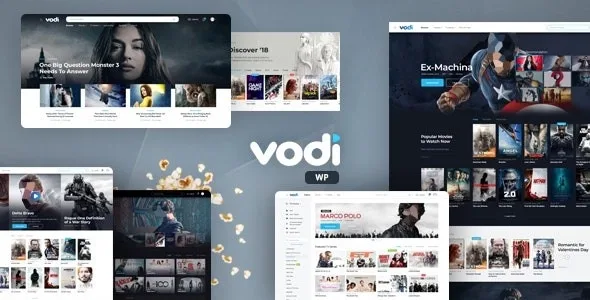
About Vodi – Video WordPress Theme for Movies & TV Shows
On a film site, visitors do not arrive through the home page
Whoever builds a movies and series site usually spends weeks on the home page: the carousel, the featured picks, the order of the genres. But people who arrive from a search engine almost never come in that way. They search for a specific title, and land on the page for that film or that episode. That page is the one competing in the results, and the one that decides whether the visitor stays.
Vodi, by MadrasThemes, is built with that idea at its centre: every film, series and video has its own page, with several styles for films, videos and episodes, and the theme automatically adds the structured data for each one so the search engine understands what it is.
Film, series and episode pages with MAS Videos
- MAS Videos, the plugin by the same author that provides the core functionality: films, series and videos are created and managed just like posts.
- Automatic structured data on film, series and video pages.
- Four single film styles, six video styles and four episode styles.
- 47 Gutenberg blocks and nine home pages, with four headers and four footers in light and dark versions.
- Archives for films, series and videos with sidebar filters and sorting.
- User accounts: history for logged-in users, playlists and uploads of their own videos by registered users.
How to work each title's page
Pick one style per content type and do not change it title by title. With four film styles and six video styles it is tempting to vary, but a consistent catalogue is easier to browse and takes less work to maintain.
Fill in the data, not just the synopsis. Structured data is generated from what you enter on each page. A film with no year, no cast or no image gives the search engine little to work with, even if the markup is in place.
Use sources to say where it can be watched. MAS Videos has a sources section, and in one of the demo styles those sources are custom HTML, which lets you link to the platforms where each title is available.
Video comes in by embed, and the rights are up to you
Its features do not include video hosting or conversion. Content comes in through the WordPress embed system: any server or service that provides an embed code compatible with WordPress will work.
Nor does it settle the rights to what you publish. A catalogue of entries, reviews or trailers is one thing; streaming other people's films is another, and that decision comes before choosing a theme.
And the filters for most viewed and most liked depend on two separate plugins, Jetpack and WP ULike. It is worth counting them as part of the installation if that sorting matters for your catalogue.
MAS Videos first, then the page style
The theme is compatible with WordPress 7.1 and is built on Underscores. MAS Videos requires WordPress 6.4 or later and PHP 7.4 or later.
- Install Vodi and activate MAS Videos, which is essential.
- Import the demo data, knowing that it comes with placeholder images and not the ones in the preview.
- Decide on one page style for films, another for videos and another for episodes.
- Load your first titles with all their data and check how the page looks before going further.
- To sort by most viewed or most liked, add Jetpack and WP ULike.
A large catalogue or a platform that charges
If the plan is a large catalogue with a look the audience already knows, PsyPlay is based on the 123movies design and includes a tool that fills in the entries with one click. If what you want is a platform that charges, WowTube covers films, series and live streams with subscription, pay-per-view or advertising, and recurring billing runs on separate plugins.
Plugins, your own video and structured data
Does it need any required plugin?
Yes, MAS Videos, by the same author. It is the one that creates the films, series and videos.
Can I upload my own films and play them?
Yes, if the server provides an embed code compatible with WordPress.
Does it add structured data?
Yes, automatically on film, series and video pages.
Can users upload videos?
Yes, registered users can upload their own and manage playlists with their account.
What is needed to sort by most viewed?
Jetpack and WP ULike. With them the advanced filters are enabled.
Topics
Version history
-
v
1.2.16 Current 17 Oct 2026
-
v
1.2.13 8 Jan 2025
Customer reviews
Sign in to leave a review. Only people who have the product can review it.
No reviews for this product yet.
Frequently asked questions
-
GPL (General Public License) is the license under which WordPress and most premium plugins/themes are distributed. It grants you the right to use, modify and redistribute the software in as many projects as you want, with no domain restrictions.
-
Yes. With membership you get automatic updates via our GPLClub Updater plugin (installed on your WP, detects new versions and applies them). With individual purchase, you get one year of manual updates from your account.
-
Depends on the plan. Monthly: 3 domains. Semi-annual: 7. Annual and Lifetime: 15. Individual purchase: 1 domain.
-
GPLClub offers its own support for installation, configuration and compatibility. For direct support from the original author (feature requests, product-specific bugs), a license purchased from the author is required.