WhatsApp Chat WordPress
Antivirus scan
Powered by ClamAV
✅ Verified clean
This product file has passed our security filters.
Want to run a fresh ClamAV scan right now? Takes a few seconds and shows scanner version, signature DB and live result.
This can take 5 to 30 seconds.
Clean file Threat detected
No threats detected in this file.
- File
- Size
- Scanned
- ClamAV
- Signature database
⚡ Powered by ClamAV
Scan could not be completed
Report product
If you detected an issue (broken file, malware, inappropriate content, etc.) let us know and we'll review it ASAP.
Sign in to report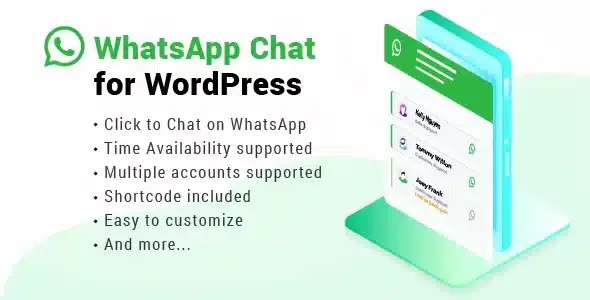
About WhatsApp Chat WordPress
When the customer wants to ask something and your contact form feels like too much work
Filling in a contact form, waiting for an email and going back to the inbox is a lot of effort for a two-line question. Many people prefer to write on WhatsApp, where the conversation is already open. WhatsApp Chat WordPress puts a button or widget on your site that takes the visitor straight to that app, with the agent they choose.
What matters in a customer service business: people forgive waiting if they know how long it will be. What they don't forgive is writing and getting no reply with no explanation. This plugin works right there, showing who is available and when.
Several agents, schedules and a button that changes color
Features that change the day-to-day:
- Several accounts in one box: you add your agents with photo, name and job title, with a phone number or a group chat link. The visitor chooses who to talk to and knows who is answering.
- Availability per person: each agent has their own schedule. When they are online, the button is green (or the color you set); outside their hours, it appears grey. This way nobody feels ignored.
- Colors and style: you can adapt the box to your site's identity, with a live preview of the widget and the button.
- One shortcode per account: each agent has their own, to paste into a page, a post or anywhere you like. There is also a Gutenberg block for the button.
- Where it appears: across the whole site or only on the pages and posts you choose, with options to show or hide it on specific posts.
- WooCommerce store: you can enable a WhatsApp button next to the add to cart button on the product page.
- Translation: it works with WPML and Polylang, and supports right-to-left writing.
What it doesn't do
It is not a chat of its own inside your site: on click, the visitor leaves for the WhatsApp app on mobile or WhatsApp Web on desktop. Conversations are handled in WhatsApp, not in a WordPress panel, so don't expect history or ticket assignment on your site. Nor is it a bot that replies by itself. And the option to hide agents who are offline is a PRO feature, so if you need it, check before setting up your team.
Frequently asked questions
Do I need to know how to code?
No. You install it, activate it and set the options from the panel. Code only appears in specific cases, such as showing the button on out-of-stock products, which requires pasting one line into the theme's functions.php file.
Can I show it only on some pages?
Yes, you can choose specific pages or posts, or show it across the whole site.
Can I measure how many clicks it gets?
It supports integration with Google Analytics, Google Tag Manager and Facebook Pixel.
Does it work with a multilingual site?
Yes, it is compatible with WPML and Polylang.
Does it work with caching and page builders?
It is compatible with the usual caching plugins and has fixed conflicts with Elementor, Oxygen Builder and some themes such as Woodmart or Porto.
Widget styles: expandable or one-click
There are two formats. The expandable one opens a box with the list of agents, useful when you have several departments. The simple one takes the visitor to the chat with one click, more practical if one person handles everything and you don't want to add steps. Choosing well here keeps the visitor from hesitating before writing.
What to set up so the button is useful from day one
Before publishing, have three things clear: which number or group handles each topic, what hours each person answers, and what predefined message you want to appear when the chat opens (line breaks are supported). Also check the WordPress time zone, because availability schedules depend on it. If your site collects visitor data, the widget includes a configurable privacy notice, but the decision on what text to show is yours. Test the button on mobile and on desktop to check that it opens WhatsApp in each case.
Topics
Version history
-
v
3.8.2 Current 22 May 2026
-
v
3.8.1 1 May 2026
Customer reviews
Sign in to leave a review. Only people who have the product can review it.
No reviews for this product yet.
Frequently asked questions
-
GPL (General Public License) is the license under which WordPress and most premium plugins/themes are distributed. It grants you the right to use, modify and redistribute the software in as many projects as you want, with no domain restrictions.
-
Yes. With membership you get automatic updates via our GPLClub Updater plugin (installed on your WP, detects new versions and applies them). With individual purchase, you get one year of manual updates from your account.
-
Depends on the plan. Monthly: 3 domains. Semi-annual: 7. Annual and Lifetime: 15. Individual purchase: 1 domain.
-
GPLClub offers its own support for installation, configuration and compatibility. For direct support from the original author (feature requests, product-specific bugs), a license purchased from the author is required.