WooCommerce Availability Scheduler
Antivirus scan
Powered by ClamAV
✅ Verified clean
This product file has passed our security filters.
Want to run a fresh ClamAV scan right now? Takes a few seconds and shows scanner version, signature DB and live result.
This can take 5 to 30 seconds.
Clean file Threat detected
No threats detected in this file.
- File
- Size
- Scanned
- ClamAV
- Signature database
⚡ Powered by ClamAV
Scan could not be completed
Report product
If you detected an issue (broken file, malware, inappropriate content, etc.) let us know and we'll review it ASAP.
Sign in to reportNewer version out, or a problem?
About WooCommerce Availability Scheduler
Selling a lunch menu only within its time slot
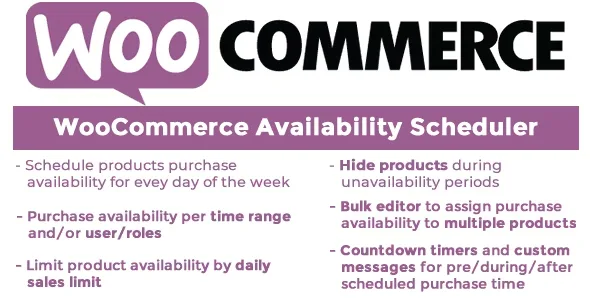
Many shops sell products that only make sense at a specific moment, and the problem is that customers see them and order when they cannot be served. WooCommerce Availability Scheduler handles exactly that: it decides which days and which time range each product can be bought in, and shows or hides the add to cart button depending on the time.
Picture a shop that sells a lunch menu available Monday to Friday, from 13:00 to 15:00. For each day of the week you set a single purchase time range. Outside that range, the button disappears in the shop and on the product page, and if you prefer, the product stops appearing altogether.
Customers are not left without an explanation: you can write a custom message that says why they cannot buy right now, and use the [start_time] and [end_time] shortcodes to show when the range starts or ends. A countdown timer completes the notice.
Frequently asked questions about WooCommerce Availability Scheduler
Do I need WooCommerce to use it?
Yes. It is an extension for WooCommerce, so the shop needs it installed and active.
Can I hide the whole product or only the button?
Both. The add to cart button is always hidden outside the available time. If you enable the option to hide products during unavailability, the whole product moves to draft while it cannot be bought.
What happens when the daily sales limit is reached?
The product stops being available for that day, or it is hidden if you have enabled that option.
Does it work with any theme?
It depends on the theme. It must correctly use the woocommerce_after_single_product, woocommerce_loop_add_to_cart_link and woocommerce_single_product_summary actions on the shop and product pages, as WooCommerce's reference templates do.
Daily sales cap and expiry date on the same product
When there is a limited number of portions each day or a menu that stops existing on a given date, the weekly schedule is not enough. You can set a daily sales cap: when it is reached, the product stops being available for that day, and a progress bar shows how sales are going. Its colors can be customized in the options menu.
You can also set an expiry date and time. After that moment, the product is hidden or in draft and, if you prefer, stays visible but cannot be bought. Different messages can appear before and after expiry, and a timer shows how much time is left. The global shortcodes [was_start_time] and [was_end_time] can also be printed in the description or on pages.
Limiting purchases to certain roles within their time
Sometimes the time range is open, but only for a certain kind of customer. With user roles you can restrict purchases for a specific day and time range to a set of users.
Loading schedules in bulk with WooCommerce Availability Scheduler
Setting up many products one by one gets slow. From the WooCommerce menu, the Bulk availability scheduler option lets you edit the availability of several products at once.
Here is a limit for variable products: availability is assigned to the main product, not to a specific variation. If one size or color needs its own schedule, this plugin does not separate it by variation.
Multilingual messages and theme templates that follow the standard
If your shop runs on WPML, availability messages are translated from a dedicated box shown in the translated product's editor, so each language can announce the schedule in its own words.
The plugin has no support for other plugins that customize the shop or product page. It is best to use the standard product and shop templates so the button is hidden and the messages appear where they should.
Topics
Version history
-
v
12.6 Current 8 Jan 2026
Customer reviews
Sign in to leave a review. Only people who have the product can review it.
No reviews for this product yet.
Frequently asked questions
-
GPL (General Public License) is the license under which WordPress and most premium plugins/themes are distributed. It grants you the right to use, modify and redistribute the software in as many projects as you want, with no domain restrictions.
-
Yes. With membership you get automatic updates via our GPLClub Updater plugin (installed on your WP, detects new versions and applies them). With individual purchase, you get one year of manual updates from your account.
-
Depends on the plan. Monthly: 3 domains. Semi-annual: 7. Annual and Lifetime: 15. Individual purchase: 1 domain.
-
GPLClub offers its own support for installation, configuration and compatibility. For direct support from the original author (feature requests, product-specific bugs), a license purchased from the author is required.