WooCommerce Estimated Delivery Or Shipping Date Per Product
Antivirus scan
Powered by ClamAV
✅ Verified clean
This product file has passed our security filters.
Want to run a fresh ClamAV scan right now? Takes a few seconds and shows scanner version, signature DB and live result.
This can take 5 to 30 seconds.
Clean file Threat detected
No threats detected in this file.
- File
- Size
- Scanned
- ClamAV
- Signature database
⚡ Powered by ClamAV
Scan could not be completed
Report product
If you detected an issue (broken file, malware, inappropriate content, etc.) let us know and we'll review it ASAP.
Sign in to reportNewer version out, or a problem?
About WooCommerce Estimated Delivery Or Shipping Date Per Product
Customers who ask when their order arrives before buying
In a shop that sells stock items alongside products made to order, a single delivery sentence for the whole catalog misleads someone: either the buyer of in-stock items is promised too much, or the one who waits longest gets a false date. Many shops end up answering by email the same question they could have answered on the product page.
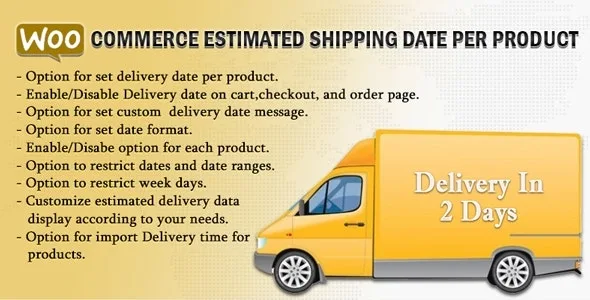
This WooCommerce plugin calculates and displays the estimated delivery or shipping date for each product and each order, so every item can have its own timing and its own text.
Timing and messages set for each product in your store
Timing is set on several levels: a global value for the whole store, another for each product and another for each variation. This way, a product with variants can have different times for each variation. You can also assign a delivery time to each shipping method.
Messages are yours too and can be fully customized, with formats such as “Delivered in 2 days”, “Delivered between 2 and 5 days” or “Receive it on 20 March”. You can also choose the date format the store will use and set an end-of-day cutoff time for the calculation.
When a cart holds several products, the plugin can show a single date for the whole order, calculated from the shortest or longest delivery time among its items.
Only for physical products
The plugin is designed for physical products. As an extension of WooCommerce, it needs WooCommerce installed and active.
Frequently asked questions about WooCommerce Estimated Delivery Or Shipping Date Per Product
Can I show a different date for out-of-stock or backordered products?
Yes. You can set a different time and message for out-of-stock and backordered products, either globally or product by product.
Can I hide the message on some pages?
Yes. You can show or hide the message on the cart, checkout, order and email, and also on the archive and shop pages.
Can I show one single date for the whole order?
Yes. The combined message is calculated from the shortest or longest delivery time among the cart products and displayed on the cart, checkout and order pages.
Can I import and change delivery times in bulk?
Yes. Delivery times are exported and imported with the WooCommerce product function and changed with bulk edit and quick edit.
Holidays, closed days and out-of-stock times in the calculation
A delivery time that ignores holidays gives dates nobody can meet. That is why you can add holidays, weekdays without activity, specific days off and date ranges, so the estimate is more accurate.
Out-of-stock and backordered products can have times different from normal stock, both in the global setting and per product, and the message can be shown or hidden in those cases.
Where the date appears: product, cart, checkout, order and email
The date can be seen on the product page, the shop, archive pages, the cart, checkout, the order page and the confirmation email. The combined order message also has fixed positions within each page:
- Cart: six positions, from before the cart table to before the cart total.
- Checkout: eight positions, between the checkout form and the order review.
- Order details: four positions around the order table and customer details.
- Email: five positions, before and after the order details and customer details.
With the shortcodes you can place the date on any page of your website, and the order list also shows the delivery date.
Working with marketplaces, caching and WPML in your WooCommerce store
If your store uses a caching plugin, the date can be loaded via AJAX on the product page, so the message stays correct even when the page is cached. Before you decide, it is worth checking three points:
- Marketplaces: compatible with Dokan and WCFM Multivendor.
- Languages: compatible with WPML.
- Development: supports the WP REST API and requires no coding.
If your store sells physical products with very different delivery times from one another, that is where the plugin will be most useful.
Topics
Version history
-
v
5.1 Current 12 May 2024
Customer reviews
Sign in to leave a review. Only people who have the product can review it.
No reviews for this product yet.
Frequently asked questions
-
GPL (General Public License) is the license under which WordPress and most premium plugins/themes are distributed. It grants you the right to use, modify and redistribute the software in as many projects as you want, with no domain restrictions.
-
Yes. With membership you get automatic updates via our GPLClub Updater plugin (installed on your WP, detects new versions and applies them). With individual purchase, you get one year of manual updates from your account.
-
Depends on the plan. Monthly: 3 domains. Semi-annual: 7. Annual and Lifetime: 15. Individual purchase: 1 domain.
-
GPLClub offers its own support for installation, configuration and compatibility. For direct support from the original author (feature requests, product-specific bugs), a license purchased from the author is required.