WooCommerce Measurement Price Calculator
Antivirus scan
Powered by ClamAV
✅ Verified clean
This product file has passed our security filters.
Want to run a fresh ClamAV scan right now? Takes a few seconds and shows scanner version, signature DB and live result.
This can take 5 to 30 seconds.
Clean file Threat detected
No threats detected in this file.
- File
- Size
- Scanned
- ClamAV
- Signature database
⚡ Powered by ClamAV
Scan could not be completed
Report product
If you detected an issue (broken file, malware, inappropriate content, etc.) let us know and we'll review it ASAP.
Sign in to report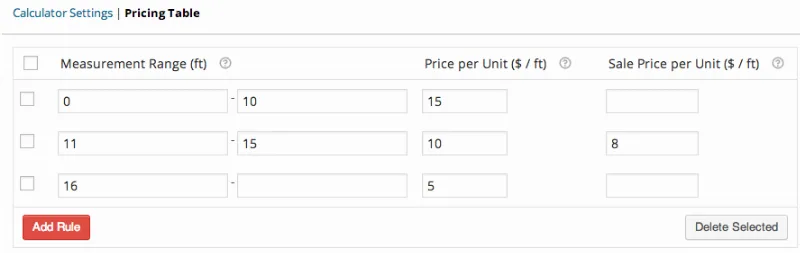
About WooCommerce Measurement Price Calculator
Selling by the meter, box or roll doesn't fit a store built for single units
WooCommerce is designed to sell T-shirts and phones: one unit, one price. But if you sell flooring, fabric, wallpaper or mulch, customers don't know how many units they need, they know how many square meters their room has. Without help, they end up emailing you with questions, miscalculating, or buying too little.
WooCommerce Measurement Price Calculator adds a calculator to the product page so customers can enter measurements and see the price or the quantity they need.
The materials business depends on customers getting the measurement right
The measurement the customer enters is shown in the cart, in the order details, in emails and in the order admin panel, so you can see exactly what was ordered too.
Two calculator modes: quantity by coverage or free measurement
Quantity calculator
This is for products with a fixed size, such as a box of tiles that covers a given area. The customer enters, for example, the length and width of their floor, and the calculator tells them how many boxes they need at minimum.
Price calculator
This is for products sold per unit of measurement in sizes chosen by the customer: fabric by the meter, mulch by volume, wrapping paper by surface. The customer enters the measurement and sees the final price. You can enable an optional average estimate when the measurement is defined by the user.
What you can measure and how it is set up
- Calculator types: dimensions, area, surface, perimeter, volume and weight.
- Inputs: a single figure, or length, width and height separately, depending on the calculator.
- Units: any combination of units and custom labels for prices and measurements.
- Limits: minimum and maximum values, and the accepted increment in what the customer types.
- Wallpaper: includes a special room walls calculator.
- Variable products: supported for price per unit, shipping weight and inventory.
Tiered pricing only works on simple products
The pricing table lets you set rules by measurement range, with a price per unit or a sale price per unit. Note: this feature is for simple products, not variable ones.
Inventory and shipping per unit of measurement require enabling options
If you sell fabric by the meter, you can track stock in meters: if someone orders two lengths of 10 feet, 20 feet are deducted from inventory. You can also set a weight per unit of measurement so shipping for custom-cut items is calculated correctly.
What it solves and what you will need to cover yourself
- It solves: calculating quantities and prices from measurements, showing the price per unit, tiered pricing, and stock and weight per unit.
- You cover: defining the measurements and units in the WooCommerce settings, configuring each product, and checking that the calculations match how you actually sell (minimum cuts, waste, offcuts).
- With another plugin: if you want to show the price list in its own tab on the product page, you need the Tab Manager plugin.
Frequently asked questions
Does it work for products sold by the box?
Yes. With the quantity calculator, the customer enters the measurements of their space and the plugin calculates the boxes needed based on the coverage you have configured.
Can I sell fabric or cuts to size?
Yes, with the price calculator and the user-defined measurement. The customer types the length and sees the final price.
Topics
Version history
-
v
3.24.2 Current 10 Oct 2026
-
v
3.24.1 5 Sep 2026
-
v
3.24.0 30 Apr 2026
Customer reviews
Sign in to leave a review. Only people who have the product can review it.
No reviews for this product yet.
Frequently asked questions
-
GPL (General Public License) is the license under which WordPress and most premium plugins/themes are distributed. It grants you the right to use, modify and redistribute the software in as many projects as you want, with no domain restrictions.
-
Yes. With membership you get automatic updates via our GPLClub Updater plugin (installed on your WP, detects new versions and applies them). With individual purchase, you get one year of manual updates from your account.
-
Depends on the plan. Monthly: 3 domains. Semi-annual: 7. Annual and Lifetime: 15. Individual purchase: 1 domain.
-
GPLClub offers its own support for installation, configuration and compatibility. For direct support from the original author (feature requests, product-specific bugs), a license purchased from the author is required.