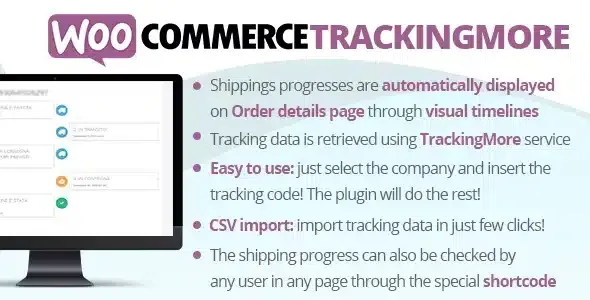
WooCommerce TrackingMore
Antivirus scan
Powered by ClamAV
✅ Verified clean
This product file has passed our security filters.
Want to run a fresh ClamAV scan right now? Takes a few seconds and shows scanner version, signature DB and live result.
This can take 5 to 30 seconds.
Clean file Threat detected
No threats detected in this file.
- File
- Size
- Scanned
- ClamAV
- Signature database
⚡ Powered by ClamAV
Scan could not be completed
Report product
If you detected an issue (broken file, malware, inappropriate content, etc.) let us know and we'll review it ASAP.
Sign in to reportNewer version out, or a problem?
About WooCommerce TrackingMore
Shipments customers want to follow without writing to you
A large share of an online store's support emails are the same question: where is my parcel? When the tracking number only appears in a loose email or on the carrier's website, the customer ends up writing to you. WooCommerce TrackingMore shows the shipment's progress as a visual timeline inside the order details.
Three ways of shipping that the tracking covers
The tracking covers three cases: stores working with several carriers, orders that ship in several parcels, and customers who buy without an account.
Stores working with several carriers
In the plugin menu you choose the shipping companies you work with and then enter the tracking code on each order. The plugin keeps the status up to date and shows it on the customer's order page.
Orders that ship in several parcels
An order can have several tracking codes, and the plugin shows one timeline for each. You can also link a code to specific products.
Customers who buy without an account
The shortcode [wctmw_order_status] places a form on any page where the person enters their order number and sees the timelines for that shipment. It is useful for people who cannot access a profile page.
What the customer receives in the email
When the order reaches the completed status, tracking information is automatically included in WooCommerce notification emails. If you prefer another status as the trigger, you can change it, and also customize the message that accompanies the tracking.
You can also turn on email notifications with the tracking information. The template is edited from the Email menu and can only be localized if you use WPML.
Loading older shipments from a CSV file
The CSV import loads tracking data from a file. There is an example file to use as a template and instructions in the import section. With the merge option enabled, tracking codes that already exist on an order are ignored. The plugin also accepts order numbers assigned by Sequential Order Numbers Pro.
Needs an API key from the TrackingMore service
The plugin relies on the TrackingMore service to check the status of each shipment, so without that connection there is no timeline to show. To connect it, you paste into the plugin menu the API key that the service itself generates. The plugin author is not affiliated with TrackingMore, and any question about subscriptions or accounts with that service is handled directly with them.
Common questions about tracking shipments with WooCommerce TrackingMore
Do I need an account with TrackingMore?
Yes. The plugin works with the TrackingMore service, so you need access there and the API key to connect it.
Does the customer have to log in to see the shipment?
Not necessarily. Inside their account they see the tracking on the order details page, but with the shortcode you can offer a form on any page where they enter their order number.
Does the shipping status update on its own?
Yes. Once the code is entered, the plugin keeps the status up to date automatically.
Can I change the status that triggers tracking in the email?
Yes. By default the completed status is used, but you can choose another and customize the message.
Can I import my older orders?
Yes, with a CSV file following the example template. With the merge option enabled, tracking codes that already exist are ignored.
How tracking stays up to date
The plugin checks the status of each code and reflects it in the order timeline without you having to review it by hand. The admin order lists do not query the service again for orders already delivered. The plugin is also compatible with WooCommerce's high-performance order storage (HPOS).
Topics
Version history
-
v
4.3 Current 8 Jan 2025
Customer reviews
Sign in to leave a review. Only people who have the product can review it.
No reviews for this product yet.
Frequently asked questions
-
GPL (General Public License) is the license under which WordPress and most premium plugins/themes are distributed. It grants you the right to use, modify and redistribute the software in as many projects as you want, with no domain restrictions.
-
Yes. With membership you get automatic updates via our GPLClub Updater plugin (installed on your WP, detects new versions and applies them). With individual purchase, you get one year of manual updates from your account.
-
Depends on the plan. Monthly: 3 domains. Semi-annual: 7. Annual and Lifetime: 15. Individual purchase: 1 domain.
-
GPLClub offers its own support for installation, configuration and compatibility. For direct support from the original author (feature requests, product-specific bugs), a license purchased from the author is required.