WooFoo Restaurant Food Menu for Elementor
Antivirus scan
Powered by ClamAV
✅ Verified clean
This product file has passed our security filters.
Want to run a fresh ClamAV scan right now? Takes a few seconds and shows scanner version, signature DB and live result.
This can take 5 to 30 seconds.
Clean file Threat detected
No threats detected in this file.
- File
- Size
- Scanned
- ClamAV
- Signature database
⚡ Powered by ClamAV
Scan could not be completed
Report product
If you detected an issue (broken file, malware, inappropriate content, etc.) let us know and we'll review it ASAP.
Sign in to report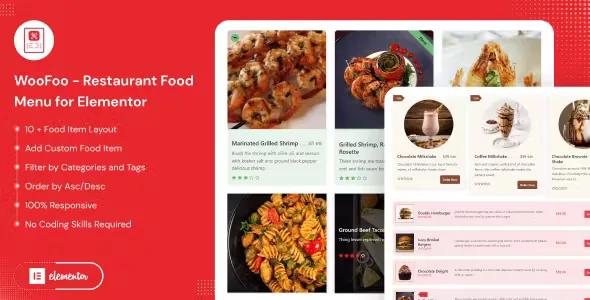
About WooFoo Restaurant Food Menu for Elementor
A restaurant menu on the web often ends up as a PDF nobody opens on their phone, a blurry picture of the dishes, or a page that has to be rewritten whenever a price changes. WooFoo Restaurant Food Menu for Elementor tries to solve that with an Elementor widget that displays your dishes in ready-made layouts, with name, description, image and price.
A restaurant changes its menu more often than its website
That is why dishes should live as data you edit, not as hand-formatted text. This plugin starts from that idea: you create the dishes from your site and the widget displays them wherever you place it.
From dish to page with WooFoo, step by step
- Step 1, create the dishes: you add each food item with its name, description, image and price from WordPress itself.
- Step 2, choose where they come from: you can show a custom list or use WooCommerce products organized by categories. If your menu is already loaded as products, there is no need to duplicate it.
- Step 3, place the widget in Elementor: you drag the widget onto the page (the home page, a menu page, a featured dishes section) and pick from more than ten layouts.
- Step 4, filter: you show only certain categories or tags, exclude others, sort ascending or descending and set a maximum number of dishes per block. That way you can separate starters, desserts and drinks into different blocks.
- Step 5, adjust what is visible: you show or hide title, description, rating, price and the add to cart button, and change the currency symbol.
- Step 6, check every screen: you set the columns for desktop, tablet and mobile, which is where most customers look at the menu before booking.
It needs Elementor, and the cart only makes sense with WooCommerce
It is an Elementor widget and does not work with any other page builder. If you don't use Elementor, it is no use to you. Also, the add to cart button belongs to the WooCommerce world: if your menu is for browsing only, you hide it and that's it. Don't expect a booking system or a takeaway order manager either; the plugin presents the menu, it does not manage tables or deliveries. Check in the demo how dishes look with allergens or variants if you need them, because that is not listed as a feature of its own.
Design: fewer options, faster to get it done
The plugin avoids filling itself with rarely used settings. It includes more than ten layouts, a flat one with hover animation, a button effect, shadows and borders for the boxes. That is an advantage if you want a clean result without fighting hundreds of controls; it is a limitation if you want very unusual layouts. It is compatible with any theme that works with Elementor and WooCommerce, and it includes a .pot file for translation.
Frequently asked questions before installing it
Does it work for a café or a bar, not just restaurants?
Yes, any business with a food or drink menu can use it, because what it displays are dishes or products with a price.
Do I have to use WooCommerce?
Not necessarily: you can use the custom list. WooCommerce comes in if you want to draw on products and categories you have already created.
Will the menu look good on mobile?
Yes, it is responsive and lets you set different columns for desktop, tablet and mobile.
Does it work without Elementor?
No. It only works with Elementor.
Topics
Version history
-
v
1.0.9 Current 25 Aug 2026
-
v
1.0.7 14 Jan 2025
Customer reviews
Sign in to leave a review. Only people who have the product can review it.
No reviews for this product yet.
Frequently asked questions
-
GPL (General Public License) is the license under which WordPress and most premium plugins/themes are distributed. It grants you the right to use, modify and redistribute the software in as many projects as you want, with no domain restrictions.
-
Yes. With membership you get automatic updates via our GPLClub Updater plugin (installed on your WP, detects new versions and applies them). With individual purchase, you get one year of manual updates from your account.
-
Depends on the plan. Monthly: 3 domains. Semi-annual: 7. Annual and Lifetime: 15. Individual purchase: 1 domain.
-
GPLClub offers its own support for installation, configuration and compatibility. For direct support from the original author (feature requests, product-specific bugs), a license purchased from the author is required.