WP and Divi Icons Pro Plugin
Antivirus scan
Powered by ClamAV
✅ Verified clean
This product file has passed our security filters.
Want to run a fresh ClamAV scan right now? Takes a few seconds and shows scanner version, signature DB and live result.
This can take 5 to 30 seconds.
Clean file Threat detected
No threats detected in this file.
- File
- Size
- Scanned
- ClamAV
- Signature database
⚡ Powered by ClamAV
Scan could not be completed
Report product
If you detected an issue (broken file, malware, inappropriate content, etc.) let us know and we'll review it ASAP.
Sign in to report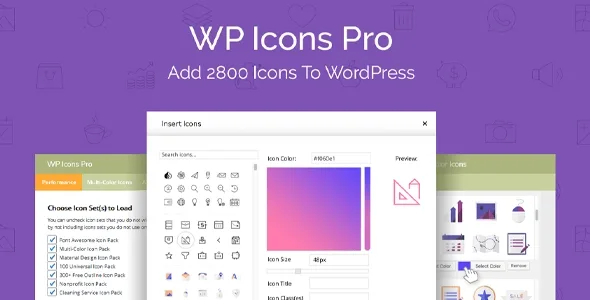
About WP and Divi Icons Pro Plugin
Stock icons give away a template website
You need an icon for a service and the ones the builder ships with are the usual ones: the same stroke, the same weight and a color that does not match the brand. You end up leaving the WordPress dashboard to search another site, download a file and upload it, and you repeat the ritual on every page.
On a client site, icons are the first thing that makes a services page look generic. Hardly anyone notices template text, but everyone notices icons that look like they came from a hundred other sites. WP and Divi Icons Pro brings thousands of icons into the editor itself, with a search tool, so you can choose and adjust without switching tabs.
Font Awesome, Material Design and your own icons in the same search
The plugin adds its own icon packs to nearly 1,300 Font Awesome icons and over 930 Material Design icons. There are no API keys to track down: you activate it and choose which kits you want available.
- Search and filters: you search by keyword and filter by pack, without switching tabs or programs.
- Divi integration: if Divi is the active theme, the expanded library appears in the Icon, Blurb, Text and Button modules.
- Gutenberg block and classic editor: icons can be inserted into posts and pages, and anywhere text can be added.
- Your own icons: you upload a font zip generated with Fontello or Icomoon and your icons work just like the preinstalled ones. It suits a logo or custom-drawn icons.
The limits, so there are no surprises: Divi modules are only expanded when Divi is active; with another builder you will work with the block or the classic editor. And to upload your own icons you must first convert them into an icon font with Fontello or Icomoon: the plugin expects that zip, not a loose SVG.
Primary, secondary and tertiary color without opening Illustrator or touching CSS
The most useful feature for anyone delivering sites to clients is the multicolor editor: you change the primary, secondary and even tertiary color of an icon with a live preview, right in the WordPress dashboard. That way the icon takes on the brand colors without going through a design program.
That said, this editing is designed for the plugin's multicolor icons; do not expect the same control in every pack, and check in the demo how the one you plan to use responds. It is also worth knowing that the free version of the plugin stays at about 300 custom designs and does not include multicolor, uploading your own icons, Font Awesome or Material Design.
Common questions before installing WP and Divi Icons Pro
Does it work without Divi? Yes. With the Gutenberg block and the classic editor you can insert icons into any post or page. What depends on Divi are the integrated modules.
Do I need a Font Awesome account or key? No. Font Awesome and Material Design come included and are used without additional credentials.
Will it slow the site down? It is designed as a lightweight plugin: you can remove the packs you do not use and it includes built-in asset minification. Even so, the more packs you load, the heavier it gets, so activate only what you need.
Can I use a client's logo as an icon? Yes, if you first convert it into an icon font with Fontello or Icomoon and upload the zip to the plugin.
Activate only the kits you are going to use
Getting started is short: you install, activate and decide which kits to include. That is the decision that matters. If your project only uses Font Awesome and one custom pack, keep those and turn off the rest; the search stays cleaner and fewer resources are loaded.
Before building a whole site with it, open the demo and try three things: how the icons look in the Blurb and Button modules, how the color changes on a multicolor icon and how the block is inserted in the editor. That will tell you whether it covers the style of your projects.
Topics
Version history
-
v
2.0.9 Current 8 May 2024
Customer reviews
Sign in to leave a review. Only people who have the product can review it.
No reviews for this product yet.
Frequently asked questions
-
GPL (General Public License) is the license under which WordPress and most premium plugins/themes are distributed. It grants you the right to use, modify and redistribute the software in as many projects as you want, with no domain restrictions.
-
Yes. With membership you get automatic updates via our GPLClub Updater plugin (installed on your WP, detects new versions and applies them). With individual purchase, you get one year of manual updates from your account.
-
Depends on the plan. Monthly: 3 domains. Semi-annual: 7. Annual and Lifetime: 15. Individual purchase: 1 domain.
-
GPLClub offers its own support for installation, configuration and compatibility. For direct support from the original author (feature requests, product-specific bugs), a license purchased from the author is required.