WP Cafe Pro
Antivirus scan
Powered by ClamAV
✅ Verified clean
This product file has passed our security filters.
Want to run a fresh ClamAV scan right now? Takes a few seconds and shows scanner version, signature DB and live result.
This can take 5 to 30 seconds.
Clean file Threat detected
No threats detected in this file.
- File
- Size
- Scanned
- ClamAV
- Signature database
⚡ Powered by ClamAV
Scan could not be completed
Report product
If you detected an issue (broken file, malware, inappropriate content, etc.) let us know and we'll review it ASAP.
Sign in to report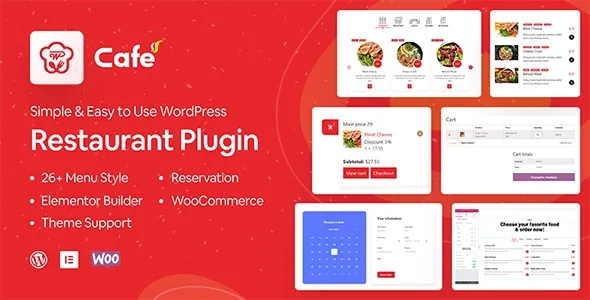
About WP Cafe Pro
Restaurant management and online ordering in a single plugin
Setting up a reservation system, an attractive digital menu and an order flow for pickup or delivery usually means combining several tools that don't always play well with WooCommerce. WP Cafe Pro solves this by integrating menu management, table reservations and online ordering into a single plugin, all connected directly to WooCommerce so that payment and billing work without friction.
Visual menus, no coding required
The plugin includes more than 33 food menu styles in its Pro version (10 in the free version), designed to display on pages, posts or widgets. You can build menus in one or two columns, apply discounts by percentage or on the total purchase, and organize products by location when the business has multiple venues. For design, it offers more than 14 Elementor widgets and is compatible with WP Bakery and Divi Builder, plus a shortcode that lets you insert the menu into any text area.
Reservations and schedule control in WP Cafe Pro
The reservation side lets you set opening and closing hours per day, with single or multiple time slots, and apply restrictions based on the seating capacity available for each slot. You can limit advance or last-minute bookings, create special reservation days, and manage cancellations directly from the frontend, without customers needing to contact the admin. Everything is centralized in a reservations list on the admin panel, with automatic email notifications to confirm or cancel appointments.
Pickup and delivery orders
For orders, WP Cafe Pro offers pickup and delivery options with independent time scheduling, a mini cart with Ajax-customizable design, and quick product views that respect variations. It also replaces WooCommerce's default layout on product pages and allows invoices to be printed or downloaded as PDF. It also includes a location-selection widget for the homepage, useful for chains with multiple restaurants, and is compatible with Dokan for multivendor scenarios.
Reporting and sales tracking
The plugin generates a detailed sales report and a specific analysis of ordered food items alongside their associated reservations, helping identify which dishes are ordered most in each time slot or location. It also supports right-to-left (RTL) languages in both forms and the booking calendar, extending its use to non-Western markets.
Who WP Cafe Pro is for
- Restaurants and cafés that want to digitize their menu and accept orders directly from their website.
- Businesses with multiple locations that need different menus and schedules per venue.
- Establishments that combine table reservations with takeout or home delivery food sales.
- Agencies building restaurant sites on WooCommerce and Elementor.
| Compatible with | WooCommerce, Elementor, WP Bakery, Divi Builder |
| Menu styles included | More than 33 in the Pro version |
| Elementor widgets | More than 14 |
| Language support | RTL in forms and calendar |
| Multivendor | Compatible with Dokan |
Frequently asked questions about WP Cafe Pro
Do I need WooCommerce to use WP Cafe Pro?
Yes, the plugin is built to work on top of WooCommerce, since it uses its product, cart and checkout system to manage food orders.
Can I manage more than one restaurant or location?
Yes, the system lets you create different menus and schedules per location, as well as display a venue selector on the homepage when there are multiple outlets.
Can I limit how many reservations are accepted per time slot?
Yes, reservation restrictions can be configured based on the seating capacity available for each day and time slot.
Does the plugin work with page builders other than Elementor?
Yes, in addition to Elementor it's compatible with WP Bakery and Divi Builder, and it also offers a shortcode for inserting the menu into any text area.
Topics
Version history
-
v
3.0.15 Current 25 Aug 2026
-
v
3.0.6 18 Mar 2026
Customer reviews
Sign in to leave a review. Only people who have the product can review it.
No reviews for this product yet.
Frequently asked questions
-
GPL (General Public License) is the license under which WordPress and most premium plugins/themes are distributed. It grants you the right to use, modify and redistribute the software in as many projects as you want, with no domain restrictions.
-
Yes. With membership you get automatic updates via our GPLClub Updater plugin (installed on your WP, detects new versions and applies them). With individual purchase, you get one year of manual updates from your account.
-
Depends on the plan. Monthly: 3 domains. Semi-annual: 7. Annual and Lifetime: 15. Individual purchase: 1 domain.
-
GPLClub offers its own support for installation, configuration and compatibility. For direct support from the original author (feature requests, product-specific bugs), a license purchased from the author is required.