WP Sheet Editor WooCommerce Coupons
Antivirus scan
Powered by ClamAV
✅ Verified clean
This product file has passed our security filters.
Want to run a fresh ClamAV scan right now? Takes a few seconds and shows scanner version, signature DB and live result.
This can take 5 to 30 seconds.
Clean file Threat detected
No threats detected in this file.
- File
- Size
- Scanned
- ClamAV
- Signature database
⚡ Powered by ClamAV
Scan could not be completed
Report product
If you detected an issue (broken file, malware, inappropriate content, etc.) let us know and we'll review it ASAP.
Sign in to report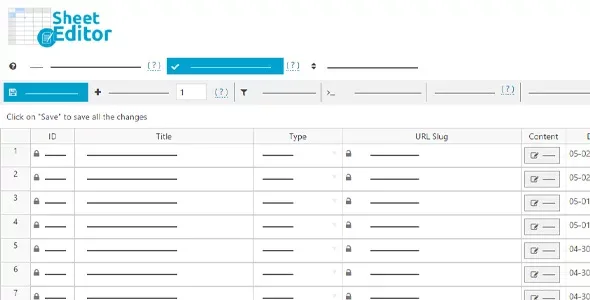
About WP Sheet Editor WooCommerce Coupons
In a connected spreadsheet, every cell is the store
You want to raise the amount of a hundred coupons by 20 %. In a normal spreadsheet you would do it with a formula, review it and then upload the file. Here the spreadsheet already is the store.
With no export or import, saving in the sheet already changes your real coupons, so the review that used to happen between the file and the store has to happen before you press save.
Coupons Spreadsheet is a plugin of the WP Sheet Editor family that shows WooCommerce coupons in a spreadsheet inside the WordPress admin. It edits every coupon field, applies formulas to hundreds of coupons at once and saves only the modified cells.
What the coupon sheet can do
- All fields editable: code, amount, discount type, and the category and product restrictions, among others.
- Fields from other plugins: they appear on their own, with no setup, and you can add columns to edit custom fields. Advanced Custom Fields metaboxes also appear in the sheet.
- Formulas and math: you replace values in any field and apply operations, such as raising amounts by 20 %, across hundreds of coupons at once.
- Search and replace: works across all coupon fields.
- Usage restrictions: can be reset in bulk.
- Bulk generation: hundreds of coupons with unique codes in one click.
- Master coupon: you create one coupon and copy its values to hundreds of coupons, or new ones copy its values.
- Reusing coupons: existing codes can be randomized so they serve new campaigns.
- Advanced search: by several fields and conditions, such as usage percentage, linked and excluded products or categories, keywords and dates.
- Columns: shown, hidden, sorted, resized and renamed, and all coupons are viewed on a single page.
Raising an amount on a hundred coupons, with the sheet as a draft
One possible procedure, which you should test first on a staging site: find the coupons of a campaign with the multi-field search, apply the amount increase operation to that selection and review the column before saving. Because changes apply live, it is wise to work with a narrow selection and not with the whole list.
On save only the modified cells are written: editing three fields in five hundred rows saves those three fields. The save batch size and the wait between batches are configurable, for example to spread the load on the server.
Performance and limits
The plugin loads only in wp-admin, so it does not affect the speed of your public site. It can open thousands of coupons in the sheet without problems.
Changes do not go through an intermediate file, so there is no import step where you review before applying. Among its features there is no simulation mode for changes. Fields from third-party plugins appear on their own, but it is wise to test with one coupon first.
Requirements and first steps
You need WooCommerce, which is where the coupons come from. It is a standalone plugin, and if you had the free version of the sheet you must uninstall it first.
- Install the plugin with the WordPress installer and activate it.
- Open the coupons sheet in WP Sheet Editor > Edit Coupons.
- Choose the columns you want to see and hide the rest.
- Try a formula on a few coupons and review the result.
- Adjust the save batch size if your server needs it.
Coupon and store editing to compare
If you want more coupon features inside WooCommerce, look at Advanced Coupons Premium or Smart Coupons Pro. To edit the store's products with the same kind of sheet, check WP Sheet Editor WooCommerce Products.
Answers about Coupons Spreadsheet
Do I have to export and import?
No. Changes apply live on the site.
Can I create many coupons at once?
Yes. You can generate hundreds with unique codes in one click or copy the values from a master coupon.
Does it affect my store's speed?
No. It loads only in wp-admin.
What is saved when I edit?
Only the modified cells.
Topics
Version history
-
v
1.3.58 Current 21 Jan 2026
Customer reviews
Sign in to leave a review. Only people who have the product can review it.
No reviews for this product yet.
Frequently asked questions
-
GPL (General Public License) is the license under which WordPress and most premium plugins/themes are distributed. It grants you the right to use, modify and redistribute the software in as many projects as you want, with no domain restrictions.
-
Yes. With membership you get automatic updates via our GPLClub Updater plugin (installed on your WP, detects new versions and applies them). With individual purchase, you get one year of manual updates from your account.
-
Depends on the plan. Monthly: 3 domains. Semi-annual: 7. Annual and Lifetime: 15. Individual purchase: 1 domain.
-
GPLClub offers its own support for installation, configuration and compatibility. For direct support from the original author (feature requests, product-specific bugs), a license purchased from the author is required.