WP Stagecoach
Antivirus scan
Powered by ClamAV
✅ Verified clean
This product file has passed our security filters.
Want to run a fresh ClamAV scan right now? Takes a few seconds and shows scanner version, signature DB and live result.
This can take 5 to 30 seconds.
Clean file Threat detected
No threats detected in this file.
- File
- Size
- Scanned
- ClamAV
- Signature database
⚡ Powered by ClamAV
Scan could not be completed
Report product
If you detected an issue (broken file, malware, inappropriate content, etc.) let us know and we'll review it ASAP.
Sign in to reportNewer version out, or a problem?
About WP Stagecoach
A live website should not be the workshop for your changes
If your site sells, collects sign-ups or publishes content every day, any update made live can break it right when someone is using it. A conflict between plugins, a stylesheet rule that disappears or a page that goes blank gives no warning: the customer simply cannot pay or register.
WP Stagecoach is built to prevent that. It creates a staging copy of your WordPress site to test changes outside the site your visitors use. Among the common problems when updating live are plugin conflicts, error messages for public users, broken links, disappearing images and loss of access to the dashboard.
WP Stagecoach: create the staging copy and push changes with one click
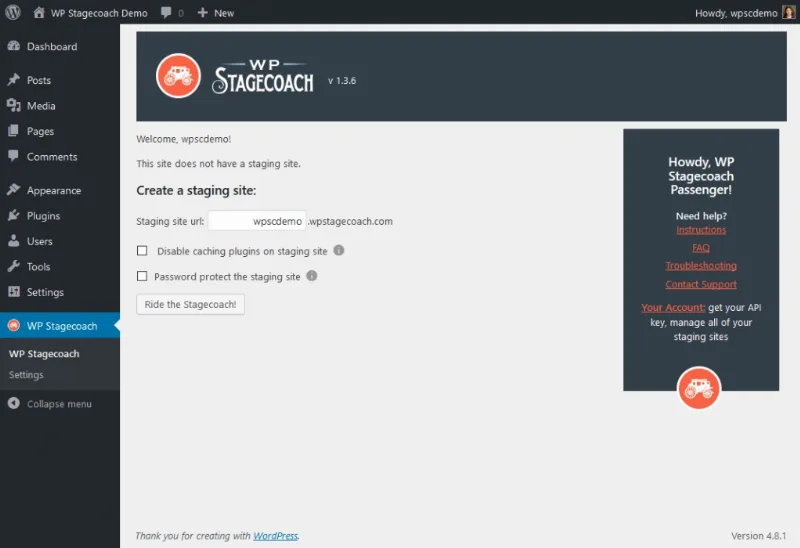
Setup comes down to two actions: one click to create the staging copy and another to push the changes to the live site. You can push the whole site or only part of it, choosing the files, the database or both.
The key difference lies in how data moves. Instead of overwriting the database, WP Stagecoach merges the changes. That way, orders, sign-ups or content created while you worked on the staging copy are not lost when you publish.
Blogs, agencies and hosting companies use the staging copy for different things
- Owners of blogs and websites who want to test their updates on a simple staging site before publishing them.
- Developers, designers and agencies that maintain client websites, create site clones or want to offer the staging copy as part of their service.
- Plugin support teams and maintenance companies, to reproduce bugs and test conflicts without touching the client's live website.
- Hosting companies that want to offer staging sites to their customers as an added service.
WP Stagecoach copies on its servers, protected with a password
The copy is hosted on WP Stagecoach's servers, not on your computer, which saves space on your hosting plan. You can protect it with a password and show it to your client so they can review changes before they reach the real site.
It also does not force you to change providers: it works with any host, so you can stay where you are.
Frequently asked questions about WP Stagecoach
Can I push only the files or only the database?
Yes. Selective migration lets you send the files, the database or both to the live site, depending on what you changed.
What happens to orders or sign-ups while I work on the copy?
The live site keeps working. When you push changes, WP Stagecoach merges the database instead of overwriting it, so new data is not lost.
Do I need to change hosting to use it?
No. It is designed to work with any host.
Does it replace a backup?
No. A backup is still essential. The staging copy is for working on problems or redesigns in a separate environment, without stopping service to the customers of the real site.
Can I show the copy to my client?
Yes. The copy can be password protected and is hosted on WP Stagecoach's servers, so it is easy to share for reviewing changes.
Topics
Version history
-
v
1.4.29 Current 14 May 2024
Customer reviews
Sign in to leave a review. Only people who have the product can review it.
No reviews for this product yet.
Frequently asked questions
-
GPL (General Public License) is the license under which WordPress and most premium plugins/themes are distributed. It grants you the right to use, modify and redistribute the software in as many projects as you want, with no domain restrictions.
-
Yes. With membership you get automatic updates via our GPLClub Updater plugin (installed on your WP, detects new versions and applies them). With individual purchase, you get one year of manual updates from your account.
-
Depends on the plan. Monthly: 3 domains. Semi-annual: 7. Annual and Lifetime: 15. Individual purchase: 1 domain.
-
GPLClub offers its own support for installation, configuration and compatibility. For direct support from the original author (feature requests, product-specific bugs), a license purchased from the author is required.