WP Timeline Vertical and Horizontal plugin
Antivirus scan
Powered by ClamAV
✅ Verified clean
This product file has passed our security filters.
Want to run a fresh ClamAV scan right now? Takes a few seconds and shows scanner version, signature DB and live result.
This can take 5 to 30 seconds.
Clean file Threat detected
No threats detected in this file.
- File
- Size
- Scanned
- ClamAV
- Signature database
⚡ Powered by ClamAV
Scan could not be completed
Report product
If you detected an issue (broken file, malware, inappropriate content, etc.) let us know and we'll review it ASAP.
Sign in to report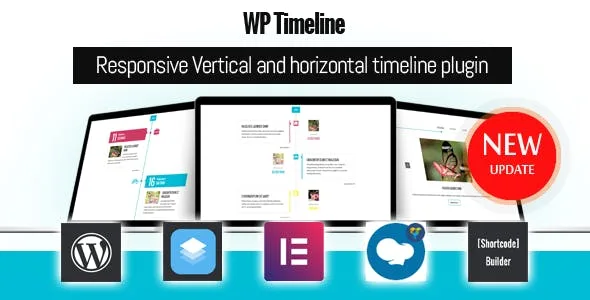
About WP Timeline Vertical and Horizontal plugin
Your company was not born the day you uploaded the post
You want to tell the story of your company, a project or a family, and publishing each milestone as a post seems natural. But a blog sorts by publication date. If you load every milestone in one session, WordPress treats them all as having happened that day, and the founding ends up behind whatever you wrote last.
A history needs its own calendar.
WP Timeline, by ExThemes, separates the two. Each item carries its own timeline date and is sorted by it or by a dedicated order field, regardless of the day you wrote it.
Dates a blog cannot handle
What sets this plugin apart shows up when the story leaves the usual calendar:
- Any date, including BC and AD dates, with a date picker from the year 1000.
- Free-form date field for writing whatever you need instead of an exact day.
- Your own numeric order: you type a number on each item and the shortcode sorts by that field.
- Settings export and import to take them to another site.
- External or custom link in place of each item's single page.
If a milestone has no exact date, you can combine the free-form field with the numeric order. That combination is our own recipe, so try it with a couple of items before loading the whole history.
More than 45 layouts, in two directions
There are more than 45 layouts and more than 40 animations, with light and dark modes. The demos break down like this:
- Vertical: Modern, Clean, Wide image, Simple, Background and Classic styles, on two sides or in a single column.
- Horizontal: full width, multiple items at once, step by step and bottom bar.
- Infographics: three styles with their own shortcode.
- Navigation: history bar, AJAX filter, load more, infinite scroll and pagination.
- Content: video, audio and gallery on each item, with Font Awesome icons or images as markers.
- Color: global, per category or per timeline, with custom fonts for headings, text and metadata.
A display plugin, with no agenda or sales
WP Timeline shows content in order; it does not write it for you. Its features do not include ticket sales, bookings or registrations, so it does not replace an events plugin if people need to sign up for something.
You can tell a roadmap with it, but you edit every change yourself: its features do not include votes or statuses either.
Install, load and publish your first timeline
It works with any theme and a shortcode is all you need to display a timeline. It offers support for Elementor, WPBakery and SiteOrigin, and is compatible with WPML. To get started:
- Upload the plugin under Plugins, Add New, Upload, and activate it.
- Install the sample data if you want to start from a demo: pick a layout, copy its shortcode and paste it into your page.
- Go to Timeline, Add New Timeline, write the title and description, add the featured image and publish.
- Under Timeline, Shortcode builder, create a shortcode with the options you want and paste it into a post, a page or a text widget.
Timelines with a block or with Elementor
Cool Timeline Pro also presents company histories or milestones vertically and horizontally, and is inserted with a shortcode or its own Gutenberg block. If you edit with that editor, it is worth comparing.
If your whole site is built with Elementor, the catalog has Timelentor Timeline Layouts for Elementor.
Dates, content and links in your timeline
Does it accept ancient or BC dates?
Yes. It accepts BC and AD dates; the date picker goes back to the year 1000 and the free-form field lets you write whatever you need.
Can I use my posts or a custom content type?
Yes. It works with categories, tags, custom post types and taxonomies, and the shortcode accepts the post type as an attribute.
Does each milestone need its own page?
No. You can send the item to an external or custom link, and there is a lightbox for images.
Can I have several timelines on the same site?
Yes, as many as you like. With the shortcode you decide which category, how many items and which style each one shows.
Does it work for sites in Arabic or Hebrew?
It has RTL support, and translating its text has its own guide.
Version history
-
v
3.7.3 Current 4 Feb 2026
Customer reviews
Sign in to leave a review. Only people who have the product can review it.
No reviews for this product yet.
Frequently asked questions
-
GPL (General Public License) is the license under which WordPress and most premium plugins/themes are distributed. It grants you the right to use, modify and redistribute the software in as many projects as you want, with no domain restrictions.
-
Yes. With membership you get automatic updates via our GPLClub Updater plugin (installed on your WP, detects new versions and applies them). With individual purchase, you get one year of manual updates from your account.
-
Depends on the plan. Monthly: 3 domains. Semi-annual: 7. Annual and Lifetime: 15. Individual purchase: 1 domain.
-
GPLClub offers its own support for installation, configuration and compatibility. For direct support from the original author (feature requests, product-specific bugs), a license purchased from the author is required.