YITH WooCommerce Added To Cart Popup Premium
Antivirus scan
Powered by ClamAV
✅ Verified clean
This product file has passed our security filters.
Want to run a fresh ClamAV scan right now? Takes a few seconds and shows scanner version, signature DB and live result.
This can take 5 to 30 seconds.
Clean file Threat detected
No threats detected in this file.
- File
- Size
- Scanned
- ClamAV
- Signature database
⚡ Powered by ClamAV
Scan could not be completed
Report product
If you detected an issue (broken file, malware, inappropriate content, etc.) let us know and we'll review it ASAP.
Sign in to report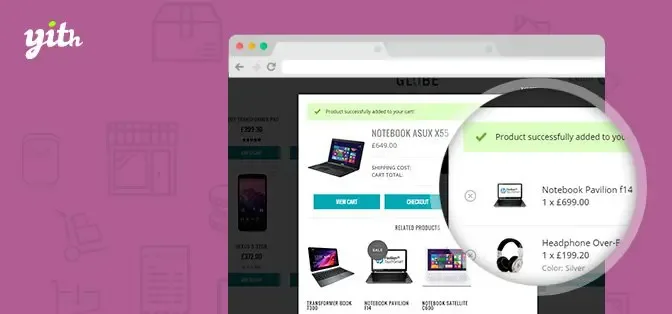
About YITH WooCommerce Added To Cart Popup Premium
A customer clicks "Add to cart" and, in many stores, nothing visible happens: a tiny number changes in the header or a notice at the top fades away. They wonder whether the product went in, and half the time they leave without buying more or end up adding it twice.
What happens in your store right after the click
The moment after a product is added is the cheapest one for selling something extra: the customer has already decided to buy, and what they do in the next few seconds determines whether they close the order or keep looking. YITH WooCommerce Added To Cart Popup Premium fills that moment with a popup window that confirms the action and gives them two clear paths: go to pay or keep shopping.
A walkthrough: from the product page to checkout
Step 1: you decide when it appears
You can show the popup for all products, only for those on an exclusion list, or for all except those on that list. You also choose which page triggers it: shop and category listings, the product page, or always.
Step 2: the customer sees what they have
The popup can show only the item that just went in or the full cart content. Inside the table you decide whether the name, image with its size, price and the chosen variation details (size, color and so on) appear. You can also add taxes, shipping costs and the cart total.
Step 3: you choose the buttons
There are three possible ones: "View cart", "Proceed to Checkout" and "Continue shopping" (which closes the window). You enable the ones you want and change the text and colors of each. If your store sells better with a fast checkout, leave only the checkout button; if your catalog invites exploring, highlight continue shopping.
Step 4: you offer something more
You can add a section of recommended products inside the popup. You choose how many to show and of what type: up-sells, cross-sells or related products, which the plugin selects based on what is in the cart, or hand-picked products that always appear. You also decide whether those products have an add to cart button. The result depends on having those relationships properly set up in WooCommerce: if your products have no up-sells or cross-sells defined, the section will have little to show, and that is where picking them manually makes sense.
Questions before installing
Does it work on mobile?
Yes, it is designed for mobile resolutions. If you prefer that smartphone or tablet customers do not see it, you can disable both the popup and the mini cart for them.
Can I change the look to match my theme?
Yes: size, overlay color, popup background, border radius, text color, animation effect (fade, slide, zoom and others) and close icon. Also the "product added" message, with your own text and a default icon or one you upload.
Does it get along with other plugins?
It is compatible with YITH Frequently Bought Together, so the popup opens when those bundled products are added, and with WooCommerce Gravity Forms Product Add-Ons. With other third-party plugins, test it in a staging environment before going live.
A floating mini cart that replaces the one in your header
Besides the popup it includes a floating mini cart that can replace your theme's cart icon. You place it on screen by dragging it, customize icon, colors and border, show a counter with the total number of products and hide it while the cart is empty. You can enable it or not depending on desktop or mobile.
What it will not do for you
It is not a full cart plugin or a recommendation engine with its own logic: it shows what WooCommerce already knows about your products or what you pick. It does not change the checkout process either. If your store already redirects straight to the cart after each click, first decide which behavior you want, because the popup and the redirect compete for the same moment.
Topics
Version history
-
v
2.43.0 Current 9 Oct 2026
-
v
2.39.0 24 Jun 2026
-
v
2.37.0 1 Apr 2026
Customer reviews
Sign in to leave a review. Only people who have the product can review it.
No reviews for this product yet.
Frequently asked questions
-
GPL (General Public License) is the license under which WordPress and most premium plugins/themes are distributed. It grants you the right to use, modify and redistribute the software in as many projects as you want, with no domain restrictions.
-
Yes. With membership you get automatic updates via our GPLClub Updater plugin (installed on your WP, detects new versions and applies them). With individual purchase, you get one year of manual updates from your account.
-
Depends on the plan. Monthly: 3 domains. Semi-annual: 7. Annual and Lifetime: 15. Individual purchase: 1 domain.
-
GPLClub offers its own support for installation, configuration and compatibility. For direct support from the original author (feature requests, product-specific bugs), a license purchased from the author is required.