YITH WooCommerce Ajax Search Premium
Antivirus scan
Powered by ClamAV
✅ Verified clean
This product file has passed our security filters.
Want to run a fresh ClamAV scan right now? Takes a few seconds and shows scanner version, signature DB and live result.
This can take 5 to 30 seconds.
Clean file Threat detected
No threats detected in this file.
- File
- Size
- Scanned
- ClamAV
- Signature database
⚡ Powered by ClamAV
Scan could not be completed
Report product
If you detected an issue (broken file, malware, inappropriate content, etc.) let us know and we'll review it ASAP.
Sign in to report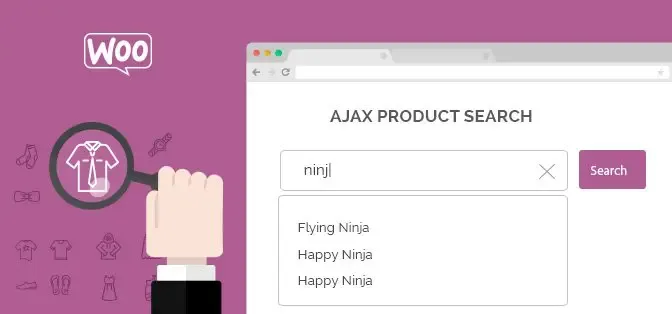
About YITH WooCommerce Ajax Search Premium
When the customer types "red pullover" and your catalog says "sweater"
A WooCommerce store can have the perfect product and still not sell it: the customer types a different word, misspells a letter or hits a "no results" screen and leaves. YITH WooCommerce Ajax Search Premium replaces the basic search with one that shows results as people type and that you can fine-tune with your own rules.
What decides the order of results in YITH WooCommerce Ajax Search Premium
You choose which fields it searches: name, description, SKU, attributes, categories and others. And you give each one a priority. With "black backpack" you can make products with both words in the name come first, then those with them in the description, then backpacks with the black color attribute, and finally those in the backpack category.
- Synonyms: you can create unlimited sets so that "pullover" and "sweater" lead to the same place.
- Typo tolerance: a matching threshold lets you ignore small errors, such as a missing or extra letter.
- Product boosting: rules to raise certain products or categories in the results, or pin specific products at the very top.
How you would use it depending on your store
If you have a large catalog with variations
The most useful features are priority by field and attributes as a search criterion. SKU search also helps those who already know the code.
If you sell fashion or electronics with models that change every season
Preset keywords appear when the customer clicks the search field, before typing anything. You can put what you want to push (a campaign, a new model, a seasonal item) without intrusive banners. Boost rules help you make recent models appear before older ones.
If a good part of your visits comes from mobile
Full-screen mode focuses attention on the search and reduces distractions. Combine it with a list or grid of results depending on the available space, and check in the demo how it looks on your screen.
Design and results: what you can customize
You can insert the search form with a Gutenberg block or with a ready-made shortcode, and create as many versions as you need. The options are the same in both: colors, borders, size, button style and form texts.
In the results you decide how many to show, whether in a list or a grid, and which data to include: image, price, stock, SKU, short description or an add-to-cart button. You can add badges for featured or discounted products, hide out-of-stock items and suggest categories based on what is typed. You can also enable the user's recent search history.
What you need to adjust yourself, because it doesn't happen on its own
Synonyms, common typos and boosts are not learned from your customers: you configure them. The most profitable approach is to review which terms people use and build the sets from there. It is also not an external search engine: it works on the WooCommerce catalog, so if attributes and categories are poorly set up, the results will reflect it.
Frequently asked questions
Can I place the search form in more than one spot?
Yes. With the block or the shortcode you can insert several forms and customize each one.
Does it search by SKU or attributes?
Yes, you can enable name, description, SKU, attributes and categories, among others, and sort them by priority.
Can I hide out-of-stock products?
Yes, there is an option to remove them from the results.
Does it work if the customer makes a typing mistake?
Yes, with the matching threshold the system ignores small typos and still shows correct results.
Can I highlight a specific product?
Yes, with boost rules or the boosted products section you can pin it among the first results.
It needs WooCommerce and your configuration work
It is an add-on for WooCommerce stores and does not work without that plugin. And to get the most out of it you need to spend some time defining priorities, synonyms and keywords.
Topics
Version history
-
v
2.16.0 Current 13 May 2026
-
v
2.14.0 28 Sep 2025
Customer reviews
Sign in to leave a review. Only people who have the product can review it.
No reviews for this product yet.
Frequently asked questions
-
GPL (General Public License) is the license under which WordPress and most premium plugins/themes are distributed. It grants you the right to use, modify and redistribute the software in as many projects as you want, with no domain restrictions.
-
Yes. With membership you get automatic updates via our GPLClub Updater plugin (installed on your WP, detects new versions and applies them). With individual purchase, you get one year of manual updates from your account.
-
Depends on the plan. Monthly: 3 domains. Semi-annual: 7. Annual and Lifetime: 15. Individual purchase: 1 domain.
-
GPLClub offers its own support for installation, configuration and compatibility. For direct support from the original author (feature requests, product-specific bugs), a license purchased from the author is required.