YITH Woocommerce Review Reminder Premium
Antivirus scan
Powered by ClamAV
✅ Verified clean
This product file has passed our security filters.
Want to run a fresh ClamAV scan right now? Takes a few seconds and shows scanner version, signature DB and live result.
This can take 5 to 30 seconds.
Clean file Threat detected
No threats detected in this file.
- File
- Size
- Scanned
- ClamAV
- Signature database
⚡ Powered by ClamAV
Scan could not be completed
Report product
If you detected an issue (broken file, malware, inappropriate content, etc.) let us know and we'll review it ASAP.
Sign in to report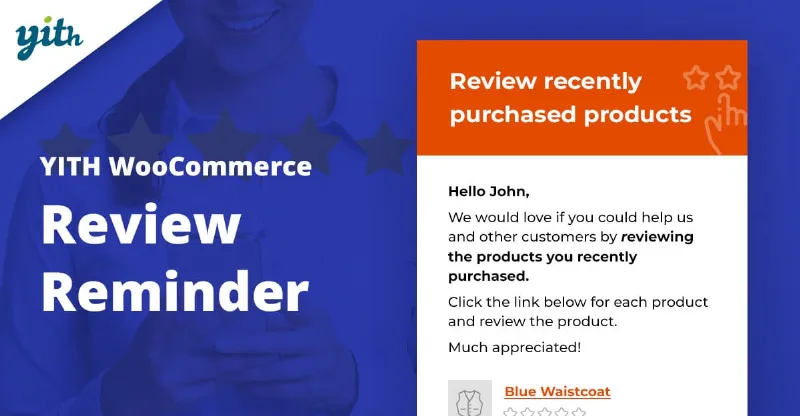
About YITH Woocommerce Review Reminder Premium
Your customers already bought, but almost nobody goes back to write a review on their own
A WooCommerce store can sell well for months and still have three reviews on its products. It isn't that customers are unhappy: nobody asks for their opinion, and once the order arrives they forget about it. Asking by hand, customer by customer, is unworkable as soon as there is some volume. YITH WooCommerce Review Reminder automates that reminder by email.
The underlying idea: reviews aren't written by whoever feels like it, they're written by whoever receives the request at the right moment. What you manage here is the timing and the product you ask about, not the opinion itself.
How YITH Review Reminder decides who to email and what to ask
The plugin sends the email a number of days after purchase, which you set. That way you can allow the time your product needs for the customer to try it.
- Which products to ask about: all purchased products or only certain categories.
- Which one in the order to review: the first or last purchased, the one with the highest or lowest quantity, the highest or lowest unit or total value, the one with the most or fewest reviews, or a random one. This is useful when an order has several items and you don't want to overwhelm the customer.
- Earlier orders: you can schedule the sending for those who bought before you installed the plugin.
- Control from the order: on each order's detail page you can force the sending, reschedule it or delete it.
- Scheduled list: a tab shows all reminders, past and future, and lets you delete them from there.
What it doesn't do and what it needs
It only sends email reminders: it doesn't moderate or publish reviews, nor does it incentivize writing them on its own. Offering something in return depends on YITH Review for Discount, which is a separate plugin. The same goes for YITH WooCommerce Email Templates, YITH Booking and Appointment and YITH Sequential Order Number: the integrations require buying and activating the premium version of each one. Managing sends with Mandrill also requires a MailChimp account.
Questions people ask before installing it
Can I ask for reviews on old orders?
Yes. You can schedule a send to all users who placed orders before you installed the plugin.
What happens if a customer doesn't want more emails?
There is an unsubscribe form, and they go to the blocklist, where you can see everyone who doesn't want to receive reminders.
Can I ask for consent at checkout?
Yes. A checkbox can be shown at checkout and emails are sent only to those who accepted. If the customer declines, they go to the blocklist. Still check the data protection rules that apply to you.
Can I test the email before launching it?
Yes, there is a test send and you can edit the message content.
Does it work for bookings?
With YITH Booking and Appointment for WooCommerce Premium (bought separately), you can ask for reviews from those who purchased a booking product.
Email templates and tracking results
You can use the standard WooCommerce template or choose among three customizable styles, with the option to include images of the purchased products. If you already use YITH WooCommerce Email Templates, you can use its templates so these emails keep the same look as the rest.
You can also set up Google Analytics campaigns to track the emails.
The order number in the email matters if you use sequential numbering
If your store uses YITH WooCommerce Sequential Order Number, the integration makes the email show the correct order number instead of the standard identifier. It prevents the customer from seeing a number that doesn't match their confirmation.
Before activating it, decide these three settings
First define the waiting days according to the type of product: a garment isn't the same as something that has to be tried for weeks. Then choose which product in the order gets reviewed, so you don't ask everyone about the same one. Finally, send yourself a test and check that the email looks right before scheduling the send to old orders.
Topics
Version history
-
v
1.61.0 Current 27 Jul 2026
-
v
1.58.0 7 Mar 2026
Customer reviews
Sign in to leave a review. Only people who have the product can review it.
No reviews for this product yet.
Frequently asked questions
-
GPL (General Public License) is the license under which WordPress and most premium plugins/themes are distributed. It grants you the right to use, modify and redistribute the software in as many projects as you want, with no domain restrictions.
-
Yes. With membership you get automatic updates via our GPLClub Updater plugin (installed on your WP, detects new versions and applies them). With individual purchase, you get one year of manual updates from your account.
-
Depends on the plan. Monthly: 3 domains. Semi-annual: 7. Annual and Lifetime: 15. Individual purchase: 1 domain.
-
GPLClub offers its own support for installation, configuration and compatibility. For direct support from the original author (feature requests, product-specific bugs), a license purchased from the author is required.