ZigZagPress Bijou WordPress Theme
Antivirus scan
Powered by ClamAV
✅ Verified clean
This product file has passed our security filters.
Want to run a fresh ClamAV scan right now? Takes a few seconds and shows scanner version, signature DB and live result.
This can take 5 to 30 seconds.
Clean file Threat detected
No threats detected in this file.
- File
- Size
- Scanned
- ClamAV
- Signature database
⚡ Powered by ClamAV
Scan could not be completed
Report product
If you detected an issue (broken file, malware, inappropriate content, etc.) let us know and we'll review it ASAP.
Sign in to report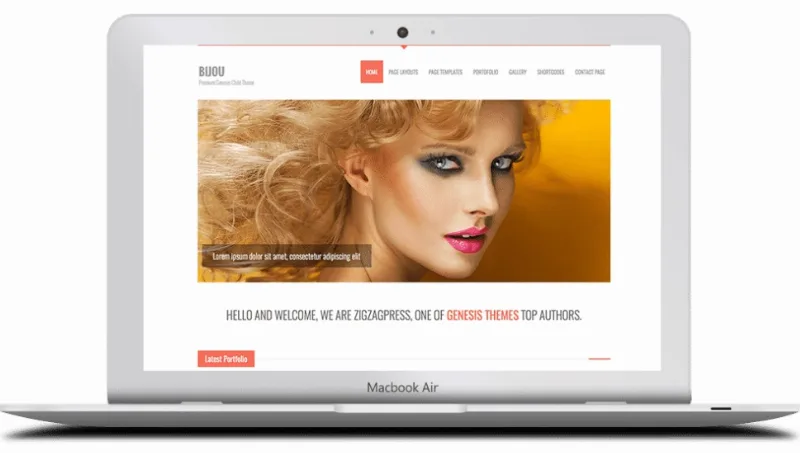
About ZigZagPress Bijou WordPress Theme
Your portfolio labels are your list of services
It is easy to leave portfolio categories until the end, once the work is uploaded, and fill them with the first thing that comes to mind: misc, projects, other. For a visitor, those words also explain what you do. A row reading identity, print and video works as a list of services; one reading misc does not help anyone decide.
Bijou, a ZigzagPress child theme for the Genesis Framework, puts that filter right on the home page: below the welcome message comes the latest portfolio with category buttons above the thumbnails. So it pays to define what you sell first, with a few clear labels, and upload projects afterward.
What the Bijou home page shows
The demo home page follows this route:
- Intro with a tagline and a short sentence.
- Slider of images with link and caption.
- Welcome message of one line.
- Latest work, with a category filter and eight thumbnails.
- What we do, in four service boxes with links.
- About the company and four short text blocks.
The whole suits a studio or freelancer who wants to show work and services on a single page.
Templates and shortcodes for inner pages
The demo gathers layouts with the sidebar on the right, on the left and at full width. There are archive and blog templates, plus a contact page.
- Portfolio in three or four columns.
- Gallery in three or four columns.
- Color variants: the demo lets you try a light version, a dark one and several color swatches.
For content, the demo shows shortcodes for buttons, calls to action, clients, columns, drop caps, lists, notices, service boxes, sliders, tabs and accordion, team and testimonials. With them you can assemble a services page without a visual builder.
What Bijou leaves to Genesis and other plugins
Bijou does not work alone: it is a child theme and needs the Genesis Framework installed. The SEO options and functions come from that framework, and the child handles design, templates and shortcodes.
The demo has no shop and WooCommerce is not among its features, so Bijou fits a presentation site better than a store. The demo photographs are not included either: stock images are left out of the purchase and you need your own material for those thumbnails.
Setting up Bijou on Genesis
The order matters, because the child depends on the framework. Try each step on a test site if you already have a live one:
- Install the Genesis Framework under Appearance, Themes.
- Upload Bijou and activate it.
- Create your portfolio categories with the names of what you sell.
- Upload projects and place them in those categories.
- Build services with service boxes and calls to action.
- Translate the interface with the .po and .mo files if your site is not in English.
Staying on Genesis or telling each job as a case
If you want to stay with Genesis, Pretty Creative Pro is another theme package with that framework. If you prefer to tell each job as a case study, Agencium has those sections and is edited with Elementor. And if you want a larger portfolio inside your current theme, Visual Portfolio adds six formats and filters by category or tag.
Bijou, point by point
Do I need the Genesis Framework?
Yes. Bijou is a child theme and requires Genesis to work.
Does it adapt to phones?
Yes, ZigzagPress themes are built to adapt from desktop to mobile devices.
Does it have SEO options?
It inherits the SEO options and functions of Genesis.
Can it be translated?
Yes, into any language, with the included .po and .mo files.
Is there a dark version?
The demo lets you try a light version and a dark one, plus color swatches.
Are the demo photos included?
No. Stock images are not included in the purchase.
Topics
Version history
-
v
1.3.3 Current 12 Jun 2024
Customer reviews
Sign in to leave a review. Only people who have the product can review it.
No reviews for this product yet.
Frequently asked questions
-
GPL (General Public License) is the license under which WordPress and most premium plugins/themes are distributed. It grants you the right to use, modify and redistribute the software in as many projects as you want, with no domain restrictions.
-
Yes. With membership you get automatic updates via our GPLClub Updater plugin (installed on your WP, detects new versions and applies them). With individual purchase, you get one year of manual updates from your account.
-
Depends on the plan. Monthly: 3 domains. Semi-annual: 7. Annual and Lifetime: 15. Individual purchase: 1 domain.
-
GPLClub offers its own support for installation, configuration and compatibility. For direct support from the original author (feature requests, product-specific bugs), a license purchased from the author is required.