3D-Mapper
Antivirus scan
Powered by ClamAV
✅ Verified clean
This product file has passed our security filters.
Want to run a fresh ClamAV scan right now? Takes a few seconds and shows scanner version, signature DB and live result.
This can take 5 to 30 seconds.
Clean file Threat detected
No threats detected in this file.
- File
- Size
- Scanned
- ClamAV
- Signature database
⚡ Powered by ClamAV
Scan could not be completed
Report product
If you detected an issue (broken file, malware, inappropriate content, etc.) let us know and we'll review it ASAP.
Sign in to report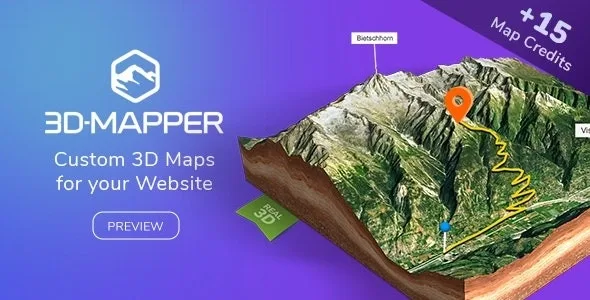
About 3D-Mapper
Built for people who showcase terrain, not buildings
A satellite photo or a flat map says little when what you want to show is relief: a hiking route, an estate, a natural spot or a trail with elevation changes. 3D-Mapper turns those places into three-dimensional maps that visitors can rotate and tilt inside your page.
It suits anyone promoting trails, rural lodging, cycling routes, outdoor events or any place where the terrain is part of the appeal. It does not suit anyone who needs to see buildings in volume: the source data is a digital terrain model, which represents the bare ground without structures or vegetation. Houses and trees do not appear with height on the map. There is also no guarantee of availability or quality of the data for each area, so check your location before building a website around it.
How 3D-Mapper works: external editor and WordPress plugin
The plugin does not work on its own. The map is designed in the 3D-Mapper.com editor and then imported into WordPress with one click, keeping the saved settings. You can also start from your own images. Once inside, it is placed on the page with a shortcode.
With the plugin you can change everything except labels and pins, which are set in the editor. This is an important detail: if you plan to change markers often, you will have to go back to the editor.
What you can customize on the map
- Relief and look: map height, subdivision level, water level, light settings, texture editor, edges with 14 textures or your own color, and 8 skybox sets or your own color.
- Base layers: OpenStreetMap, OpenTopoMap, Outdoor, Satellite and Satellite with streets.
- Content: markers and pins, popups with text, image and link, and several search options.
- Routes: import of .gpx and .kml files, useful for showing your own route.
- Animation: automatic map rotation.
Settings designed to fit your design
From WordPress you can set the canvas size, make the background transparent or use your own image or color, use your own or high-resolution textures, hide the map edges, and disable zoom and tilt if you do not want visitors to lose the view. You can also overlay a headline, a subline and a button, so the map also works as a header block with a call to action.
Attribution and commercial use
The maps work for both private and commercial projects, but if you use data from the 3D-Mapper location browser (or maps created from it) for commercial purposes, a commercial license is required for each map set. A clearly visible text attribution near the map is also required. If you use your own data (heightmap and texture) and hold all the rights, you can use it in commercial projects too.
One extra: final maps can be downloaded as glTF for Blender or Unreal Engine, or as STL and OBJ for 3D printing.
Frequently asked questions about 3D-Mapper
Do I need to know how to code?
No, the map is created in the editor and inserted with a shortcode.
Are buildings shown in 3D?
No. The model represents only the terrain, without structures or vegetation.
Can I change pins from WordPress?
No: labels and pins cannot be edited in the plugin, but the rest of the parameters can.
Can I show my own route?
Yes, .gpx and .kml files can be imported.
Version history
-
v
1.0.0 Current 15 May 2024
Customer reviews
Sign in to leave a review. Only people who have the product can review it.
No reviews for this product yet.
Frequently asked questions
-
GPL (General Public License) is the license under which WordPress and most premium plugins/themes are distributed. It grants you the right to use, modify and redistribute the software in as many projects as you want, with no domain restrictions.
-
Yes. With membership you get automatic updates via our GPLClub Updater plugin (installed on your WP, detects new versions and applies them). With individual purchase, you get one year of manual updates from your account.
-
Depends on the plan. Monthly: 3 domains. Semi-annual: 7. Annual and Lifetime: 15. Individual purchase: 1 domain.
-
GPLClub offers its own support for installation, configuration and compatibility. For direct support from the original author (feature requests, product-specific bugs), a license purchased from the author is required.