AdSanity - User Role Ad Visibility
Antivirus scan
Powered by ClamAV
✅ Verified clean
This product file has passed our security filters.
Want to run a fresh ClamAV scan right now? Takes a few seconds and shows scanner version, signature DB and live result.
This can take 5 to 30 seconds.
Clean file Threat detected
No threats detected in this file.
- File
- Size
- Scanned
- ClamAV
- Signature database
⚡ Powered by ClamAV
Scan could not be completed
Report product
If you detected an issue (broken file, malware, inappropriate content, etc.) let us know and we'll review it ASAP.
Sign in to report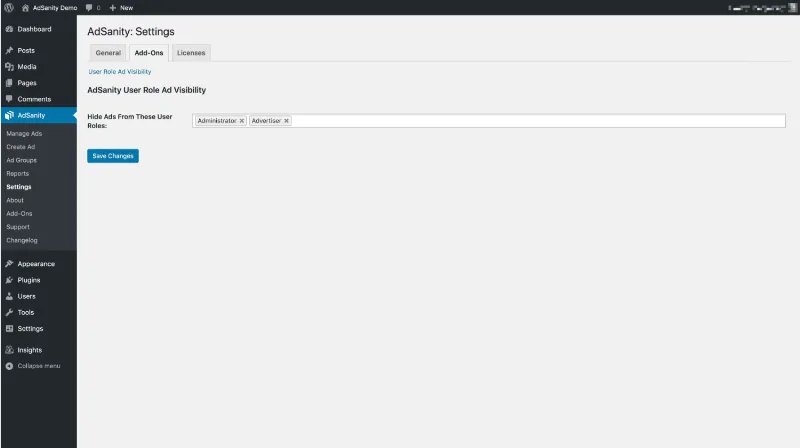
About AdSanity - User Role Ad Visibility
People who log in to your site shouldn't see the same ads as a passing visitor
A site with advertising usually treats everyone the same: the reader arriving from Google, the subscriber who already has an account, the customer who has just bought, and the editor checking the homepage. But they aren't worth the same to you. Someone who has registered has already given you something, and a badly timed banner can be exactly what makes them think twice. And your own team, while working on the site, doesn't need to see ads (or click them by mistake).
User Role Ad Visibility is an AdSanity add-on that hides ads based on the visitor's role.
User Role Ad Visibility switches ads off role by role
The logic is simple: if you disable visibility for a user role, that role stops seeing ads on the site.
- Any role, including non-standard ones. It recognizes roles that come from other sources, not just the ones WordPress ships with.
- Only when logged in. The site only recognizes the role of someone who is connected.
- It needs AdSanity. It's an add-on and doesn't work on its own: it requires AdSanity to be installed, and the hiding criterion is always the visitor's role.
If the ad sits in an AdSanity widget, the whole widget disappears
When the ad lives in one of AdSanity's standard widgets (or one specific to an add-on), the hidden role doesn't see the entire widget, title included. That way you don't end up with a heading like «Advertising» floating above an empty gap in the sidebar.
If you place the ad some other way, check with a test account how the space it leaves behind looks.
Common questions before hiding ads by role
Does a visitor who hasn't logged in also stop seeing ads?
No. The site only recognizes the role of someone who is connected.
Does it recognize roles created by other plugins?
Yes, it recognizes any non-standard role, wherever it comes from.
Can I hide ads for only some roles?
Yes. You disable visibility role by role.
Does it work without AdSanity?
No. It's an add-on and needs AdSanity installed to do anything.
Create a test account for each role before you trust the setting
Install AdSanity first and, on top of it, this add-on. It's best to add only the add-ons your advertising really needs, not every one available.
Then create a user for each role you want to hide ads from, log in with it and go through the homepage, the posts and the sidebar. Afterwards, visit as an anonymous visitor to confirm the ads are still there. If your roles come from another tool, this test tells you whether they are recognized as you expect.
Topics
Version history
-
v
1.1.0 Current 12 May 2024
Customer reviews
Sign in to leave a review. Only people who have the product can review it.
No reviews for this product yet.
Frequently asked questions
-
GPL (General Public License) is the license under which WordPress and most premium plugins/themes are distributed. It grants you the right to use, modify and redistribute the software in as many projects as you want, with no domain restrictions.
-
Yes. With membership you get automatic updates via our GPLClub Updater plugin (installed on your WP, detects new versions and applies them). With individual purchase, you get one year of manual updates from your account.
-
Depends on the plan. Monthly: 3 domains. Semi-annual: 7. Annual and Lifetime: 15. Individual purchase: 1 domain.
-
GPLClub offers its own support for installation, configuration and compatibility. For direct support from the original author (feature requests, product-specific bugs), a license purchased from the author is required.