Advanced Database Cleaner Pro
Antivirus scan
Powered by ClamAV
✅ Verified clean
This product file has passed our security filters.
Want to run a fresh ClamAV scan right now? Takes a few seconds and shows scanner version, signature DB and live result.
This can take 5 to 30 seconds.
Clean file Threat detected
No threats detected in this file.
- File
- Size
- Scanned
- ClamAV
- Signature database
⚡ Powered by ClamAV
Scan could not be completed
Report product
If you detected an issue (broken file, malware, inappropriate content, etc.) let us know and we'll review it ASAP.
Sign in to report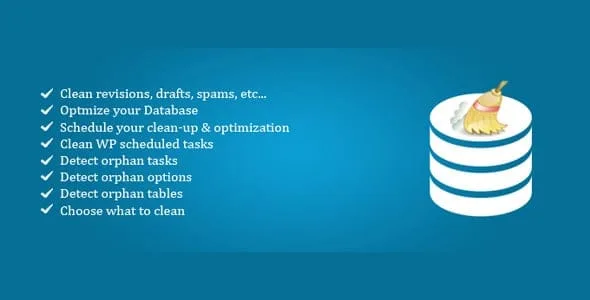
About Advanced Database Cleaner Pro
For the site that has spent years installing and uninstalling plugins (and not for anyone expecting speed and nothing else)
Uninstalling a plugin doesn't always delete what it left behind: tables, options, metadata and scheduled tasks stay put. That's why the database of a site with years of experiments weighs more than a freshly built one, without anyone having decided it. Advanced Database Cleaner Pro is designed for whoever maintains that kind of site: stores with a long history, blogs with thousands of revisions, or client sites inherited from another agency.
Before installing it, be clear about its limits:
- It isn't a caching plugin and doesn't replace good hosting: it tidies the database, it doesn't compress images or fix a heavy theme.
- Deleting means deleting: make a backup before the first cleanup.
- Orphan detection reduces false positives, but what the scanner flags as ownerless deserves a review before you remove it.
- The remote check spends daily credits, so it isn't unlimited.
Advanced Database Cleaner Pro and its 28 cleanup tools
It isn't a single "optimize" function but a set of tools, each with a real-time counter of items ready to clean. Among the most useful:
- Revisions and auto-drafts
- Expired transients
- Post and user meta: it detects meta belonging to content or users that were already deleted, duplicates, and leftovers from removed plugins.
- Action Scheduler leftovers
You can calculate the space each item takes up, see a preview before deleting, and set it to keep the last n items or those from the last x days. That last option is what lets you clean without losing recent data.
Orphaned tables and autoload options: what you pay for on every page load
The table list shows rows, size and overhead for each one. You can optimize, repair, empty or delete them, and find those belonging to plugins and themes that no longer exist or that use an invalid prefix. A smart filter helps you see the ones needing attention first.
Options work similarly, but with more impact. The plugin tells you whether the autoload size is excessive, highlights the heaviest options, identifies orphaned ones from old plugins, and lets you set autoload to "off" with one click. You can search them by name, value and other criteria.
A two-step scanner so you don't delete what is still in use
The local scan reviews posts, metadata, options and the real relationships between objects, and detects records that point to deleted or missing content. That is the kind of leftover that simpler cleanup tools often miss.
The remote scan checks those findings against a database of plugin footprints. No automatic detection replaces common sense: if you doubt an item, leave it and check the preview.
Ownerless cron tasks and cleanups that run on their own
The cron section lists all scheduled tasks with their next run and frequency, and flags those belonging to deleted plugins or with no associated action. These are processes that use server resources without doing anything useful. You can also schedule automatic cleanups so maintenance doesn't depend on you remembering. It also works on multisite installs, managing the network from a single dashboard.
Questions from those afraid of deleting what they shouldn't
Can I see what will be removed before doing it?
Yes. There is a preview mode per item, and you can keep the last n items or those from the last x days to protect recent data.
Does it clean up the leftovers of a plugin I already uninstalled?
Yes, that is its main use: it detects orphaned tables, options, metadata and cron tasks from removed plugins and themes.
Do I need a backup?
It's the safest course. Deletions are permanent and, although the scanner reduces false positives, it doesn't eliminate them entirely.
Does it work on a multisite network?
Yes, it is compatible with multisite and lets you manage the network from a single dashboard.
Version history
-
v
4.2.0 Current 15 Jul 2026
-
v
4.0.6 30 Jan 2026
Customer reviews
Sign in to leave a review. Only people who have the product can review it.
No reviews for this product yet.
Frequently asked questions
-
GPL (General Public License) is the license under which WordPress and most premium plugins/themes are distributed. It grants you the right to use, modify and redistribute the software in as many projects as you want, with no domain restrictions.
-
Yes. With membership you get automatic updates via our GPLClub Updater plugin (installed on your WP, detects new versions and applies them). With individual purchase, you get one year of manual updates from your account.
-
Depends on the plan. Monthly: 3 domains. Semi-annual: 7. Annual and Lifetime: 15. Individual purchase: 1 domain.
-
GPLClub offers its own support for installation, configuration and compatibility. For direct support from the original author (feature requests, product-specific bugs), a license purchased from the author is required.