AffiliateWP Marketing WordPress Plugin
Antivirus scan
Powered by ClamAV
✅ Verified clean
This product file has passed our security filters.
Want to run a fresh ClamAV scan right now? Takes a few seconds and shows scanner version, signature DB and live result.
This can take 5 to 30 seconds.
Clean file Threat detected
No threats detected in this file.
- File
- Size
- Scanned
- ClamAV
- Signature database
⚡ Powered by ClamAV
Scan could not be completed
Report product
If you detected an issue (broken file, malware, inappropriate content, etc.) let us know and we'll review it ASAP.
Sign in to report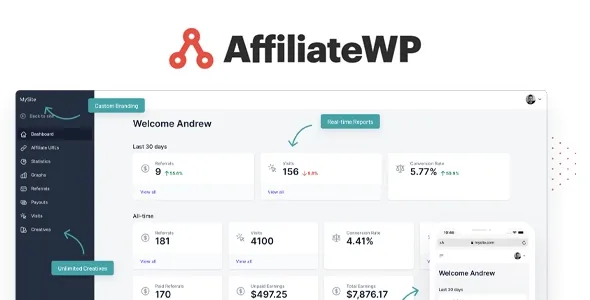
About AffiliateWP Marketing WordPress Plugin
Affiliates managed with spreadsheets and distrust
Setting up an affiliate program by hand usually ends the same way: referrals noted in a spreadsheet, tracking code that breaks with every change and commissions argued over by message.
AffiliateWP runs on your own WordPress, and its branded affiliate dashboard is what makes the program inspire trust.
Tracking, commissions and payouts in AffiliateWP Marketing
The plugin covers the whole cycle of an affiliate program, from affiliate registration to payment.
- Tracking: referral links, affiliate coupons, custom landing pages, cross-domain promotions and direct links. Because it runs on your server, it bypasses most ad blockers and stores no third-party cookies.
- Commission rules: one-time, recurring, tiered, lifetime or personalized for a specific affiliate.
- Payouts: you pay everyone with one click through Stripe or PayPal, without going transfer by transfer.
- Affiliate dashboard: customizable and branded, so affiliates see their results without writing to you.
- Promotional material: links, banners, coupons, landing pages and QR codes.
- Growth tools: email marketing, an affiliate leaderboard for contests and automatic registration of customers as affiliates.
- Fraud detection and reports: to see which promotions work and curb abuse.
Where you'll need to do your part
Tracking depends on integrations: it works with store, membership and form plugins such as WooCommerce, Easy Digital Downloads, MemberPress, WPForms, Gravity Forms or Elementor. If you sell with a tool that isn't among them, you'll need to code using its hooks, filters or REST API. It also doesn't recruit affiliates for you: you'll have to find them and give them reasons to promote you. And to pay through Stripe or PayPal you need an account with them.
Common questions: forms, cookies and your own dashboard
Is it only for stores? No. Since it integrates with form plugins, you can record where each lead comes from.
Do I need to know how to code? For the included integrations, no. Code only comes in if you want to adapt templates or behavior.
Can I give each affiliate a different commission? Yes, the rules include personalized commissions, as well as recurring, tiered and lifetime ones.
Is it available in my language? It's designed so you can launch the program in your audience's language, with support for more than 30 languages.
Store, form or client: each one uses it differently
An online store uses it to have sellers who only get paid when they sell, with no middlemen to pay. A small business that lives off contact forms can record where each lead comes from without copying data by hand. And anyone who builds websites for clients saves writing tracking code and can show the client results in a clear dashboard.
If your business has nothing to sell yet and no forms with real volume, the program will have little to measure.
Choose the integration first, adjust the rest later
Before touching anything, decide which plugin you'll use to record sales or contacts: tracking comes from there. Activate that integration and make a test purchase or submission with an affiliate link to check that the referral is attributed correctly.
Then define the commission rule you'll use, how you'll approve affiliates and what they'll see in their dashboard. Leave promotional material, contests and email for last: they are extras that only add value once the basics measure well.
Topics
Version history
-
v
2.37.4 Current 31 Oct 2026
-
v
2.37.3 30 Oct 2026
-
v
2.37.2 24 Oct 2026
-
v
2.37.1 14 Oct 2026
-
v
2.37.0 1 Oct 2026
-
v
2.36.4 30 Sep 2026
-
v
2.36.3 15 Sep 2026
-
v
2.36.2 9 Sep 2026
-
v
2.36.1 5 Sep 2026
-
v
2.36.0 26 Aug 2026
Customer reviews
Sign in to leave a review. Only people who have the product can review it.
No reviews for this product yet.
Frequently asked questions
-
GPL (General Public License) is the license under which WordPress and most premium plugins/themes are distributed. It grants you the right to use, modify and redistribute the software in as many projects as you want, with no domain restrictions.
-
Yes. With membership you get automatic updates via our GPLClub Updater plugin (installed on your WP, detects new versions and applies them). With individual purchase, you get one year of manual updates from your account.
-
Depends on the plan. Monthly: 3 domains. Semi-annual: 7. Annual and Lifetime: 15. Individual purchase: 1 domain.
-
GPLClub offers its own support for installation, configuration and compatibility. For direct support from the original author (feature requests, product-specific bugs), a license purchased from the author is required.