Astero WordPress Weather Plugin
Antivirus scan
Powered by ClamAV
✅ Verified clean
This product file has passed our security filters.
Want to run a fresh ClamAV scan right now? Takes a few seconds and shows scanner version, signature DB and live result.
This can take 5 to 30 seconds.
Clean file Threat detected
No threats detected in this file.
- File
- Size
- Scanned
- ClamAV
- Signature database
⚡ Powered by ClamAV
Scan could not be completed
Report product
If you detected an issue (broken file, malware, inappropriate content, etc.) let us know and we'll review it ASAP.
Sign in to report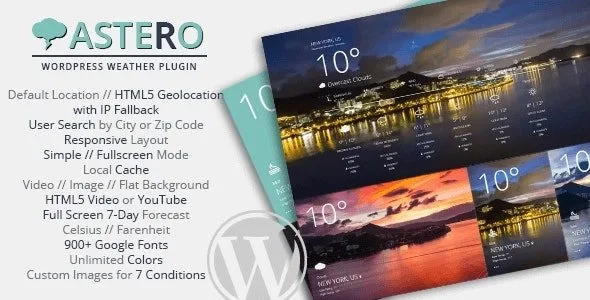
About Astero WordPress Weather Plugin
For people who already have (or will get) an OpenWeatherMap key, not for anyone expecting a widget that works right after activation
Putting the weather on a website looks like a one-minute job and ends up as a blank widget, a forecast that won't load or an unexpected bill for API calls. Astero is built for people who accept one starting condition: the data comes from OpenWeatherMap, and you need a key from that platform for anything to show.
- Without a key entered in the settings, there is no forecast.
- A newly created key can take a few hours to activate, so don't test in a rush on the day you sign up.
- The 5 or 7-day forecast with the Onecall 3.0 API requires subscribing to that service (it includes 1,000 free calls per day). Without it, you will only see 5 days.
- Searching by city name directly in the shortcode works with a city and country code.
If your business lives off the weather, you know visitors don't want a number, they want to decide
A tourism website, a campsite, a surf school, an excursion agency or a sailing club all share one problem: visitors ask themselves whether it's worth going today, and an icon with degrees doesn't answer that. Astero shows more than the temperature: the full-screen view adds humidity, wind, cloudiness, and sunrise and sunset times. The 5 or 7-day forecast shows temperature, humidity and cloudiness. For someone deciding whether to climb a trail or take the boat out, that detail matters more than a nice background.
How Astero knows where you are (and how it avoids the browser prompt)
You can set a default location or use the visitor's HTML5 geolocation. If you don't want their browser to show a permission prompt, there is IP-only detection with the free MaxMind GeoIP database. With the shortcode you can also pass latitude and longitude so each page shows a different place: a lodging listing, a beach, a ski slope.
There is also an optional search so users can check another city by name or zip code and choose their units (°C or °F).
Astero WordPress Weather Plugin inside: backgrounds, layout and performance
The look is built with a shortcode builder and can be inserted as a widget, as a shortcode, or both.
- Three background types: HTML5 video (.mp4, .webm, .ogg) or YouTube, your own images for 7 weather conditions, or a clean minimal background for flat designs.
- Two layout modes: simple with a full-screen overlay, or full forecast that adapts its content to the size of the element.
- Customization: more than 1,400 Google Fonts, unlimited background and text colors, overall and temperature font size, border style and optional rounded corners.
- Several widgets on the same page and WordPress Multisite support.
Scripts and styles load only where needed, the local cache lasts one hour and reduces API calls, and the CSS3 animations are designed for mobile. A practical note: a video background on a site visited from mobile is heavy, so consider whether it's worth it compared with an image.
Languages and translation
Weather texts can be shown in 49 OpenWeatherMap languages, including Spanish, Catalan, Galician, Basque, English, French and Portuguese. The plugin includes the .mo and .po files, so you can also translate its interface.
Frequently asked questions
Why isn't the weather loading?
Most often the OpenWeatherMap key is missing in Settings > Astero Weather. If you have already entered it and it still won't load, it may not be active yet: wait a few hours.
Why do I only see 5 days?
To see 7 days you need to subscribe to the OpenWeatherMap Onecall 3.0 API and enable it in the plugin settings. You can set a daily limit in OpenWeatherMap to control spending.
Can I show a different place on each page?
Yes: the shortcode accepts latitude and longitude, or city and country code.
Does it work on an HTTP or HTTPS site?
It works on both.
Version history
-
v
2.0.0 Current 30 May 2024
Customer reviews
Sign in to leave a review. Only people who have the product can review it.
No reviews for this product yet.
Frequently asked questions
-
GPL (General Public License) is the license under which WordPress and most premium plugins/themes are distributed. It grants you the right to use, modify and redistribute the software in as many projects as you want, with no domain restrictions.
-
Yes. With membership you get automatic updates via our GPLClub Updater plugin (installed on your WP, detects new versions and applies them). With individual purchase, you get one year of manual updates from your account.
-
Depends on the plan. Monthly: 3 domains. Semi-annual: 7. Annual and Lifetime: 15. Individual purchase: 1 domain.
-
GPLClub offers its own support for installation, configuration and compatibility. For direct support from the original author (feature requests, product-specific bugs), a license purchased from the author is required.