Bookly Service Extras (Add-on)
Antivirus scan
Powered by ClamAV
✅ Verified clean
This product file has passed our security filters.
Want to run a fresh ClamAV scan right now? Takes a few seconds and shows scanner version, signature DB and live result.
This can take 5 to 30 seconds.
Clean file Threat detected
No threats detected in this file.
- File
- Size
- Scanned
- ClamAV
- Signature database
⚡ Powered by ClamAV
Scan could not be completed
Report product
If you detected an issue (broken file, malware, inappropriate content, etc.) let us know and we'll review it ASAP.
Sign in to report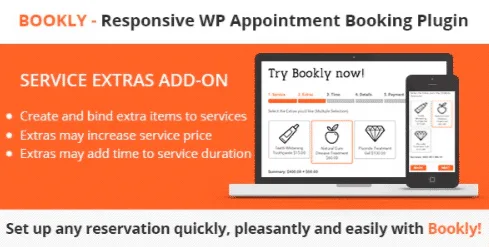
About Bookly Service Extras (Add-on)
Selling an appointment at the base price and then finding out in the room that the client also wanted the extra treatment, the rented equipment or half an hour more is the classic hole in appointment-based businesses: time stretches, the price doesn't change and the schedule gets messy. Bookly Service Extras lets those add-ons be requested, charged and scheduled from the booking form itself.
What the client adds without warning doesn't fit your schedule either
In businesses that sell time slots (hair salons, beauty, physiotherapy, equipment rental by appointment), an extra is rarely just money: it almost always uses up the professional's time. If you agree on it by hand at the last minute, the next slot gets overrun. This add-on makes each extra carry its own duration and price.
A walkthrough with Bookly Service Extras: one service from start to finish
Imagine a massage service with three optional extras. Here is how each step is solved:
- You set up extras on each service separately. An extra from one service doesn't show up in another, so you don't offer aromatherapy with a consultation that can't include it.
- You give it an image, price and duration. The image appears in the form, which helps when the client needs to understand what they are buying (a product, an accessory, a variant).
- You set a minimum and maximum. You can limit how many units of an extra can be ordered, so you don't accept more than you can actually handle.
- You decide when the extras step appears: before or after choosing the time.
- The client chooses and the total updates. The price and duration of the appointment change according to what is selected.
- Your team sees it. Extras appear in the Bookly calendar, in the appointment details and in the Bookly cart.
- Notifications include them. There are placeholders for email and SMS templates, so staff and clients receive what has been booked.
It needs Bookly PRO to work
It isn't a standalone plugin: it is an add-on for the Bookly booking system and requires Bookly PRO. Without it, it does nothing. Nor does it turn your website into a shop: extras are added to an appointment, not sold separately like a product catalog.
Frequently asked questions
Can I offer different extras depending on the service?
Yes, extras are created for each service separately.
Can an extra make the appointment longer?
Yes. Each extra has its own duration and price, and both affect the appointment total depending on what the client chooses.
Can I limit the quantity of the same extra?
Yes, with a minimum and maximum quantity.
Does staff find out which extras were ordered?
Yes: they show in the calendar and in the appointment details, and you can include them in emails and SMS using placeholders.
Before you decide: test it with your most complex service
Recreate in the demo your most tangled case, the one with the most add-ons and variable duration, and check that the extras step sits where you want it and that the appointment summary is clear to the person booking.
Topics
Version history
-
v
6.8 Current 5 Sep 2026
-
v
6.6 13 Jul 2026
-
v
6.5 14 Apr 2026
Customer reviews
Sign in to leave a review. Only people who have the product can review it.
No reviews for this product yet.
Frequently asked questions
-
GPL (General Public License) is the license under which WordPress and most premium plugins/themes are distributed. It grants you the right to use, modify and redistribute the software in as many projects as you want, with no domain restrictions.
-
Yes. With membership you get automatic updates via our GPLClub Updater plugin (installed on your WP, detects new versions and applies them). With individual purchase, you get one year of manual updates from your account.
-
Depends on the plan. Monthly: 3 domains. Semi-annual: 7. Annual and Lifetime: 15. Individual purchase: 1 domain.
-
GPLClub offers its own support for installation, configuration and compatibility. For direct support from the original author (feature requests, product-specific bugs), a license purchased from the author is required.