Bookme Appointment Booking Scheduling Plugin
Antivirus scan
Powered by ClamAV
✅ Verified clean
This product file has passed our security filters.
Want to run a fresh ClamAV scan right now? Takes a few seconds and shows scanner version, signature DB and live result.
This can take 5 to 30 seconds.
Clean file Threat detected
No threats detected in this file.
- File
- Size
- Scanned
- ClamAV
- Signature database
⚡ Powered by ClamAV
Scan could not be completed
Report product
If you detected an issue (broken file, malware, inappropriate content, etc.) let us know and we'll review it ASAP.
Sign in to report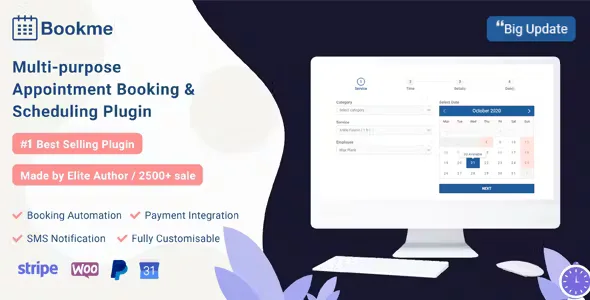
About Bookme Appointment Booking Scheduling Plugin
For the business that sells the hours of specific people
Handling appointments through calls and messages means answering at odd hours, crossing each employee's schedule by hand and finding out on Monday that two clients had the same slot. And an empty hour can't be recovered: the Saturday at five that nobody took can't be sold on Sunday. Bookme aims to let the client see the free slots and book alone, without you acting as the middleman.
It suits beauty salons, massage therapists, yoga or pilates studios, tutors, consultancies and clinics, and anyone running classes or events with limited places. Before you decide, keep in mind what it needs in order to work:
- Email and SMS reminders require setting up cron on your hosting.
- SMS uses Twilio, so you need your own account with that service.
- Payments depend on the gateway you choose (PayPal, Stripe, Mollie, 2Checkout, Authorize.Net) or on WooCommerce, and each one requires its own account.
- If the form collects health data, ask only for what is essential and think about what you do with that information.
Services, staff and a calendar with free seats in Bookme
The basic booking follows a clear order: category, service, staff member and a calendar showing seat availability. There is no limit on the number of services, customers or employees.
- Each staff member can have their own price and their own capacity for the same service.
- Each service has a color so you can tell them apart at a glance.
- You can set each employee's weekly schedule and days off.
- If the client doesn't choose a staff member, the preference you set for that service applies.
- There is a daily calendar view with the whole team, and you can manage bookings from the admin panel.
Groups, consultants and cart: three ways to book
Group booking
The client says how many people are coming and takes several seats in the same slot. In the admin panel it shows up as a single appointment, with no duplicates to sort out.
Consultant booking
Designed for meetings with someone who gives expert advice: management, education, accountancy, law, marketing and similar fields.
Appointment cart
The client can book several appointments in a single session. The button to book more takes them back to the first step without losing what is already in the cart. Useful if your clients tend to chain services.
Payments, notices and coupons without leaving the plugin
Payment can be made with the built-in gateways or through WooCommerce. You can also offer discount coupons. Notices reach clients and staff by email, with editable templates, and by SMS with Twilio. Remember that scheduled reminders need cron to be set up: without it they don't go out.
A form you adapt to what you need to ask
You can customize the form fields, the calendar, the time slots and the color schemes. You can also show or hide the progress bar, display the duration next to the service name or the price next to the staff member, and reorder the service, category, staff member and cart columns.
- It is inserted with a shortcode, and another one lets the client check and cancel their bookings.
- It includes Google reCAPTCHA and a custom success page after booking.
- You can edit existing bookings and export them to CSV.
- It supports multiple users and is compatible with Loco Translate and WPML (POT file included).
Common questions before choosing Bookme
Can I charge for the booking in advance? Yes, with PayPal, Stripe, Mollie, 2Checkout, Authorize.Net or with WooCommerce.
Is it useful if I work alone? Yes. It is designed both for businesses with a team and for one person offering appointments from their website.
Can it be translated? Yes, it is compatible with Loco Translate and WPML and includes a POT file.
Do reminders go out with no further setup? No: they require cron to be configured. SMS also needs a Twilio account.
Topics
Version history
-
v
4.9 Current 7 Sep 2026
-
v
4.8 8 May 2024
Customer reviews
Sign in to leave a review. Only people who have the product can review it.
No reviews for this product yet.
Frequently asked questions
-
GPL (General Public License) is the license under which WordPress and most premium plugins/themes are distributed. It grants you the right to use, modify and redistribute the software in as many projects as you want, with no domain restrictions.
-
Yes. With membership you get automatic updates via our GPLClub Updater plugin (installed on your WP, detects new versions and applies them). With individual purchase, you get one year of manual updates from your account.
-
Depends on the plan. Monthly: 3 domains. Semi-annual: 7. Annual and Lifetime: 15. Individual purchase: 1 domain.
-
GPLClub offers its own support for installation, configuration and compatibility. For direct support from the original author (feature requests, product-specific bugs), a license purchased from the author is required.