Canvas, by Bonfire
Antivirus scan
Powered by ClamAV
✅ Verified clean
This product file has passed our security filters.
Want to run a fresh ClamAV scan right now? Takes a few seconds and shows scanner version, signature DB and live result.
This can take 5 to 30 seconds.
Clean file Threat detected
No threats detected in this file.
- File
- Size
- Scanned
- ClamAV
- Signature database
⚡ Powered by ClamAV
Scan could not be completed
Report product
If you detected an issue (broken file, malware, inappropriate content, etc.) let us know and we'll review it ASAP.
Sign in to report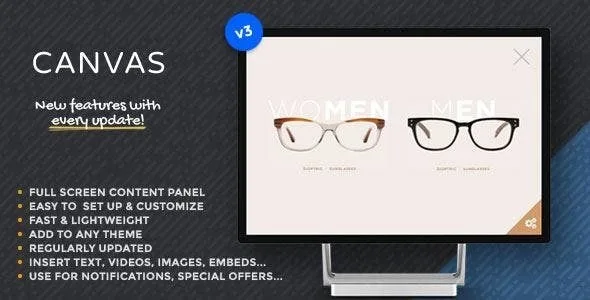
About Canvas, by Bonfire
A menu, a form or a notice that doesn't fit on the page without breaking the layout
Some content needs to be one click away for visitors but doesn't deserve a permanent spot in the layout: a contact form, a video, a long block of text, a shortcode you already use elsewhere. If you put it on the page, you weigh the page down. If you remove it, nobody finds it. Canvas solves that conflict with a panel that slides over the site and closes when it is no longer needed.
Canvas, by Bonfire: a sliding panel for any theme
The plugin adds a panel that enters from the side you choose: left, right, top or bottom. Inside you can show text, images, videos, forms or shortcodes. The content goes into an unstyled widget location, so the look is decided by your theme and by what you put inside, not by the plugin.
- All colors can be changed from the WordPress Customizer, with a real-time preview.
- You can hide the included close button.
- You can lock page scrolling while the panel is open.
- The panel closes with the activation button, the close button or the ESC key.
How the panel opens: modern button, classic triangle or your own link
A good part of the decision is here, because the button is what visitors see first.
If you want a button with your own text
The modern design lets you write the text, change the font size, use your theme's fonts, adjust the roundness and border thickness, change its position and add a background image, either a pattern or a full-size image.
If you prefer a discreet icon
The classic triangle design can be placed wherever you want and supports an icon chosen from hundreds. If your installation already loads that icon set from another plugin or theme, you can disable the one Canvas includes and avoid loading it twice.
If you already have a button or a link
You can activate the panel from your own element: a text link, an image or a button that already exists in your design.
Full-screen panel: think about mobile before filling it
Many people open a panel like this from their phone, and any excess shows there. A ten-field form or a heavy video inside a panel that fills the whole screen is more tiring than a normal page. It works better with one thing per panel and an obvious way to close it. That is why it's best not to hide the close button unless you offer another clear way out, such as a link inside the content itself.
Canvas doesn't build the panel's content
Canvas is the container, not a content editor. It includes no forms, galleries or videos of its own: whatever you want to show must be created with your theme, a widget or another plugin and placed in the panel's widget location. Nor is it a popup system with display rules: the panel opens when the visitor asks for it, and there are no triggers by time, exit intent or scroll. If you are looking for lead-capture campaigns with conditions, look at a different kind of tool.
Frequently asked questions about Canvas
Does it work with any theme?
It is designed to be added to any WordPress theme. Even so, check in the demo how it looks with your site's typography and colors.
Can I change the look without touching code?
Yes. The settings are in the WordPress Customizer, under Appearance, Customize, Canvas Plugin, with changes visible instantly.
Can it be used on mobile and tablet?
Yes, it has been tested on desktop, tablets and phones with iOS, Android and Windows, and in the usual browsers.
Can I open the panel from a link or a button of my own?
Yes, through a custom element such as a text link, an image or your own button.
Can I stop the page from scrolling behind the panel?
Yes, there is an option to disable site scrolling while the panel is open.
Version history
-
v
3.0 Current 30 May 2024
Customer reviews
Sign in to leave a review. Only people who have the product can review it.
No reviews for this product yet.
Frequently asked questions
-
GPL (General Public License) is the license under which WordPress and most premium plugins/themes are distributed. It grants you the right to use, modify and redistribute the software in as many projects as you want, with no domain restrictions.
-
Yes. With membership you get automatic updates via our GPLClub Updater plugin (installed on your WP, detects new versions and applies them). With individual purchase, you get one year of manual updates from your account.
-
Depends on the plan. Monthly: 3 domains. Semi-annual: 7. Annual and Lifetime: 15. Individual purchase: 1 domain.
-
GPLClub offers its own support for installation, configuration and compatibility. For direct support from the original author (feature requests, product-specific bugs), a license purchased from the author is required.