Chords – Music / Artist / Radio WordPress theme
Antivirus scan
Powered by ClamAV
✅ Verified clean
This product file has passed our security filters.
Want to run a fresh ClamAV scan right now? Takes a few seconds and shows scanner version, signature DB and live result.
This can take 5 to 30 seconds.
Clean file Threat detected
No threats detected in this file.
- File
- Size
- Scanned
- ClamAV
- Signature database
⚡ Powered by ClamAV
Scan could not be completed
Report product
If you detected an issue (broken file, malware, inappropriate content, etc.) let us know and we'll review it ASAP.
Sign in to report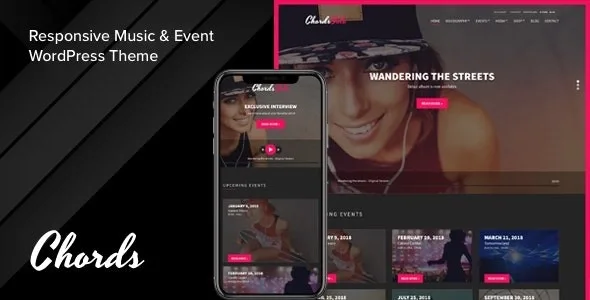
About Chords – Music / Artist / Radio WordPress theme
Your site's player plays the record or the live signal
A band wants people to hear the latest album. A station wants its show playing right now. A venue or collective that does both has to settle one question first: what is heard when someone enters the site.
Chords forces that answer, and it is its central decision: the theme's player works with an album tracklist or with a ShoutCast or IceCast stream. Choosing one or the other also defines which sections deserve the home page, because a site selling music pushes the discography and one that broadcasts pushes the signal and its events.
Chords, by CSSIgniter, is a WordPress theme for DJs, solo artists, bands, collectives, club owners, music and event producers, and radio stations.
Four home pages depending on who you are
The package includes sample content for four approaches: Solo, Radio, Rock and Light. They are not closed templates: the home page is assembled with the Front Page Widgets area, and each approach combines its own, such as upcoming events, an album tracklist, top tracks or a newsletter. The theme includes 12 custom widgets.
So you can start from the Radio layout and add, for example, the events from the Solo layout, moving widgets without touching code.
Discography, events and the rest of your music content
- Discography: each album has a cover, description and tracklist. Each track takes a title, subtitle, buy URL, MP3 play URL, download URL and lyrics, and is reordered by dragging.
- Events: with their listing page and a map on the single page, hidden if you leave the coordinates empty.
- Videos: with featured image, date, location and a URL from a supported provider.
- Galleries: with columns, optional masonry layout and random order.
- Artists: with photo and bio.
- Slides: for the home page slider, with optional video.
The [tracklisting] shortcode takes tracks into any content: it shows those of the current album or another one, by id or slug, and lets you pick track numbers or limit how many appear.
Traps in radio and downloads
The stream comes from your streaming server. The theme plays a ShoutCast or IceCast signal in MPEG audio, but does not generate it.
The title of what is playing has conditions. The Now Playing feature depends on the ShoutCast server version and a stream URL in IP and port format. Otherwise it does not work.
Forced downloads are local only. The theme forces the download of MP3 files hosted on your site. For remote files, it depends on how that server is configured.
Also, deleting a track and saving is final.
Installing Chords and building the first home page
WooCommerce is optional and only needed to sell. For the rest, Socials Ignited, Contact Form 7, CSSIgniter Shortcodes and WP Instagram Widget are recommended.
- Upload chords.zip from Appearance, Themes and activate it.
- Import the sample content with the One Click Demo Import plugin. Without WooCommerce, harmless notices about the product post type may appear.
- Create a page with the Homepage template and set it as the front page in Settings, Reading.
- Set up the player in CSSIgniter Settings, Music Player Options, with an album or your stream.
- Create the listing pages for events, discography, videos, galleries and artists with their templates.
Stations with a schedule and musicians with continuous playback
Among its content types there are no podcasts or program schedule. If your station lives on those, OnAir2 brings an automatic schedule, podcasts and a player that does not stop while browsing. For continuous playback aimed at musicians, Kentha adds a booking form and buy links, and Pulse lets you sell audio with Easy Digital Downloads. If you already have a theme you like and only lack the player, AudioIgniter Pro, also by CSSIgniter, adds playlists to any page.
Chords beyond the radio
Can it sell merchandise?
Yes, with WooCommerce, which has its own options in the theme panel: related products, up-sells, shop columns.
Can I build pages with a page builder?
Yes. It has a Page Builder template for working with the builder you prefer.
Does it work for a band with no radio?
Yes. The Solo and Rock layouts start from that, and the player can play an album list.
Does it include an email newsletter?
Yes, with Newsletter Options and the CI Newsletter widget.
Version history
-
v
2.7.0 Current 18 Jun 2024
Customer reviews
Sign in to leave a review. Only people who have the product can review it.
No reviews for this product yet.
Frequently asked questions
-
GPL (General Public License) is the license under which WordPress and most premium plugins/themes are distributed. It grants you the right to use, modify and redistribute the software in as many projects as you want, with no domain restrictions.
-
Yes. With membership you get automatic updates via our GPLClub Updater plugin (installed on your WP, detects new versions and applies them). With individual purchase, you get one year of manual updates from your account.
-
Depends on the plan. Monthly: 3 domains. Semi-annual: 7. Annual and Lifetime: 15. Individual purchase: 1 domain.
-
GPLClub offers its own support for installation, configuration and compatibility. For direct support from the original author (feature requests, product-specific bugs), a license purchased from the author is required.