EM4U Event Management WordPress Theme
Antivirus scan
Powered by ClamAV
✅ Verified clean
This product file has passed our security filters.
Want to run a fresh ClamAV scan right now? Takes a few seconds and shows scanner version, signature DB and live result.
This can take 5 to 30 seconds.
Clean file Threat detected
No threats detected in this file.
- File
- Size
- Scanned
- ClamAV
- Signature database
⚡ Powered by ClamAV
Scan could not be completed
Report product
If you detected an issue (broken file, malware, inappropriate content, etc.) let us know and we'll review it ASAP.
Sign in to report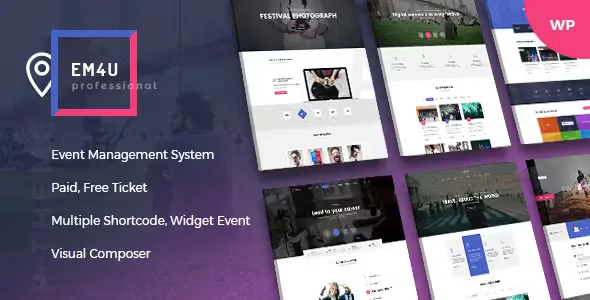
About EM4U Event Management WordPress Theme
Setting up an event in WordPress often ends up as a patchwork: one page for the schedule, another for speakers, a form that doesn't control capacity and tickets someone has to email by hand. EM4U Event Management WordPress Theme brings events, tickets, speakers, venues and bookings together in one theme.
Event organizers sell limited seats, not just tickets
A conference, a workshop or an online class has a capacity that runs out and an attendee list you need to control on the day. The problem isn't publishing the date: it's knowing who has paid, who has checked in and who needs their ticket resent. EM4U is built for that: each event has its own tickets with their own inventory, and each booking is recorded with the event name and the customer's data.
EM4U features for selling and controlling tickets
These are the pieces that weigh most when deciding:
- Unlimited tickets with inventory: you can create free, paid, WooCommerce-linked or external tickets, and control the units of each one.
- QR and barcode: the ticket PDF can carry a QR code, a barcode, a logo and a certificate as a PDF or image. The QR code is used to verify and update the ticket's status from the website.
- Private data on the ticket: the buyer receives a link and a password by email, useful for Zoom or Google Meet events, online classes or webinars.
- Resend and download: if the customer didn't receive the email, you can resend the ticket, and they can download it again from their bookings area.
- Custom fields in the booking form: text, phone, email, password, textarea, checkboxes, dropdowns, radio buttons and files.
- Schedule with speakers: create tabbed schedules, pick one or several speakers per session, and each speaker has a profile with bio, social links and the events they take part in.
- Venues and locations: each venue shows opening days, map and contact details, and locations are organized on two levels (country and city, or state and city). Google Maps is integrated.
- Sponsors and organizers: unlimited sponsorship levels (gold, silver…) and organizer details you can hide, with a contact form.
- CSV export of tickets and attendees per event, and an option to require login before checkout.
Payments: what it includes and what depends on WooCommerce
On its own it takes payments with PayPal, Stripe and offline payment. If you need more gateways, you have to go through WooCommerce. Nor is it a theme for time-slot bookings: it's designed to sell tickets to events with a set date.
It needs WPBakery for the listings
The order of event listings (custom order, featured, name, ID or start date) is set with WPBakery Page Builder elements, which the theme includes. If you prefer another builder, check in the demo how far it goes.
Questions before choosing EM4U
Is it suitable for online events?
Yes: you can add a link and a password to the ticket, which the buyer receives by email.
Can I run several events at once?
Yes, and each one can have its own landing page or a single page.
Can it be translated?
It includes a .pot file for translation, and the date and month format can be changed for your country.
Does it control access on the day of the event?
The QR code lets you verify and update each ticket's status from the website. Don't count on a separate scanning app: check the demo if your entry flow is very high-volume.
Ready-made design and variants
The theme includes more than 12 homepage variants, 11 slideshow variants, 5 headers, 5 footers, 10 event list styles, 4 blog styles, 4 speaker list styles, 2 venue list styles and 3 contact templates. It supports MegaMenu, WooCommerce, and Font Awesome, Elegant Icons and Flaticon. You can change the header, footer and layout (left sidebar, right sidebar or none, wide or boxed) on each page or event. It includes reCAPTCHA v2 and v3 on login, registration and booking forms.
Demos import with one click and the design is adjusted afterwards
The theme lets you import demo data with one click, so the sensible approach is to start from the homepage closest to your event and adapt it. Before publishing, create your venues, speakers and tickets, because events rely on them. If you need to change event templates, do it through an override in a child theme.
Topics
Version history
-
v
1.9.2 Current 21 Oct 2026
-
v
1.8.9 5 Sep 2026
-
v
1.8.7 25 Oct 2025
Customer reviews
Sign in to leave a review. Only people who have the product can review it.
No reviews for this product yet.
Frequently asked questions
-
GPL (General Public License) is the license under which WordPress and most premium plugins/themes are distributed. It grants you the right to use, modify and redistribute the software in as many projects as you want, with no domain restrictions.
-
Yes. With membership you get automatic updates via our GPLClub Updater plugin (installed on your WP, detects new versions and applies them). With individual purchase, you get one year of manual updates from your account.
-
Depends on the plan. Monthly: 3 domains. Semi-annual: 7. Annual and Lifetime: 15. Individual purchase: 1 domain.
-
GPLClub offers its own support for installation, configuration and compatibility. For direct support from the original author (feature requests, product-specific bugs), a license purchased from the author is required.
Related products

Panthar – Private Security & CCTV Service WordPress Theme + RTL

StudioPress Kreativ Pro Genesis WordPress Theme
By StudioPress
Charitxa | Multipurpose Nonprofit WordPress Theme