Food Online Premium for WooCommerce
Antivirus scan
Powered by ClamAV
✅ Verified clean
This product file has passed our security filters.
Want to run a fresh ClamAV scan right now? Takes a few seconds and shows scanner version, signature DB and live result.
This can take 5 to 30 seconds.
Clean file Threat detected
No threats detected in this file.
- File
- Size
- Scanned
- ClamAV
- Signature database
⚡ Powered by ClamAV
Scan could not be completed
Report product
If you detected an issue (broken file, malware, inappropriate content, etc.) let us know and we'll review it ASAP.
Sign in to report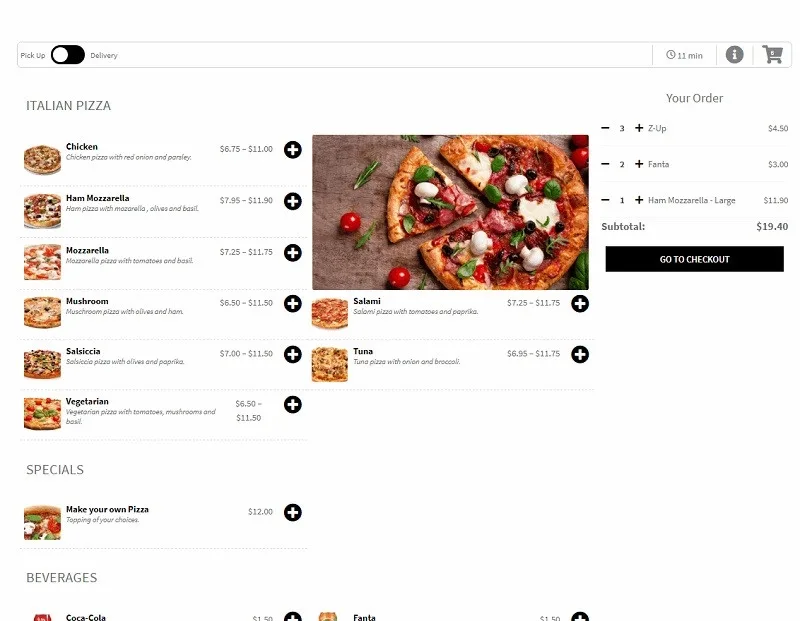
About Food Online Premium for WooCommerce
Anyone selling food online isn't managing a shipment, they're managing a time. If the customer orders for 9 pm and the kitchen is already swamped, or types an incomplete address, the problem isn't technical: it's a cold pizza and a bad review. Food Online Premium for WooCommerce turns WooCommerce into a restaurant ordering system that controls exactly that: when, where and how the food is delivered.
Products are the usual WooCommerce ones. Categories become the menu headings (starters, mains, desserts, drinks) and their order is adjusted in the plugin settings. For dishes with sizes or proteins you use variable products, and it is compatible with WooCommerce Product Add-Ons if you need more options per dish.
Home delivery, pickup or eating in from the same menu
The customer chooses between home delivery, pickup or eating at the restaurant. You can define delivery zones by postcode and give each one its own delivery fee. If you have several locations, the customer can choose where to pick up. And if the delivery menu isn't the dining room menu, or it changes by day and time, you can schedule which menu is shown for each mode.
Addresses are validated with Google Maps on the menu page itself and are passed automatically to the checkout shipping form. If Google can't find the street, the customer marks their location on a map. And if your zones are set by postcode, they can check whether you deliver to them and see the fee before filling the cart.
Time slots and preparation time in Food Online Premium
You can create slots for delivery, pickup and eating in, and assign them to one category, several, or to tags. That way the dessert hours don't have to match the pizza hours. At checkout, a time picker lets the customer choose when they want to receive or pick up the order, and the plugin calculates and shows the time until it is ready. For deliveries, the travel time is calculated with Google, as if by car or by bike.
You can also show a pop-up at checkout to offer drinks, a tip or other extras, and set a minimum order by amount or quantity.
Accepting or rejecting orders live requires another plugin
Food Online Premium organizes the menu and the checkout, but it is not a complete kitchen system. Here is what it includes and what you will need to cover:
- Already solved: menu by categories, delivery modes, zones with fees, time slots, address validation and time picker.
- Another plugin: accepting or rejecting orders and informing the customer live is done with Live Order Confirmation for WooCommerce, a separate plugin from the same team.
- Google account: the delivery selector and address validation require you to set up your own Google Maps API key.
- Delivery: orders can be sent to Shipday with a delivery time and the driver's pick-up time. If you don't use Shipday, you organize the logistics yourself.
- Payments, taxes and general design: these depend on WooCommerce and your theme.
A menu built your way with shortcodes and ready for mobile
The [foodonline] shortcode inserts the menu on any page. With its attributes you can show only certain categories, certain tags or specific products by ID, and combine them. It works with WordPress blocks or Elementor to build your own layout. You can also show one category at a time with an accordion effect, or open with a start page with icons to choose the delivery mode.
On mobile, the menu can have a top bar and a drop-down of categories, and the plugin is designed for desktops, tablets and phones. Before deciding, check in the demo how it behaves with your number of dishes and categories.
Frequently asked questions
Does it work without WooCommerce?
No. It installs on top of WooCommerce and its settings are under WooCommerce, in the Food Online Premium tab.
Can I translate it into my language?
Yes. You can adjust the translations or create a new language with Loco Translate.
Can I show only part of the menu on a page?
Yes, with the shortcode you can filter by categories, tags or specific products.
Do I need a Google Maps key?
To validate addresses, enable the delivery selector and calculate travel times with Google, yes: you will need to set up your own API key.
Topics
Version history
-
v
5.1.4 Current 17 May 2024
Customer reviews
Sign in to leave a review. Only people who have the product can review it.
No reviews for this product yet.
Frequently asked questions
-
GPL (General Public License) is the license under which WordPress and most premium plugins/themes are distributed. It grants you the right to use, modify and redistribute the software in as many projects as you want, with no domain restrictions.
-
Yes. With membership you get automatic updates via our GPLClub Updater plugin (installed on your WP, detects new versions and applies them). With individual purchase, you get one year of manual updates from your account.
-
Depends on the plan. Monthly: 3 domains. Semi-annual: 7. Annual and Lifetime: 15. Individual purchase: 1 domain.
-
GPLClub offers its own support for installation, configuration and compatibility. For direct support from the original author (feature requests, product-specific bugs), a license purchased from the author is required.