Google Drive Embedder Enterprise
Antivirus scan
Powered by ClamAV
✅ Verified clean
This product file has passed our security filters.
Want to run a fresh ClamAV scan right now? Takes a few seconds and shows scanner version, signature DB and live result.
This can take 5 to 30 seconds.
Clean file Threat detected
No threats detected in this file.
- File
- Size
- Scanned
- ClamAV
- Signature database
⚡ Powered by ClamAV
Scan could not be completed
Report product
If you detected an issue (broken file, malware, inappropriate content, etc.) let us know and we'll review it ASAP.
Sign in to report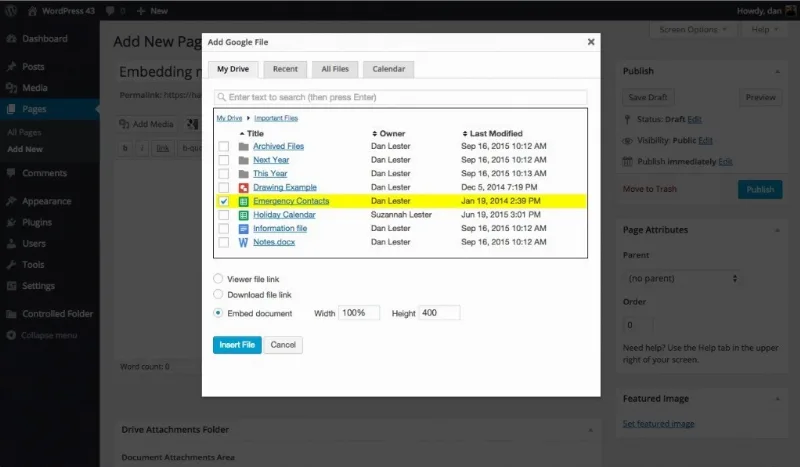
About Google Drive Embedder Enterprise
Documents in Drive, outdated website
The usual story: the good document lives in Google Drive, while the website keeps an old PDF someone uploaded to the media library months ago. Every change means downloading, re-uploading and remembering to replace the link. Google Drive Embedder Enterprise targets that gap: it shows the Drive file inside the page, so what is edited in Drive is what appears on the site.
This matters most to teams where the person updating the information is not the person who handles WordPress: a club, a department, a small company with documents that change often. If you already work in Google Workspace, content stays where you already maintain it, and WordPress remains a tidy storefront.
How a file or folder gets inserted
From any page or post you open a window to add a Google file, just like picking an image from the media library. You can browse My Drive, see recent files or search all of Drive.
- Embedded or linked files: you can show a viewer inside the page or add a link to open or download. Many types are supported: documents, spreadsheets, PDFs, videos, forms and images.
- Interactive folders: visitors can browse the folder without leaving WordPress and, if you allow it, upload files by dragging them in.
- Calendars: these can be added too.
The result adapts well to mobile screens and the document can be downloaded as a PDF or other formats.
Access: public, by role or account only
This is the part that matters most to an organization. You can let people without a Google account view files and folders, or restrict access by WordPress role. The plugin can also log the user out of Google when they log out of WordPress.
The attachments area works like this: each page or post creates its own folder inside your Drive hierarchy, and files can be dropped into that folder without entering WordPress. Google's shared drives (Team Drives) are also supported.
Choosing Enterprise: what it requires and what it does not solve
The Enterprise edition includes the advanced folder features (browsing and uploading without leaving the page), the automatic attachments area, coordinated logout, calendars and shared drives. If you only need to insert single files, the basic insert and link version may be enough, so check what you will really use.
Limits to be clear about:
- The automatic attachments area requires a Google Workspace account; a regular Gmail account will not work.
- Files remain hosted in Drive: if you change permissions there or delete the file, the site reflects it.
- It is not a gallery or a download manager with statistics: it connects Drive to WordPress and little more.
Does it work with a personal Gmail account?
The per-page attachments area needs Google Workspace.
Can visitors without a Google account see the files?
Yes, you can allow it. You can also limit it by WordPress role.
Can I show a whole folder?
Yes. You can embed it and, with the advanced features, browse subfolders and upload files without leaving the page.
Which file types does it support?
Many: documents, spreadsheets, presentations, PDFs, videos, forms and images. Check in the demo how your specific format looks.
Version history
-
v
5.2.3 Current 26 May 2024
Customer reviews
Sign in to leave a review. Only people who have the product can review it.
No reviews for this product yet.
Frequently asked questions
-
GPL (General Public License) is the license under which WordPress and most premium plugins/themes are distributed. It grants you the right to use, modify and redistribute the software in as many projects as you want, with no domain restrictions.
-
Yes. With membership you get automatic updates via our GPLClub Updater plugin (installed on your WP, detects new versions and applies them). With individual purchase, you get one year of manual updates from your account.
-
Depends on the plan. Monthly: 3 domains. Semi-annual: 7. Annual and Lifetime: 15. Individual purchase: 1 domain.
-
GPLClub offers its own support for installation, configuration and compatibility. For direct support from the original author (feature requests, product-specific bugs), a license purchased from the author is required.