MainWP Pro Reports
Antivirus scan
Powered by ClamAV
✅ Verified clean
This product file has passed our security filters.
Want to run a fresh ClamAV scan right now? Takes a few seconds and shows scanner version, signature DB and live result.
This can take 5 to 30 seconds.
Clean file Threat detected
No threats detected in this file.
- File
- Size
- Scanned
- ClamAV
- Signature database
⚡ Powered by ClamAV
Scan could not be completed
Report product
If you detected an issue (broken file, malware, inappropriate content, etc.) let us know and we'll review it ASAP.
Sign in to report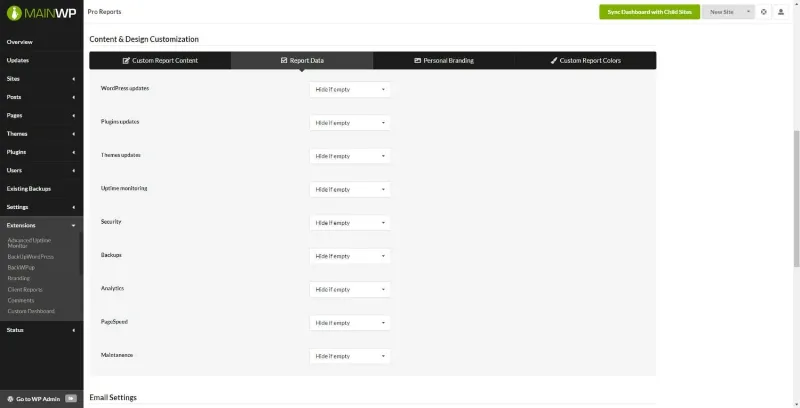
About MainWP Pro Reports
Clients pay for maintenance and never see what gets done
You update, check and maintain, and at the end of the month the client only gets an email they use to decide whether to keep paying. A technical list of changes tells them nothing; a report with your brand and only what matters to them does. MainWP Pro Reports turns the data your sites collect into a PDF that you prepare and send from your own dashboard.
In this business the challenge is not showing more, but showing just enough. You decide what to include, from a short summary to a full breakdown, so each client can get the level of information that is actually useful to them.
PHP, HTML and CSS templates with tokens for each client
It comes with professional templates so you don't start from scratch. Since they are built with PHP, HTML and CSS, they can be adapted as much as you like: if you don't code, you'll use them almost as they are; if you do, or have someone who does, the design is yours.
Tokens let you personalize each report. You can use the existing ones or create new ones, and add your own text to each report.
Logo, colors and a draft before sending
You can add your logo and brand colors, adjust the layout and save it for reuse, so every report comes out looking the same. When it's ready, you save a draft, preview it, download the PDF or send it to the client, all from the MainWP Dashboard.
The email is configurable too: in the email settings you control how reports are sent, and you can include tokens in the text to encourage the client to open the attached PDF, where the detail is.
Uptime for each site and REST API access
Reports can display data from other MainWP extensions. One example is Advanced Uptime Monitor, which lets you include the uptime of the sites you manage. MainWP Pro Reports also offers access to its data through the REST API, with a list of endpoints, useful if you want to extract information for your own decisions.
Without MainWP Child Reports on every site there is no report
This extension doesn't work on its own: it is part of the MainWP ecosystem. Here is what it covers and what is left to you:
- Already solved: laying out the report, applying your brand, choosing what data is shown, generating the PDF and sending it by email.
- You install it: the MainWP Child Reports plugin on every child site, which collects the data and can be installed from the WordPress.org repository.
- You need it separately: a MainWP Dashboard from which to manage the sites.
- With another extension: uptime statistics depend on Advanced Uptime Monitor.
- By hand or with a professional: a design very different from the templates requires editing PHP, HTML and CSS.
Frequently asked questions about MainWP Pro Reports
Can I use it without MainWP Child Reports?
No. That plugin must be installed on every child site, because it collects the data used to generate the reports.
Can I change the templates?
Yes. They are built with PHP, HTML and CSS, so they adapt to your design. You can also save a client's layout to use it again.
Does the client receive the PDF by email?
Yes, you can send it straight from the MainWP Dashboard with the PDF attached, and adjust the email text in the email settings.
Can I include a site's uptime?
Yes, if you use the Advanced Uptime Monitor extension, whose data can be shown in the report.
Version history
-
v
5.1.1 Current 8 Jan 2025
Customer reviews
Sign in to leave a review. Only people who have the product can review it.
No reviews for this product yet.
Frequently asked questions
-
GPL (General Public License) is the license under which WordPress and most premium plugins/themes are distributed. It grants you the right to use, modify and redistribute the software in as many projects as you want, with no domain restrictions.
-
Yes. With membership you get automatic updates via our GPLClub Updater plugin (installed on your WP, detects new versions and applies them). With individual purchase, you get one year of manual updates from your account.
-
Depends on the plan. Monthly: 3 domains. Semi-annual: 7. Annual and Lifetime: 15. Individual purchase: 1 domain.
-
GPLClub offers its own support for installation, configuration and compatibility. For direct support from the original author (feature requests, product-specific bugs), a license purchased from the author is required.