Material WordPress Admin Theme
Antivirus scan
Powered by ClamAV
✅ Verified clean
This product file has passed our security filters.
Want to run a fresh ClamAV scan right now? Takes a few seconds and shows scanner version, signature DB and live result.
This can take 5 to 30 seconds.
Clean file Threat detected
No threats detected in this file.
- File
- Size
- Scanned
- ClamAV
- Signature database
⚡ Powered by ClamAV
Scan could not be completed
Report product
If you detected an issue (broken file, malware, inappropriate content, etc.) let us know and we'll review it ASAP.
Sign in to report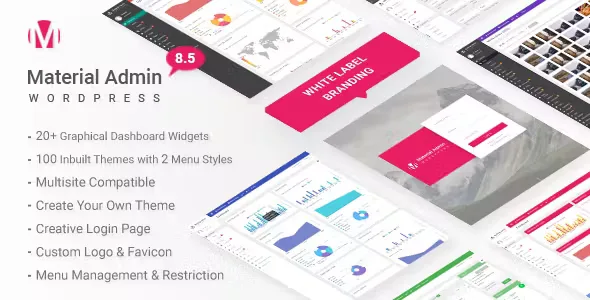
About Material WordPress Admin Theme
If you hand over sites to clients who open the dashboard every day
You deliver a polished website and the client logs into the WordPress dashboard for the first time: menus they don't understand, notices from other plugins and the WordPress logo everywhere. For them, that panel is also your work, and it's the part of the project they will see most often.
Material WordPress Admin Theme suits agencies and freelancers who want that panel to look like their own and cleaner. It's not for you if you want to change the look of the public site: it acts on the admin area, the login screen and the top bar. And if you manage a single site of your own, you will probably not need many of the options.
Your logo, your favicon and your login screen
White-labeling reaches several corners of the panel:
- Your own logo and favicon in the admin, even loaded from an external URL, so you can control the images of all your clients from one place.
- A footer with your own text and the option to hide the WordPress version.
- A top bar with every link under your control, two styles (full width or partial), a logout link and a greeting that replaces "Howdy" with the text you want.
- A login screen with your own logo, plus colors, opacity, background and fonts for each element, and the option to hide links such as "Back to Site" or the forgotten password one.
A menu that speaks your client's language
You can rename menu and submenu items, reorder them by dragging, change the icons and enable or disable the ones the client doesn't need. A panel with four options instead of twenty saves calls like "where do I click for this?".
One caution: removing an entry from the menu simplifies the view, but it isn't the same as protecting a screen. To restrict access for real, also rely on user roles. The plugin also includes a floating shortcut menu, which can be placed in four positions, with as many custom links as you want.
Material WordPress Admin Theme: 100 styles and one made to measure
It includes 100 visual themes, from light to dark to multicolor. If none fits your brand, you can create your own or edit an existing one by importing its settings file.
There's plenty of room on typography: more than 650 Google Fonts, with a different font for headings, menu and text, and control of size, line height and weight. You can also edit the CSS of buttons (with hover colors), forms, content boxes and the main menu, enable or disable the page loader and add your own CSS. The options panel is built on Redux Framework, and the settings can be exported and imported to carry them to another site.
Statistics widgets and multisite networks
It comes with more than 20 dashboard widgets with site and visitor statistics. You can show or hide them, and the same goes for the default WordPress widgets. Before promising figures to a client, check in the demo what data each widget shows.
It works on multisite, activated for the whole network or only on specific sites, and it's compatible with left-to-right and right-to-left languages.
Frequently asked questions
Does it change the look of my public website?
No. It only modifies the admin, the login and the top bar (the latter can also be enabled or disabled on the public side).
Can I create my own color theme?
Yes. You can start from scratch or edit one of the included themes by importing its settings file.
Does it work on a multisite network?
Yes, both activated across the whole network and on individual sites.
Can I reuse the same setup for all my clients?
Yes, the panel lets you export the settings and import them on another site.
Version history
-
v
8.7 Current 8 Jan 2025
Customer reviews
Sign in to leave a review. Only people who have the product can review it.
No reviews for this product yet.
Frequently asked questions
-
GPL (General Public License) is the license under which WordPress and most premium plugins/themes are distributed. It grants you the right to use, modify and redistribute the software in as many projects as you want, with no domain restrictions.
-
Yes. With membership you get automatic updates via our GPLClub Updater plugin (installed on your WP, detects new versions and applies them). With individual purchase, you get one year of manual updates from your account.
-
Depends on the plan. Monthly: 3 domains. Semi-annual: 7. Annual and Lifetime: 15. Individual purchase: 1 domain.
-
GPLClub offers its own support for installation, configuration and compatibility. For direct support from the original author (feature requests, product-specific bugs), a license purchased from the author is required.