Medicare Doctor Medical and Healthcare
Antivirus scan
Powered by ClamAV
✅ Verified clean
This product file has passed our security filters.
Want to run a fresh ClamAV scan right now? Takes a few seconds and shows scanner version, signature DB and live result.
This can take 5 to 30 seconds.
Clean file Threat detected
No threats detected in this file.
- File
- Size
- Scanned
- ClamAV
- Signature database
⚡ Powered by ClamAV
Scan could not be completed
Report product
If you detected an issue (broken file, malware, inappropriate content, etc.) let us know and we'll review it ASAP.
Sign in to report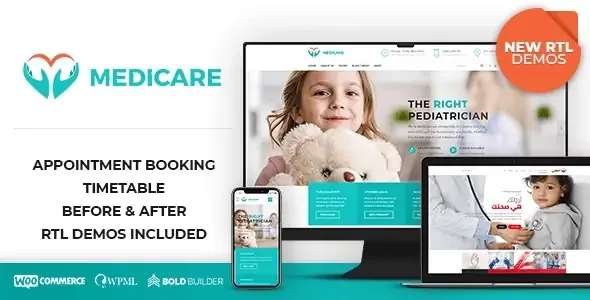
About Medicare Doctor Medical and Healthcare
An appointment form collects a request and does not book a time
A patient visits the clinic website, picks her doctor, enters a date and hits send. She walks away feeling she has booked. At the clinic, someone has to open that message, look at the diary, check for a gap and call or write to her to offer a time.
That stretch is what to think about before choosing a theme: a form collects a request, and the diary stays where it was. If nobody replies quickly, the patient believes she has an appointment and the clinic does not know she is expecting one.
Medicare comes with a ready-made appointments page, and in the clinic demo the form asks for name, email, doctor, date and a message. Its fields do not include a time or free slots. For a practice with its own front desk that may be exactly what is needed; if you want the patient to see and take a slot, you will need a booking system alongside it.
Twelve demos by specialty and three right-to-left
Medicare is designed both for a single doctor office and for private centers with several specialties. Its demos cover:
- General and hospital medicine: clinic, general hospital and medical laboratory.
- Specialties: cardiology, surgery, cosmetic surgery, dentistry, optometry and pediatrics.
- Mental and physical health: psychiatry, and physiatry or chiropractic.
- Veterinary: a single-page demo.
- Right-to-left: versions of clinic, cardiology and surgery.
Several include team and doctor profile pages, such as the clinic and dentistry demos.
The timetable, the calculator and the other sector pieces
- Doctor timetable with the Timetable and Event Schedule plugin, included. In the demo, each doctor has a column, and each block shows the type of visit and its time range.
- Cost Calculator, also included. The demo uses dental examples: the visitor enters sessions or teeth per treatment and sees a total.
- Dedicated elements: working hours, price list, before and after images, services and Google Maps.
- Bold Builder for building pages by dragging elements, with content copying between pages and sites.
- Contact Form 7 for forms, with support for WPML, WooCommerce, Yoast and W3 Total Cache.
The timetable table informs, and its labels lead to the appointments page. Booking does not happen from the table itself.
Limits worth knowing before choosing it
The timetable is maintained by hand. Events, columns and categories are added from the Timetable panel on the dashboard. If a doctor changes shift, someone has to update it.
It is not optimized for Gutenberg. The included builder is Bold Builder.
The demo images have to be replaced. They are not cleared for use on live sites, so you need your own photos or ones you have permission for.
Preparing the server and importing a demo
It requires PHP 7.4 or higher, a memory limit of 256M or more and a maximum upload size of 64M or more. These are the steps:
- Start from a fresh WordPress install: the demos are not recommended on sites with content.
- Upload the theme in Appearance, Themes, and activate it.
- Install the required plugins. If you choose a demo with a shop, activate WooCommerce first.
- Go to Tools, BT Import, and pick the demo for your specialty.
- Activate Timetable and Event Schedule if you will use the timetable, and replace doctors, photos and prices.
Health themes and booking in the catalog
If you want patients to really book, LatePoint offers a step-by-step booking form with self-service cancellation, and Amelia manages several professionals with their own schedules and syncs with Google Calendar per professional.
Among other themes in the sector, Brivona brings six demos with editing in Elementor or WPBakery.
Questions before building your practice website
Can the patient choose a doctor?
In the clinic demo, yes: the form has a dropdown of doctors.
Can they choose a free time?
In that demo you choose a date, not a time. Seeing free slots takes a booking plugin.
Can I sell products?
Yes, it supports WooCommerce, and the clinic demo includes a shop.
Topics
Version history
-
v
2.1.1 Current 4 Mar 2025
Customer reviews
Sign in to leave a review. Only people who have the product can review it.
No reviews for this product yet.
Frequently asked questions
-
GPL (General Public License) is the license under which WordPress and most premium plugins/themes are distributed. It grants you the right to use, modify and redistribute the software in as many projects as you want, with no domain restrictions.
-
Yes. With membership you get automatic updates via our GPLClub Updater plugin (installed on your WP, detects new versions and applies them). With individual purchase, you get one year of manual updates from your account.
-
Depends on the plan. Monthly: 3 domains. Semi-annual: 7. Annual and Lifetime: 15. Individual purchase: 1 domain.
-
GPLClub offers its own support for installation, configuration and compatibility. For direct support from the original author (feature requests, product-specific bugs), a license purchased from the author is required.
Related products
Bechef – Theme for Food Recipe Bloggers &Chefs WordPress Theme

Stylone – Beauty Hair Salon WordPress Elementor Theme WordPress Theme

MediClinic – Medical Healthcare Theme