PeepSo BadgeOS Integration Addon
Antivirus scan
Powered by ClamAV
✅ Verified clean
This product file has passed our security filters.
Want to run a fresh ClamAV scan right now? Takes a few seconds and shows scanner version, signature DB and live result.
This can take 5 to 30 seconds.
Clean file Threat detected
No threats detected in this file.
- File
- Size
- Scanned
- ClamAV
- Signature database
⚡ Powered by ClamAV
Scan could not be completed
Report product
If you detected an issue (broken file, malware, inappropriate content, etc.) let us know and we'll review it ASAP.
Sign in to report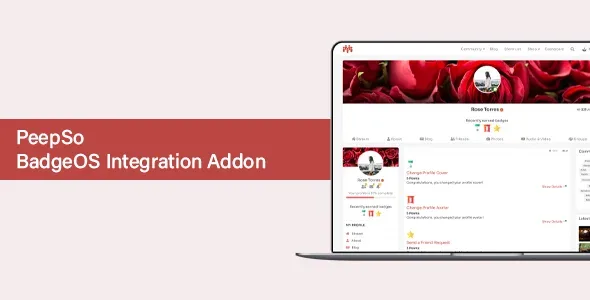
About PeepSo BadgeOS Integration Addon
Every badge you hand out is also a post on your wall
You create a badge for each small gesture: the first comment, the profile photo, the third visit. The community starts earning them, and soon the wall where conversations should happen fills up with automatic congratulations.
With this integration, your badge catalog also becomes part of your editorial line. Each achievement can take a place in the activity, so it pays to think about which behaviors deserve that visibility before designing the list.
PeepSo BadgeOS Integration connects the BadgeOS badge system with the PeepSo community. BadgeOS still defines what is earned and how. The integration carries the result to profiles, the wall and notifications. It needs both plugins active, because on its own it brings neither badges nor a community.
Where an earned badge appears
- Activity post: earning it creates an entry in the community that works as an announcement. You can turn it off.
- Notification: alerts the person who earned it.
- Profile listing: earned badges appear on the profile, with a submenu under the cover.
- Profile cover: shows the most recent ones, up to a limit you set.
- Profile widget: does the same, with a separate limit.
- Access points: reach them from the PeepSo toolbar, the profile widget or the link under the cover.
Three BadgeOS fields that end up in public
When you create a badge in BadgeOS, several fields stop being internal as soon as PeepSo displays them:
- Title: shows in activity posts and in the profile badge listing.
- Congratulatory text: is the message of the wall post.
- Featured image: is the badge image in posts, in the listing and on the cover.
That is why those texts deserve the same care as any message addressed to your community. If several minor badges share a congratulation, the wall will show them all nearly the same.
How they are earned and where this add-on ends
Badges are earned by completing the steps you define in BadgeOS. Admins can also hand them out manually: from Users > All Users, edit the person and use the Award an Achievement section. It serves to recognize something no automatic step detects.
With Paid Memberships Pro, the PeepSo Community Engagement step group offers Checkout Membership Level Upon Registration. That way, whoever registers at a given level receives their member badge on the profile.
This add-on displays and announces badges, but does not create them: the list, the steps and the images are handled in BadgeOS. Its settings include no leaderboards between members and no points system of its own.
PeepSo also offers Achievements, a plugin in its Ultimate bundle with points, automatic or manual badges, streaks and progress. If you are starting from scratch and do not use BadgeOS, compare that option before installing BadgeOS.
Your first badge on the wall
With PeepSo and BadgeOS already active, follow this order:
- Open PeepSo > Configuration > BadgeOS and enable Enable BadgeOS Integration.
- Choose whether you want activity posts and the Badges link on the profile.
- Set how many recent badges show on the cover and in the widget.
- Under BadgeOS > Badges, create a badge with its steps, title, congratulation and featured image.
- Earn it with a test account and check how it looks on the wall.
More pieces for a community with incentives
The base is PeepSo Core. PeepSo User Limits regulates participation by roles, complete profiles and memberships.
If you prefer to build the incentives on GamiPress, GamiPress Referrals rewards referrals with points, achievements or ranks.
Badges in PeepSo, case by case
Does it work without BadgeOS?
No. BadgeOS is what manages the badges this integration carries to PeepSo.
Can I stop every badge from appearing on the wall?
Yes. Turn off Create posts when user earns a new badge in the configuration.
Can I remove the Badges link from the profile?
Yes, with its option under PeepSo > Configuration > BadgeOS.
Where does the post text come from?
From the congratulatory text of each badge, along with its title and featured image.
Can I hand out a badge manually?
Yes, from the user edit screen, as long as the badge already exists.
Topics
Version history
-
v
9.1.0.0 Current 26 Oct 2026
-
v
8.0.0.0 16 Dec 2025
Customer reviews
Sign in to leave a review. Only people who have the product can review it.
No reviews for this product yet.
Frequently asked questions
-
GPL (General Public License) is the license under which WordPress and most premium plugins/themes are distributed. It grants you the right to use, modify and redistribute the software in as many projects as you want, with no domain restrictions.
-
Yes. With membership you get automatic updates via our GPLClub Updater plugin (installed on your WP, detects new versions and applies them). With individual purchase, you get one year of manual updates from your account.
-
Depends on the plan. Monthly: 3 domains. Semi-annual: 7. Annual and Lifetime: 15. Individual purchase: 1 domain.
-
GPLClub offers its own support for installation, configuration and compatibility. For direct support from the original author (feature requests, product-specific bugs), a license purchased from the author is required.