PeepSo Email Digest Addon
Antivirus scan
Powered by ClamAV
✅ Verified clean
This product file has passed our security filters.
Want to run a fresh ClamAV scan right now? Takes a few seconds and shows scanner version, signature DB and live result.
This can take 5 to 30 seconds.
Clean file Threat detected
No threats detected in this file.
- File
- Size
- Scanned
- ClamAV
- Signature database
⚡ Powered by ClamAV
Scan could not be completed
Report product
If you detected an issue (broken file, malware, inappropriate content, etc.) let us know and we'll review it ASAP.
Sign in to report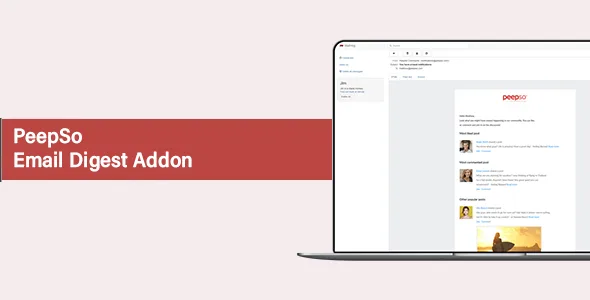
About PeepSo Email Digest Addon
Your community cannot alert someone who no longer visits
Inside the site everything works: the feed moves, groups talk, notifications pile up. But a member who stopped visiting the community weeks ago sees none of that. They stopped coming back, and what happens inside does not reach them.
A community cools down through the members who stop returning, and they can only be reached outside the site. That is why the first decision about an email roundup is who gets it, before how it looks.
PeepSo Email Digest is a PeepSo add-on that emails a roundup of community activity, with the option of aiming it only at people who have not visited the site for a certain time. It needs PeepSo: it does not work on its own.
Audience and frequency: who gets it and when
- Inactivity filter: sends only to users who have not visited the site for the number of days you set.
- Frequency: monthly, weekly, biweekly or daily.
- Day and start time of the send.
- Recipient roles: community members, community administrators or both.
- Default subscription for new users, on or off.
Each user can turn the digest off in their preferences, under Profile, Notifications. The option appears there once the administrator has enabled sending.
Which posts go into each email
Content is set in its own panel, with these options:
- Title of the digest.
- Number of posts per email, and whether it goes out even with fewer than that.
- Most liked post and most commented post of the period, presented as such.
- Duplicates allowed or not: if allowed, those highlights can repeat in the main content.
- Character limit to shorten long posts.
- Images in the email, on or off.
A digest needs at least one new post. If there is none, it is not sent, so a community with no activity in the period will not send an email.
Batch sending and other limits to keep in mind
The emails do not all go out at once. They pass through the mail queue in batches, so each person may receive it at a different time even if you set a start time.
You can choose how many emails are created per batch and run the creation through cron. The advice is to turn that option on and set up a cron job on the server.
Its settings do not include a newsletter editor: the content comes from community posts. If you want to compose an email by hand, with your own text and offers, you need a separate email tool.
The digest should also not be confused with another PeepSo option: email notification intensity, which lets each user group their unread notifications instead of receiving them right away.
Setting up the first digest from PeepSo
It needs PeepSo active on the site. The settings are under WP Admin, PeepSo, Configuration, Email Digest.
- In the General panel, turn on "Send Email Digest emails" and pick frequency, day and time.
- Set how many days of absence put a user in the send, if you want to aim it at inactive members.
- Set up the cron job on the server and the size of each batch.
- In Content, set the title, the number of posts and the highlights.
- In Users, decide the roles and whether new users are subscribed by default.
What it pairs with and what covers other emails
PeepSo is the base this add-on needs. PeepSo Social Login & Invitations works on members coming in, with sign-in through social accounts, while the digest works on bringing back those already there.
For campaigns and sequences you write yourself, FluentCRM Pro keeps contacts in your own database and offers scheduled and recurring campaigns plus sequences with delays. It sits outside PeepSo, so it does not compose the activity roundup for you.
The activity roundup in practice
Does it work without PeepSo?
No. It is a PeepSo add-on and needs that plugin active.
Can I send it only to inactive members?
Yes. One option limits sending to people who have not visited the site for the number of days you set.
How often can it be sent?
Monthly, weekly, biweekly or daily, with the day and start time you choose.
What happens if there were no posts that week?
It is not sent. Each digest needs at least one new post.
Can users unsubscribe?
Yes. They can turn it off in the notification preferences on their profile.
Topics
Version history
-
v
9.1.0.0 Current 26 Oct 2026
-
v
9.0.2.0 2 Jun 2026
-
v
8.0.0.0 16 Dec 2025
Customer reviews
Sign in to leave a review. Only people who have the product can review it.
No reviews for this product yet.
Frequently asked questions
-
GPL (General Public License) is the license under which WordPress and most premium plugins/themes are distributed. It grants you the right to use, modify and redistribute the software in as many projects as you want, with no domain restrictions.
-
Yes. With membership you get automatic updates via our GPLClub Updater plugin (installed on your WP, detects new versions and applies them). With individual purchase, you get one year of manual updates from your account.
-
Depends on the plan. Monthly: 3 domains. Semi-annual: 7. Annual and Lifetime: 15. Individual purchase: 1 domain.
-
GPLClub offers its own support for installation, configuration and compatibility. For direct support from the original author (feature requests, product-specific bugs), a license purchased from the author is required.