Pinegrow
Antivirus scan
Powered by ClamAV
✅ Verified clean
This product file has passed our security filters.
Want to run a fresh ClamAV scan right now? Takes a few seconds and shows scanner version, signature DB and live result.
This can take 5 to 30 seconds.
Clean file Threat detected
No threats detected in this file.
- File
- Size
- Scanned
- ClamAV
- Signature database
⚡ Powered by ClamAV
Scan could not be completed
Report product
If you detected an issue (broken file, malware, inappropriate content, etc.) let us know and we'll review it ASAP.
Sign in to report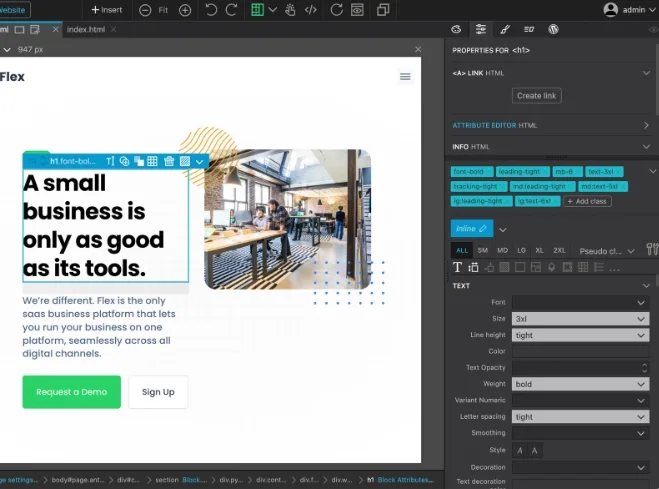
About Pinegrow
Design in HTML and CSS, but end up with a real WordPress theme
Anyone who builds custom themes or blocks tends to get stuck on the same thing: the design works in static HTML, but turning it into WordPress PHP, queries, menus and templates is a separate job. Pinegrow takes the opposite route: you design the structure and styling, and then assign WordPress actions to the HTML elements.
It is a tool for people who build sites for others or maintain their own brand and want a result of their own, without depending on a generic theme with a hundred options they never use. What it generates is WordPress code, not a layer you have to maintain on top.
Smart actions adapt WordPress to your HTML, not the other way around
The usual problem with builders is that they impose their own tag structure. Here the smart actions adjust the WordPress output to your HTML and your styles. They include:
- Blocks: you can create custom blocks for Gutenberg.
- Custom queries, custom post types, post fields and relationships: for listings and content that are not just a simple blog post.
- Template parts, menus, pagination, breadcrumbs and widget areas: the pieces that make up a complete theme.
- Tags, categories and custom taxonomies.
- Customizer fields and sections.
- Forms and WooCommerce.
What to expect and what not
It is not a drag-and-drop builder for people who do not want to see code: you work with the logic of HTML and CSS, and you will feel comfortable if you already understand how a theme or a block is structured. It does not include everything either: static components and SASS compilation are left out of the plugin. Also, Pinegrow Theme Converter is a separate desktop application, which works with local files and a local WordPress installation.
Tailwind, interactions and WooCommerce in the same plugin
Besides the WordPress side, the plugin includes the visual Tailwind CSS editor, interactions and animations, and the WooCommerce features.
Frequently asked questions
Can I try it before committing?
Yes: there is a free version of the plugin that you can install on a development WordPress site, as well as a trial version and the desktop edition.
Do I need to know how to code?
To create blocks and themes without writing PHP, no. But it helps to understand HTML and CSS, because that is the starting point of the design.
Can I use it on client websites?
Yes, as long as you are the one who operates them. That is, on your own sites or on those of clients that you run.
What happens to what I export if I stop using it?
The plugins and themes you have already exported keep working. What you can no longer do is keep using Pinegrow to edit them.
Can I publish straight to the site?
Yes, the plugin exports the theme or plugin directly to the site's staging or production environment.
Start with the build-your-first-block tutorial
The best starting point is the interactive tutorial for building your first block, available from the Pinegrow dashboard. In it you build the HTML structure, style it with CSS and turn it into an editable React-based Gutenberg block with custom sub-blocks.
A practical recommendation: install the free version first on a development WordPress site rather than on the production site. That way you can check whether the workflow suits you before exporting anything to a real environment.
Version history
-
v
1.0.29 Current 17 Oct 2026
-
v
1.0.26 8 Apr 2026
Customer reviews
Sign in to leave a review. Only people who have the product can review it.
No reviews for this product yet.
Frequently asked questions
-
GPL (General Public License) is the license under which WordPress and most premium plugins/themes are distributed. It grants you the right to use, modify and redistribute the software in as many projects as you want, with no domain restrictions.
-
Yes. With membership you get automatic updates via our GPLClub Updater plugin (installed on your WP, detects new versions and applies them). With individual purchase, you get one year of manual updates from your account.
-
Depends on the plan. Monthly: 3 domains. Semi-annual: 7. Annual and Lifetime: 15. Individual purchase: 1 domain.
-
GPLClub offers its own support for installation, configuration and compatibility. For direct support from the original author (feature requests, product-specific bugs), a license purchased from the author is required.