Product Sales Report Pro
Antivirus scan
Powered by ClamAV
✅ Verified clean
This product file has passed our security filters.
Want to run a fresh ClamAV scan right now? Takes a few seconds and shows scanner version, signature DB and live result.
This can take 5 to 30 seconds.
Clean file Threat detected
No threats detected in this file.
- File
- Size
- Scanned
- ClamAV
- Signature database
⚡ Powered by ClamAV
Scan could not be completed
Report product
If you detected an issue (broken file, malware, inappropriate content, etc.) let us know and we'll review it ASAP.
Sign in to report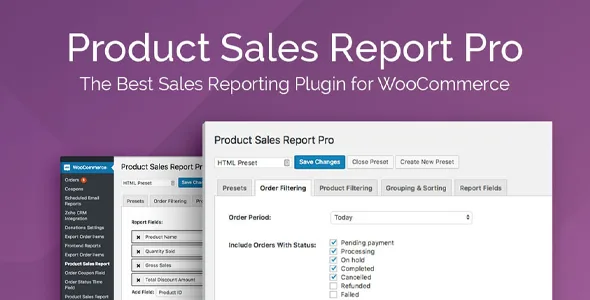
About Product Sales Report Pro
Two people, the same month and two sales figures
You pull the month's sales and your accountant pulls theirs. They do not match, and nobody made a mistake. One counted only completed orders and the other included those still processing. One looked at the gross and the other subtracted discounts and refunds.
The word "sold" does not name a single figure until you decide which orders count and which amount you look at. As long as that definition changes from one report to the next, comparing two months compares two different questions. Product Sales Report Pro, a product report builder for WooCommerce, lets you pin that definition down, save it and repeat it unchanged.
Six tabs to phrase the question
- Orders: period with preset ranges or your own dates, statuses included or excluded (pending payment, processing, on hold, completed, cancelled, refunded and failed) and customer filters, also by role, custom roles included.
- Products: all, or limited by category, ID, tags or meta fields.
- Grouping and sorting: a field to subdivide the report, with variations together or each one apart.
- Fields: add, remove, drag and rename columns.
- Format: title with dynamic fields, header, totals row and file type.
- Advanced: time limit, object caching, debug mode and report CSS.
The columns that tell one sale from another
The value lies in placing the versions of the same figure on the same row:
- Sales amounts: gross sales, gross sales after discounts, total discount amount, taxes and total including tax.
- Returns: quantity refunded, tax refunded and amount refunded with or without tax.
- Today's status: current price, with or without tax, and current stock.
- Data from other extensions: custom fields, taxonomies and other product data.
Keep in mind that price and stock are today's, not those of the report period. They help plan purchases, not calculate what came in.
Saving the definition to repeat it
Each configuration is saved as a named preset, and from the presets tab you generate its report, edit it or delete it. If your definition of a sale lives in a preset, this month's report and last month's answer the same thing. Dynamic date expressions help you avoid touching the period by hand; test how they behave in your case before relying on them.
The result downloads in one click or goes to any email address, as CSV, XLSX, HTML or Enhanced HTML.
Two related functions are separate add-ons: Scheduled Email Reports sends the report as an attachment on a recurring basis, and Frontend Reports embeds a report or a download link on a page.
Getting your first preset ready
It needs self-hosted WordPress with WooCommerce and is not compatible with Multisite. XLSX export requires the PHP ZIP extension. Its features do not include charts, live preview, calculated fields, premade templates or details of individual orders: its unit is the product and its result, a table.
- Install and activate the plugin. A Product Sales Report item appears in the WooCommerce menu.
- Decide with whoever keeps your books which order statuses count as a sale.
- Choose the amount columns and add the refund ones.
- Generate the report for a closed month and compare it with your figures.
- Save it as a preset.
On large catalogs, if timeout errors appear, raise the time limit, which starts at 300 seconds. For memory errors, disable object caching.
When the question is about orders or journeys
To pull data order by order, with customer and coupons, Advanced Order Export for WooCommerce exports to Excel, CSV, XML, JSON, PDF and HTML. If you care where the sale comes from, AnalyticsWP keeps each person's journey inside WordPress.
Common questions about these reports
Can I exclude cancelled and refunded orders?
Yes. The status filter includes or excludes each status separately.
Can I see each variation on its own row?
Yes. You can group variations or report each one separately.
Can reports arrive by email on their own?
With the Scheduled Email Reports add-on, which works on top of presets. Without it, sending is triggered by hand with Email Report.
Topics
Version history
-
v
2.2.53 Current 22 Jan 2026
Customer reviews
Sign in to leave a review. Only people who have the product can review it.
No reviews for this product yet.
Frequently asked questions
-
GPL (General Public License) is the license under which WordPress and most premium plugins/themes are distributed. It grants you the right to use, modify and redistribute the software in as many projects as you want, with no domain restrictions.
-
Yes. With membership you get automatic updates via our GPLClub Updater plugin (installed on your WP, detects new versions and applies them). With individual purchase, you get one year of manual updates from your account.
-
Depends on the plan. Monthly: 3 domains. Semi-annual: 7. Annual and Lifetime: 15. Individual purchase: 1 domain.
-
GPLClub offers its own support for installation, configuration and compatibility. For direct support from the original author (feature requests, product-specific bugs), a license purchased from the author is required.