Pwork
Antivirus scan
Powered by ClamAV
✅ Verified clean
This product file has passed our security filters.
Want to run a fresh ClamAV scan right now? Takes a few seconds and shows scanner version, signature DB and live result.
This can take 5 to 30 seconds.
Clean file Threat detected
No threats detected in this file.
- File
- Size
- Scanned
- ClamAV
- Signature database
⚡ Powered by ClamAV
Scan could not be completed
Report product
If you detected an issue (broken file, malware, inappropriate content, etc.) let us know and we'll review it ASAP.
Sign in to report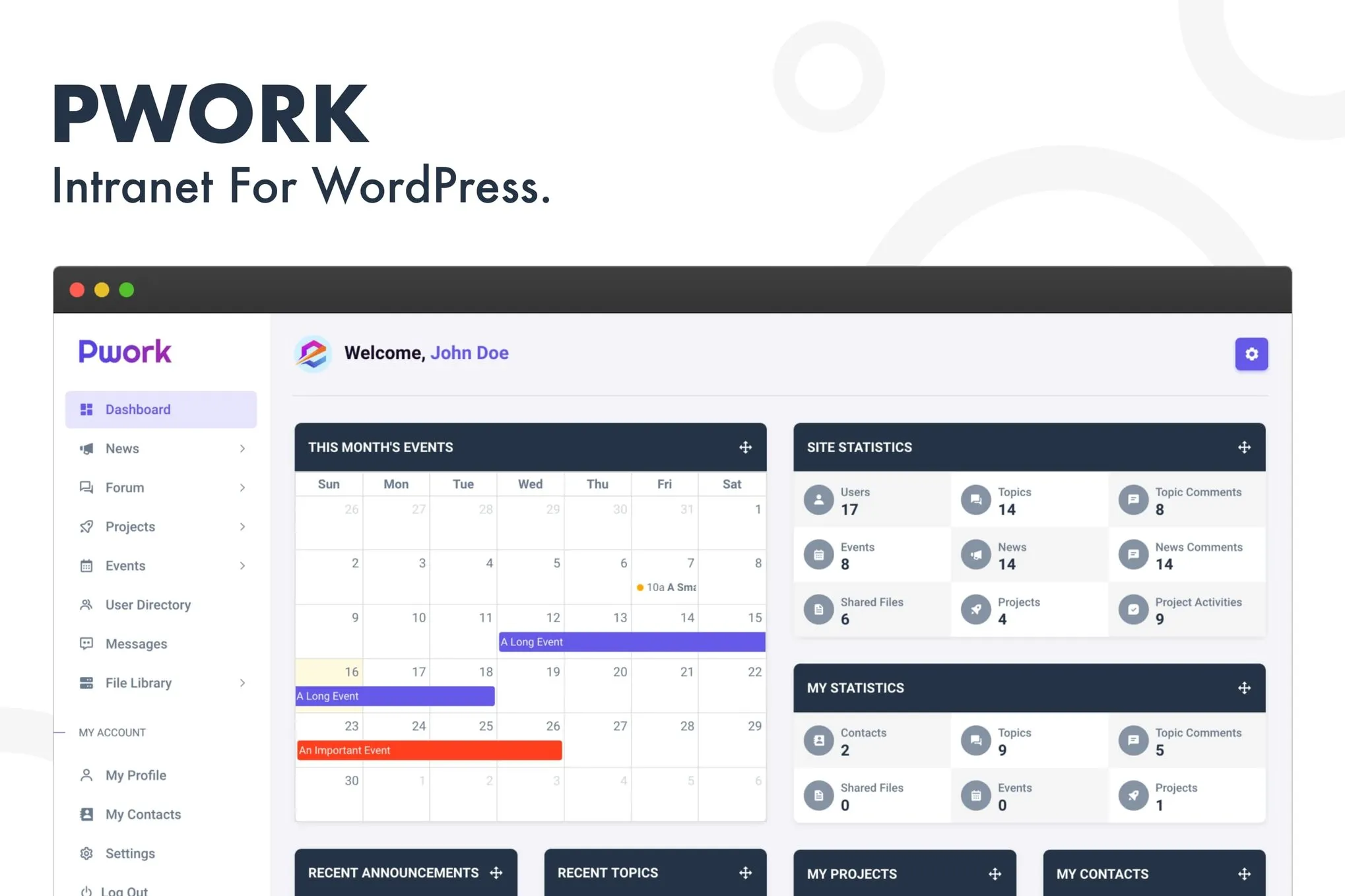
About Pwork
What Pwork is and what problem it solves
Coordinating a team through scattered emails, messy shared folders and external chat apps ends up creating disjointed information and opaque processes. Pwork turns your WordPress installation into a private, self-hosted intranet where employees, collaborators or clients manage projects, share documents, communicate in real time and keep up with company news from a single centralized portal.
A self-contained environment inside your own WordPress
Rather than mixing the intranet with the public site, Pwork creates its own dedicated URL with an application interface that's independent of the active theme. This means the team works in a clean space, free of distractions from the public-facing site, while the front end keeps running normally.
- Modern app-style design: top navigation bar, collapsible side menu, notification center and quick profile menu.
- Customizable home dashboard: widgets showing active projects, recent announcements, upcoming events, forum discussions and personal stats.
- Branded login screen: logo, custom background, terms-and-conditions acceptance, and configurable redirects after login or logout.
Collaboration modules included in Pwork
Pwork brings together in a single plugin the tools that would normally require several separate extensions:
- News and announcements: rich text editor, featured notices on the main dashboard, employee comments and automatic email notifications.
- Discussion forum: categories organized by department or project, multi-level nested replies and moderation tools for administrators.
- Projects and Kanban boards: drag-and-drop cards across customizable stages, deadlines with countdown, checklists with progress bars and task assignment with email alerts.
- Event calendar: monthly and weekly views, automatic reminders and an upcoming-events widget on the home dashboard.
- User directory: search by name, department or role, profiles with bio and recent activity, and a personal contacts list.
- Direct messaging: one-on-one conversations with dynamically loaded history and email notifications when the recipient is offline.
- File library: folder structure, format validation, role-based permissions and instant document search.
- Knowledge base: tagged articles managed by administrators, designed for manuals, internal policies and onboarding guides.
Activity logs for auditing and compliance
Pwork includes an activity logging system that tracks actions across eight categories: files, projects, tasks, forum, announcements, direct messages, logins and profile changes. Each entry can be inspected in detail (timestamp, IP address and direct links to the affected content), filtered by user, category or date, exported to CSV and automatically deleted according to the configured retention period.
What kind of projects Pwork is suited for
It's useful for companies that need an internal portal without setting up a separate WordPress installation, agencies managing clients and external teams from a private space, organizations that need centralized documentation with role-based access control, and any team looking to replace scattered chat, task management and storage tools with a single dashboard.
Pwork vs. traditional intranet themes
Unlike dedicated intranet themes, which typically require a fresh WordPress installation, demo content import and the setup of several additional plugins such as forums or page builders, Pwork activates on top of your existing site with no external dependencies. The public site's visual theme is unaffected and can be changed at any time without breaking the intranet.
Technical details
| Type | WordPress plugin |
| Hosting | Self-hosted |
| Intranet environment | Isolated application dashboard with its own URL |
| Theme compatibility | Works with any WordPress theme |
| Dependencies | None; no additional plugins required, such as forums or page builders |
| Color mode | Light and dark |
| Content management | From the WordPress admin dashboard |
| Log export | CSV |
Frequently asked questions about Pwork
Do I need to install other plugins for it to work?
No. All modules (forum, messaging, projects, calendar, files) are built into the plugin itself.
Does it affect the design of my public site?
No. Pwork runs on its own URL and application environment, independent of the active theme, so the public site remains unchanged.
Can I restrict access to projects or files?
Yes. Both projects and the document library support role-based access control, allowing you to create public or fully private spaces.
Can user actions be audited?
Yes. The activity logging system records events for files, projects, tasks, forum, announcements, messages, logins and profile changes, with CSV export.
How long does it take to set up an intranet with Pwork?
The process comes down to installing the plugin, activating it and defining the private area, with no need to import templates or configure external tools.
Version history
-
v
3.1.1 Current 2 Nov 2026
Customer reviews
Sign in to leave a review. Only people who have the product can review it.
No reviews for this product yet.
Frequently asked questions
-
GPL (General Public License) is the license under which WordPress and most premium plugins/themes are distributed. It grants you the right to use, modify and redistribute the software in as many projects as you want, with no domain restrictions.
-
Yes. With membership you get automatic updates via our GPLClub Updater plugin (installed on your WP, detects new versions and applies them). With individual purchase, you get one year of manual updates from your account.
-
Depends on the plan. Monthly: 3 domains. Semi-annual: 7. Annual and Lifetime: 15. Individual purchase: 1 domain.
-
GPLClub offers its own support for installation, configuration and compatibility. For direct support from the original author (feature requests, product-specific bugs), a license purchased from the author is required.