Iconic WooCommerce Bundled Products
Antivirus scan
Powered by ClamAV
✅ Verified clean
This product file has passed our security filters.
Want to run a fresh ClamAV scan right now? Takes a few seconds and shows scanner version, signature DB and live result.
This can take 5 to 30 seconds.
Clean file Threat detected
No threats detected in this file.
- File
- Size
- Scanned
- ClamAV
- Signature database
⚡ Powered by ClamAV
Scan could not be completed
Report product
If you detected an issue (broken file, malware, inappropriate content, etc.) let us know and we'll review it ASAP.
Sign in to report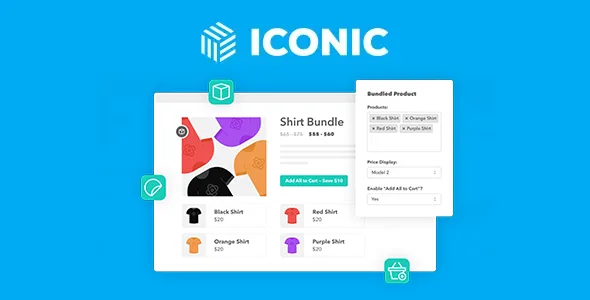
About Iconic WooCommerce Bundled Products
Someone who already owns one piece will not buy the bundle
You put together a three-piece outfit with a discount. One customer already owns the jacket and only wants the other two. If the outfit sells as a block, her options are to pay for something she does not need or to hunt for each piece separately.
A closed bundle leaves out the person who wants almost everything in it.
WooCommerce Bundled Products by Iconic handles the offer another way. It gathers several products on a single page, and the customer can add each one separately or all at once. The fixed discount only applies when all of them are in the cart, so the price rewards taking the whole set without forcing anyone. If your offer requires selling everything together, you can also hide the individual buttons.
What the Bundled Product type adds
- Several products on one page: it works for lookbooks, hampers, cross-sells and shop the look pages.
- Any product type: simple, variable and others.
- Options on the page: on a variable product, the customer picks color, size or fabric before adding it.
- Add All to Cart button: adds the whole set at once.
- Four ways to show the price: none, the sum of the items, a range from cheapest to most expensive, or the amount you enter in Bundle Price.
- Fixed discount: subtracts an amount from the total when all products are in the cart.
- Visible savings: on fixed price bundles, the add to cart button shows how much is saved.
Open, closed or showcase: three pages with the same plugin
Open set. Keep the individual buttons visible and enable Add All to Cart. Add a fixed discount as an incentive. It suits looks and collections where the customer may already own a piece.
Closed set. Hide the individual buttons, quantities and prices, and leave only Add All to Cart. It suits a hamper conceived as a single unit.
Cross-sell showcase. With no discount and the price set to None, the page presents related products and each is bought on its own.
Variables, position and discount: five points to review
- Variables and Add All to Cart: the button stays disabled until the customer picks all options on each variable product.
- Position: the block appears after the main image and summary. Moving it requires adding a code snippet to functions.php.
- Shortcode: [iconic-woo-bundle id=123] inserts the bundle into a page or post, but without the main image or description.
- Discount type: the setting is a fixed amount. Its features do not include a percentage discount.
- Guided selection: its features do not include boxes the customer builds with minimums and maximums either.
If you use the Custom price, place a test order and check that the cart total matches what the page advertises.
WooCommerce and the first bundle, step by step
You need WooCommerce and a well-coded theme compatible with it.
The first bundle is created from the product editor:
- Under Products, add a new product with a title, description and images.
- In Product Data, choose the Bundled Product type so the Bundled Products tab appears.
- Search for each product by typing at least three letters and add it. They will display in the order you add them.
- Choose how to show the price, decide which buttons and quantities to hide and enter the fixed discount, if any.
- Publish and test the full journey through the cart.
When you need custom boxes or purchase suggestions
WooCommerce Product Bundles is for more elaborate offers: boxes the customer builds with minimums and maximums, optional items with a chosen quantity and assembled products, along with alerts for low-stock bundles.
If you only want to suggest related products, WPC Frequently Bought Together shows them as buy-together suggestions at the bottom of the product description.
Bundles in WooCommerce: quick answers
Can the customer buy only part of the bundle?
Yes, if you keep the individual buttons visible. The fixed discount applies when all products are in the cart.
Does it support variable products?
Yes. The customer picks the options on the bundle page.
Does it work with my theme?
It should work with a well-coded, WooCommerce-compatible theme. Check it on a staging install.
Topics
Version history
-
v
2.10.1 Current 29 Aug 2025
Customer reviews
Sign in to leave a review. Only people who have the product can review it.
No reviews for this product yet.
Frequently asked questions
-
GPL (General Public License) is the license under which WordPress and most premium plugins/themes are distributed. It grants you the right to use, modify and redistribute the software in as many projects as you want, with no domain restrictions.
-
Yes. With membership you get automatic updates via our GPLClub Updater plugin (installed on your WP, detects new versions and applies them). With individual purchase, you get one year of manual updates from your account.
-
Depends on the plan. Monthly: 3 domains. Semi-annual: 7. Annual and Lifetime: 15. Individual purchase: 1 domain.
-
GPLClub offers its own support for installation, configuration and compatibility. For direct support from the original author (feature requests, product-specific bugs), a license purchased from the author is required.