Shipping Zones by Drawing Premium for WooCommerce
Antivirus scan
Powered by ClamAV
✅ Verified clean
This product file has passed our security filters.
Want to run a fresh ClamAV scan right now? Takes a few seconds and shows scanner version, signature DB and live result.
This can take 5 to 30 seconds.
Clean file Threat detected
No threats detected in this file.
- File
- Size
- Scanned
- ClamAV
- Signature database
⚡ Powered by ClamAV
Scan could not be completed
Report product
If you detected an issue (broken file, malware, inappropriate content, etc.) let us know and we'll review it ASAP.
Sign in to report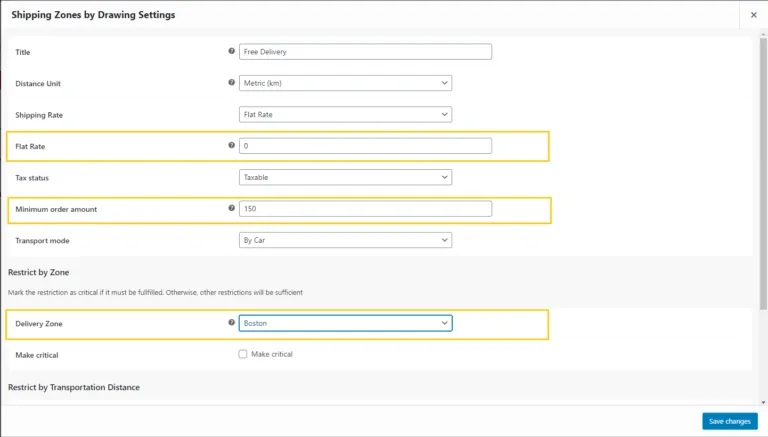
About Shipping Zones by Drawing Premium for WooCommerce
When you deliver to people's homes, the postcode is a blunt tool: it includes streets you don't reach, leaves out others you do, and forces you to charge the same to someone next to your shop as to someone at the edge of your range. Shipping Zones by Drawing Premium changes the criterion: you draw your area on a Google map and use it as a WooCommerce shipping method.
Your delivery area isn't shaped like a postcode
A neighbourhood shop, a florist or a restaurant delivers where it pays off, and that rarely matches administrative boundaries. A river, a motorway or a steep hill means two points at the same straight-line distance can take very different delivery times. This plugin lets you mark the real area and also measure by route, not just in a straight line.
Draw, import or trace a radius: three ways to define the zone
- Draw by hand: you click on the map to outline the area where you deliver.
- Import a KML file: useful if you already have the zone drawn in another tool.
- Radius around an origin: works for any starting point, and you can set several origins if you deliver from more than one location.
With a shortcode you can show a map of your delivery area on any page, so customers can see at a glance whether you reach them.
A flat rate per zone, or pricing by kilometres and travel time
You can charge in several ways depending on how you work:
- A flat rate per zone.
- A fixed rate plus a charge for the straight-line distance beyond an included radius.
- Rates by driving distance.
- A minimum order amount per method.
- Showing only the cheapest of the matching methods, if you prefer.
At checkout, the customer's address is checked against your zones. You can limit by distance or by travel time, calculated by car, truck or bike, and accept Plus Codes for places without a street address. It works with Food Online Premium, which checks delivery addresses against the zones you drew.
Is the free version enough, or do you need Premium?
There is a free version on WordPress.org with zone drawing. Premium adds what is described above, such as rates by distance or time and multiple origins. If you only need one zone with a fixed price, start with the free one and see if it is enough.
Before deciding, keep in mind what it requires:
- It needs a Google Maps key, which you must add before drawing.
- It is not an address lookup for the customer before buying: that is done by the Check My Address plugin, which is separate.
- For distance-based rates you need a secondary Google Maps key that is not restricted by HTTP referrer, and your shop address must be valid.
Can customers check their address before they buy?
Not with this plugin alone. With Check My Address they can, and both are also sold as a bundle.
Why don't my distance-based rates work?
Almost always it is the Google key: it must be a secondary one without an HTTP referrer restriction, and your shop address has to be valid.
Does it suit a restaurant using Food Online?
Yes, Food Online Premium validates addresses against the zones you have drawn.
Does it keep working if I stop renewing?
The plugin keeps working; you just stop receiving new releases.
Topics
Version history
-
v
2.8.12 Current 17 May 2024
Customer reviews
Sign in to leave a review. Only people who have the product can review it.
No reviews for this product yet.
Frequently asked questions
-
GPL (General Public License) is the license under which WordPress and most premium plugins/themes are distributed. It grants you the right to use, modify and redistribute the software in as many projects as you want, with no domain restrictions.
-
Yes. With membership you get automatic updates via our GPLClub Updater plugin (installed on your WP, detects new versions and applies them). With individual purchase, you get one year of manual updates from your account.
-
Depends on the plan. Monthly: 3 domains. Semi-annual: 7. Annual and Lifetime: 15. Individual purchase: 1 domain.
-
GPLClub offers its own support for installation, configuration and compatibility. For direct support from the original author (feature requests, product-specific bugs), a license purchased from the author is required.