TablePress (Premium)
Antivirus scan
Powered by ClamAV
✅ Verified clean
This product file has passed our security filters.
Want to run a fresh ClamAV scan right now? Takes a few seconds and shows scanner version, signature DB and live result.
This can take 5 to 30 seconds.
Clean file Threat detected
No threats detected in this file.
- File
- Size
- Scanned
- ClamAV
- Signature database
⚡ Powered by ClamAV
Scan could not be completed
Report product
If you detected an issue (broken file, malware, inappropriate content, etc.) let us know and we'll review it ASAP.
Sign in to report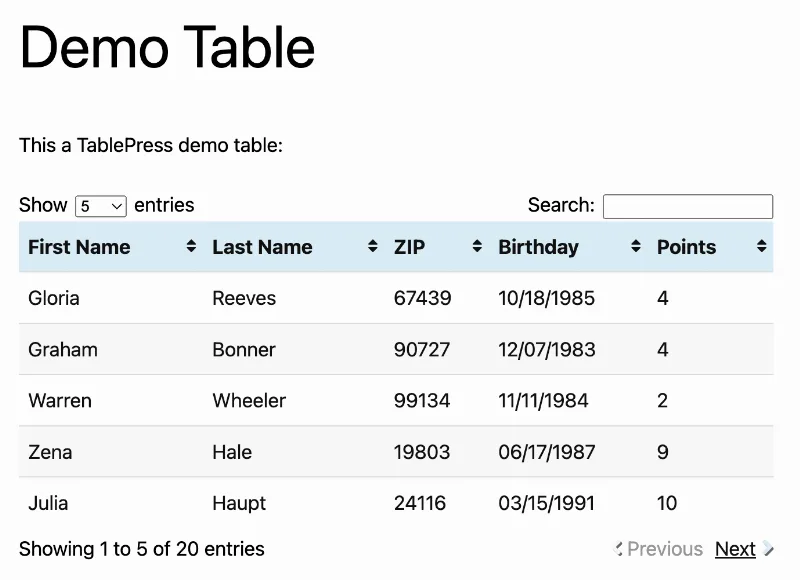
About TablePress (Premium)
Professional data tables in WordPress without touching code
Building a decent table in WordPress with the native block editor is limited: no sorting, no search, no way to import existing data. TablePress solves this with a spreadsheet-like interface right inside the WordPress dashboard, letting you create, edit and organize tables of any size without writing a single line of HTML or CSS.
How table editing works
The plugin adds an admin screen where each table is managed like a spreadsheet: rows, columns and cells are editable directly, with support for Excel-style math formulas. Once created, the table is inserted into any post or page via a block, a widget or a shortcode, making it compatible with the classic editor, the block editor and page builders like Elementor, Divi or Bricks.
Importing and exporting data
You don't have to start from scratch. TablePress can import tables from Excel, CSV, HTML and JSON files, or directly from a URL, which comes in handy when you already have data in another format and want to publish it quickly. It works the other way too: you can export your tables to those same formats, one at a time or bundled together in a ZIP file.
Interactivity for visitors
The tables this plugin generates aren't just static grids. They include live search and filtering, column sorting, pagination and horizontal scrolling, all of which visitors can control directly on the page without a reload. Responsive design adapts the table's presentation to different screen sizes, from mobile to desktop, and the generated markup follows accessibility best practices for users of assistive technologies.
Advanced features in TablePress Premium
The Premium version considerably expands what you can do with a table:
- Visual customization: a style customizer with predefined variations or your own color schemes, plus control over the layout and position of elements around the table.
- Frozen rows and columns: keeps the header, footer, or the first and last columns visible while users scroll through long tables.
- Column filtering: adds individual search boxes or dropdown menus for each column, with fuzzy search options that tolerate typos.
- Row grouping: organizes data by a shared category or keyword.
- Action buttons: lets visitors download, copy or print the table, or choose which columns to display.
- Automatic periodic import: updates a table from a configured external source without manual intervention.
- Advanced access control: restricts editing of specific tables to particular users.
- Server-side processing: moves sorting, filtering and pagination to the server to speed up loading of very large tables.
- REST API: exposes table data for consumption by external applications.
Common use cases
TablePress fits projects that need to display product catalogs with specifications, price or plan comparisons, schedules, sports results, staff directories, real estate listings, or any set of tabular data that needs to stay readable, filterable and updatable without relying on a developer every time something changes.
Frequently asked questions
Do I need to know how to code to use TablePress?
No. Editing is done from a spreadsheet-like interface in the WordPress dashboard; the HTML and CSS code is generated automatically, though you can add your own CSS if you want extra style tweaks.
Can I migrate tables I already have in Excel?
Yes, the plugin imports Excel, CSV, HTML and JSON files, as well as data directly from a URL.
Do the tables work well on mobile devices?
Yes, responsive design adapts the display based on screen size, and the Premium version offers additional options to control that behavior.
Is it compatible with page builders like Elementor or Divi?
Yes, any builder that supports shortcodes can insert TablePress tables, in addition to native block and widget support.
Can I limit who can edit each table?
Yes, advanced access control lets you restrict editing of specific tables to particular users.
Version history
-
v
2.3.1 Current 4 Jul 2024
Customer reviews
Sign in to leave a review. Only people who have the product can review it.
No reviews for this product yet.
Frequently asked questions
-
GPL (General Public License) is the license under which WordPress and most premium plugins/themes are distributed. It grants you the right to use, modify and redistribute the software in as many projects as you want, with no domain restrictions.
-
Yes. With membership you get automatic updates via our GPLClub Updater plugin (installed on your WP, detects new versions and applies them). With individual purchase, you get one year of manual updates from your account.
-
Depends on the plan. Monthly: 3 domains. Semi-annual: 7. Annual and Lifetime: 15. Individual purchase: 1 domain.
-
GPLClub offers its own support for installation, configuration and compatibility. For direct support from the original author (feature requests, product-specific bugs), a license purchased from the author is required.