Tokyo – Personal Portfolio WordPress Theme
Antivirus scan
Powered by ClamAV
✅ Verified clean
This product file has passed our security filters.
Want to run a fresh ClamAV scan right now? Takes a few seconds and shows scanner version, signature DB and live result.
This can take 5 to 30 seconds.
Clean file Threat detected
No threats detected in this file.
- File
- Size
- Scanned
- ClamAV
- Signature database
⚡ Powered by ClamAV
Scan could not be completed
Report product
If you detected an issue (broken file, malware, inappropriate content, etc.) let us know and we'll review it ASAP.
Sign in to report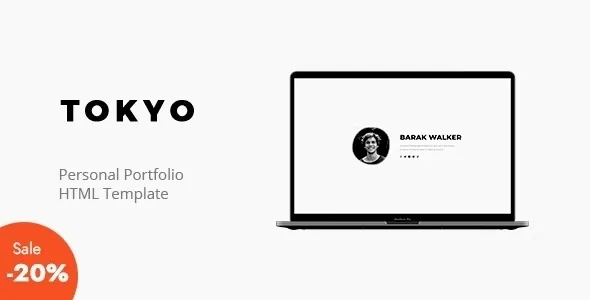
About Tokyo – Personal Portfolio WordPress Theme
Not all work can be shown in a photo
A voice actor, a musician or a video editor has a problem with many portfolios: the grid asks for an image, and what they sell is heard or moves. They end up uploading a still image and asking the visitor to imagine the rest.
If your work is heard or moves, the portfolio has to play it, not describe it. When choosing a theme, that matters more than the number of grids: the useful question is what a project can contain.
Tokyo, by Marketify, is a minimal WordPress theme for showcasing projects and services, aimed at freelancers, agencies, companies and startups. Its portfolio posts accept images, Vimeo, YouTube or SoundCloud, so a piece of audio or video is presented as what it is.
One project, one medium: how each piece is built
- Post images, for visual work.
- Vimeo or YouTube, for video pieces.
- SoundCloud, for audio.
- Required featured image, which works as the project cover.
The condition is that only one of those fields is filled in per project. If a single job has both video and audio, you have to decide which one represents it or split it into two posts.
And since the featured image is required, an audio piece needs a cover too. It is worth preparing them before you start, because the demo images are not included.
What you adjust in the theme options
Home pages are built in Elementor with the theme's own FREL elements. The rest is handled in its options, without touching code:
- Dark mode with a switcher to turn it on or off.
- Main colors for headings, body text and buttons.
- Logos for desktop, retina and mobile.
- Navigation with desktop skins and its own mobile settings.
- Typography with more than 800 Google Fonts.
- Custom CSS, SEO tags and export and import of settings.
It also has its own widgets such as business hours, estimate, brochure, about, social and news, a custom 404 page and Contact Form 7 compatibility. It includes a .po file to translate it with Poedit.
Demos without photos, SSL and other Tokyo limits
The demo images are not included. After importing they still need replacing, and the design can only really be judged once it holds your projects.
It needs Elementor and tokyo-core. Without activating tokyo-core not all of its features are available, and home pages are put together with Elementor.
The one-click importer needs an SSL certificate, and it should not be used on an install that already has a lot of content. If that is your case, make a backup first.
Its features do not include a shop or service sales: the theme shows the work and leaves contact to a form.
Elementor, tokyo-core and your first page
It asks for WordPress 5.0 or higher, PHP 5.6 or higher, Elementor 2.0.3 or higher and MySQL 5 or higher. For the server, memory_limit 96M, max_input_vars 3000, max_execution_time 600, post_max_size and upload_max_filesize of 32M, and allow_url_fopen on are recommended.
Getting started is short:
- Upload the tokyo.zip file under Appearance, Themes, and activate it.
- Activate the tokyo-core plugin the theme proposes.
- Install Elementor and, on a site with SSL, import the demo.
- Create your portfolio posts with one medium and one cover each.
- Set your home page as a static page under Settings, Reading.
Full screen, layouts, AJAX or a plugin
If your work is mainly visual and you want it to land through full-screen images, Harington offers five showcases. For those who care more about how projects are arranged, Zugan comes with 36 layouts.
Rhye changes pages with AJAX transitions, at the cost of having to adjust added scripts. And if you prefer to keep your current theme, Visual Portfolio is a plugin that adds project structure to WordPress.
Audio, video and importing in Tokyo
Can I publish audio tracks as projects?
Yes. Portfolio posts accept SoundCloud, and they also need a featured image as a cover.
Can I mix video and images in one project?
With those fields, no: only one should be filled in per project.
Does it work without Elementor?
Elementor is one of its requirements, and home pages are built with it.
Can I import the demo on a site that already has content?
If it has a lot of content, that is not advisable. If you do it anyway, make a backup first.
Topics
Version history
-
v
1.9 Current 12 Jun 2024
Customer reviews
Sign in to leave a review. Only people who have the product can review it.
No reviews for this product yet.
Frequently asked questions
-
GPL (General Public License) is the license under which WordPress and most premium plugins/themes are distributed. It grants you the right to use, modify and redistribute the software in as many projects as you want, with no domain restrictions.
-
Yes. With membership you get automatic updates via our GPLClub Updater plugin (installed on your WP, detects new versions and applies them). With individual purchase, you get one year of manual updates from your account.
-
Depends on the plan. Monthly: 3 domains. Semi-annual: 7. Annual and Lifetime: 15. Individual purchase: 1 domain.
-
GPLClub offers its own support for installation, configuration and compatibility. For direct support from the original author (feature requests, product-specific bugs), a license purchased from the author is required.