TV Schedule and Timetable for WordPress
Antivirus scan
Powered by ClamAV
✅ Verified clean
This product file has passed our security filters.
Want to run a fresh ClamAV scan right now? Takes a few seconds and shows scanner version, signature DB and live result.
This can take 5 to 30 seconds.
Clean file Threat detected
No threats detected in this file.
- File
- Size
- Scanned
- ClamAV
- Signature database
⚡ Powered by ClamAV
Scan could not be completed
Report product
If you detected an issue (broken file, malware, inappropriate content, etc.) let us know and we'll review it ASAP.
Sign in to report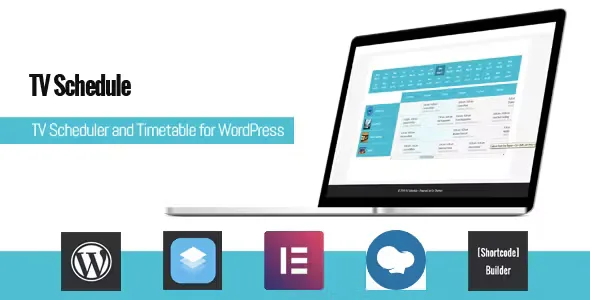
About TV Schedule and Timetable for WordPress
A local station, a radio with video or a streaming channel often publishes its lineup as an image uploaded by hand, a PDF or a pasted table nobody updates. The result: viewers don't know what is on now, what comes next, or what time their Thursday show airs.
A lineup is kept going by repetition, not by one-off shows
The truth of this business is that almost all programming repeats: the news every morning, the Friday magazine show, the Sunday movie. Whoever manages a lineup spends more time repeating than creating. That is why TV Schedule and Timetable is built around weekly repetition and global programmes, not around a calendar of one-off events.
Walkthrough: from an empty channel to a published lineup
- Step 1, the channels. You create each channel and, if you want, give it its own link. Programmes are tied to a channel, so the lineup is split by station from the start.
- Step 2, the programmes. Each programme supports a title, subtitle, content (with HTML) and image. The content is what viewers later see expanded, so it pays to write a useful synopsis and not just the name.
- Step 3, the repetition. You mark the programme as weekly and set its start date and end date. The end date is mandatory: the programme is not set up as an indefinite broadcast, so you will need to review it when the season ends.
- Step 4, global programmes. If the same show airs on several days, a global programme saves you from creating it over and over.
- Step 5, order and control. You can reorder programmes by dragging them and, in the admin listing, filter by channel or date to quickly find what needs fixing. You can also show a schedule with special dates, useful for holidays or extraordinary broadcasts. A programme that ends after midnight is shown with its end time on the following day.
- Step 6, publishing it. You place the lineup wherever you want with a shortcode, which you can generate with the included shortcode builder. It works with WPBakery and any page builder, and you can place as many lineups as you need.
Six styles and a lineup viewers filter themselves
There are six styles: three simple schedules and three advanced ones. The simple ones suit a clear list of what is airing; the advanced ones, a fuller grid view. In the advanced version you can set the minimum and maximum hour displayed, ideal if your broadcast doesn't fill 24 hours.
- Programmes load via Ajax according to the date or channel the viewer picks, without reloading the page.
- Details can be viewed as a collapse, a modal window or a tooltip.
- An On Air shortcode shows what is airing now plus a configurable number of upcoming programmes.
- A button lets viewers add the programme to Google Calendar.
Colors and fonts: the lineup with your channel's look
You can choose a main color applied to all styles and customize fonts and colors. If you don't want to load a Google font, there is a setting to disable it. The design is responsive and adapts to mobile, where most lineups are checked.
What TV Schedule and Timetable is not
It is a plugin for displaying schedules, not for playing video or broadcasting. It doesn't handle bookings, tickets or subscriptions, even though it sits in the bookings category: its job is to tell people what airs and when. Nor does it import a lineup from an external broadcast system: programmes are entered in WordPress by hand. Check in the demo how the style you like looks with many programmes on the same day.
Frequently asked questions
Does it work for a radio station or an event?
Yes, the plugin works with channels, programmes and times, so it suits any agenda with that structure, although its approach is that of a TV lineup.
Do I need a page builder?
No. Pasting the shortcode into a page is enough. If you use WPBakery or any other builder, it works too.
Can I show several channels in one lineup?
Yes, multichannel can be enabled with a filter so viewers can switch channels.
What happens when the season ends?
Weekly repetition requires an end date, so when that date arrives the programme stops being shown and you will need to extend it if it continues.
Topics
Version history
-
v
1.6.7 Current 1 Aug 2025
Customer reviews
Sign in to leave a review. Only people who have the product can review it.
No reviews for this product yet.
Frequently asked questions
-
GPL (General Public License) is the license under which WordPress and most premium plugins/themes are distributed. It grants you the right to use, modify and redistribute the software in as many projects as you want, with no domain restrictions.
-
Yes. With membership you get automatic updates via our GPLClub Updater plugin (installed on your WP, detects new versions and applies them). With individual purchase, you get one year of manual updates from your account.
-
Depends on the plan. Monthly: 3 domains. Semi-annual: 7. Annual and Lifetime: 15. Individual purchase: 1 domain.
-
GPLClub offers its own support for installation, configuration and compatibility. For direct support from the original author (feature requests, product-specific bugs), a license purchased from the author is required.