UpVote – Social Bookmarking WordPress Theme
Antivirus scan
Powered by ClamAV
✅ Verified clean
This product file has passed our security filters.
Want to run a fresh ClamAV scan right now? Takes a few seconds and shows scanner version, signature DB and live result.
This can take 5 to 30 seconds.
Clean file Threat detected
No threats detected in this file.
- File
- Size
- Scanned
- ClamAV
- Signature database
⚡ Powered by ClamAV
Scan could not be completed
Report product
If you detected an issue (broken file, malware, inappropriate content, etc.) let us know and we'll review it ASAP.
Sign in to report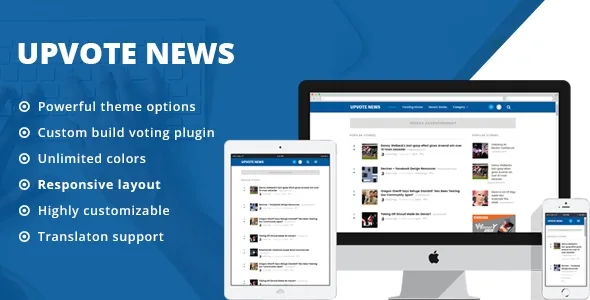
About UpVote – Social Bookmarking WordPress Theme
A vote is worth as much as your ability to see who cast it
You open a link aggregator for your sector. The first weeks go well. One day, someone submits an article from their own store and several newly created accounts vote for it in a row. It climbs the popular list, and a first-time visitor finds an ad shaped like news at the very top.
On a voting site, your product is the ranking, and that ranking only deserves trust if the votes can be reviewed. UpVote, the ThemeWarrior theme for building sites in the style of Reddit or Hacker News, shows under each story the list of those who voted for it, with avatar and profile. That list lets you and your community recognize a group of accounts that always votes together.
Stories, votes and users in UpVote
- Link submission by registered users, through a custom plugin. Each submission is a story.
- Automatic data: title, featured image and description are taken from the link if the URL supports Open Graph.
- Registration with the WordPress form, or login with Facebook and Twitter.
- Front page lists: Popular, Trending and Recent, next to an active users page.
- Story page with vote count, voters, source link, comments, related stories and buttons for Facebook, Twitter and Pinterest.
- A link to report a story.
- Sidebar with recommended stories, categories, tags and trending lists, plus a separate blog.
Reviewing the ranking before someone bends it
Three parts of the demo help you watch over the site. The voters list shows who pushed each story. The active users page filters by one week, one month or six months and counts each person's stories, so someone posting nonstop stands out. The report link shares the work with your readers.
Each row also shows the source domain next to the title, which makes it easy to notice when one website repeats too often.
UpVote limits worth knowing
Among its features there is no fake-vote detection, and the monitoring stays in your hands. In the demo, the active users page shows each person's number of stories, without points or karma.
Automatic fetching depends on the linked page: if that URL does not support Open Graph, the title, image and description are not filled in by themselves.
Commenting and voting require logging in. And renaming stories, for example so your site talks about resources or news, means editing a plugin file by hand, as does changing the word story in the URL. Keep a copy of that change, because a plugin update could replace the file.
Opening registration and publishing the first stories
The theme works together with its UpVote plugin. These steps get the site ready to receive submissions:
- Install the theme and its plugin on WordPress.
- Enable the membership checkbox under Settings, General, so people can register.
- Create the story categories and place the sidebar widgets.
- Test the Facebook and Twitter login if you want to offer it.
- Submit the first stories yourself, so nobody finds an empty front page.
If you change the word story in the URL, save the permalinks afterwards in Settings. Registration is disabled on the demo, so submission tests happen on your own install.
When your community needs to talk rather than vote
UpVote ranks links. If what you need is discussion topics with replies, ForumWP adds a forum where members open topics and reply. The Forum theme by Visualmodo is designed for communities with bbPress, BuddyPress and its own knowledge base.
For a network with profiles, groups, activity and courses, the BuddyBoss theme gives an app-like look, and it needs the platform separately.
How UpVote works day to day
Is the link title filled in automatically?
Yes, along with the image and description, when the URL supports Open Graph.
Can people log in with social networks?
It supports login with Facebook and Twitter, in addition to the normal WordPress registration.
Can you see who voted for a story?
Yes. In the demo, the voters list appears on the story page.
Can I call stories something else?
Yes, by editing the labels in the plugin's post-type.php file.
Topics
Version history
-
v
2.2.2 Current 17 Jun 2024
Customer reviews
Sign in to leave a review. Only people who have the product can review it.
No reviews for this product yet.
Frequently asked questions
-
GPL (General Public License) is the license under which WordPress and most premium plugins/themes are distributed. It grants you the right to use, modify and redistribute the software in as many projects as you want, with no domain restrictions.
-
Yes. With membership you get automatic updates via our GPLClub Updater plugin (installed on your WP, detects new versions and applies them). With individual purchase, you get one year of manual updates from your account.
-
Depends on the plan. Monthly: 3 domains. Semi-annual: 7. Annual and Lifetime: 15. Individual purchase: 1 domain.
-
GPLClub offers its own support for installation, configuration and compatibility. For direct support from the original author (feature requests, product-specific bugs), a license purchased from the author is required.