Vedhak – Camping and Adventure WordPress Theme
Antivirus scan
Powered by ClamAV
✅ Verified clean
This product file has passed our security filters.
Want to run a fresh ClamAV scan right now? Takes a few seconds and shows scanner version, signature DB and live result.
This can take 5 to 30 seconds.
Clean file Threat detected
No threats detected in this file.
- File
- Size
- Scanned
- ClamAV
- Signature database
⚡ Powered by ClamAV
Scan could not be completed
Report product
If you detected an issue (broken file, malware, inappropriate content, etc.) let us know and we'll review it ASAP.
Sign in to report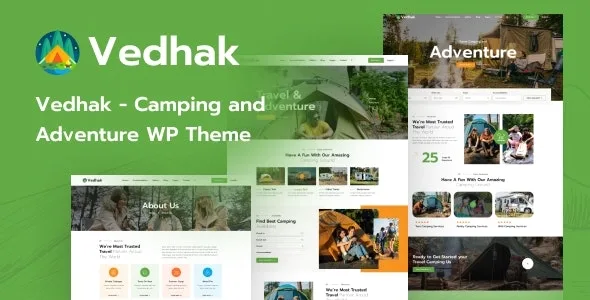
About Vedhak – Camping and Adventure WordPress Theme
At a campsite, every sale closes twice
Whoever books in spring for the summer pays part of it and forgets. The person running the campsite cannot forget: months later they have to collect the rest, booking by booking, and check who has paid and who still owes. With ten bookings a spreadsheet will do. With two hundred, that balance becomes a second job.
The booking is the first sale; the balance is the second, and it needs as much of a system as the first.
Vedhak, by ovatheme, is a WordPress theme built on Elementor for adventure travel and outdoor accommodation. Its package includes a booking plugin that works on top of WooCommerce and generates the balance invoice, either by hand or automatically.
From deposit to balance: how Vedhak collects payment
- Fixed or percentage deposit, enabled per accommodation, with the option to also show full payment.
- Order status: in the admin it shows as partial payment, and it changes when the customer pays the rest.
- Manual balance: from the order you create the remaining invoice and send it to the customer, who pays through the link in the email.
- Automatic balance: the system creates the invoice with the days of lead time you choose, and it can send the email with the order details.
- Gateways: payment goes through WooCommerce, so any gateway that works with WooCommerce will do.
Prices, extras and dates on each accommodation
Each accommodation is rented in one of three ways: by day, by hour or by period of time, with fixed-hour or unfixed-hour packages. On that base you set up the following:
- Price by day of the week on day rentals.
- Price by booking length, through the global discount.
- Special periods, such as holidays or seasons, and price by total guests.
- Unlimited paid resources and services, per day, per hour or per order depending on the rental type.
- Blocked dates, which the customer cannot pick for arrival or departure.
- Customer cancellation up to the number of hours beforehand that you set.
- Discount codes, custom fields on the forms and manual orders for people who book at the office.
There is one rule worth knowing before setting rates: inside a special period, the price is calculated from that period and not from the global discount.
The rest of the theme is three home pages, accommodation listings and detail pages, a travel search form, a request form, testimonials, a blog and several sidebars. It is compatible with Slider Revolution, Contact Form 7, WPML, MailChimp, Yoast SEO and Rank Math.
No payment guarantee and no pitch map
The system creates the balance invoice and sends it, but it does not guarantee payment. If the customer does not pay the rest, the decision is still yours, so it is worth putting in writing what happens to the booking in that case.
Its features do not include a pitch map for customers to choose their spot. Calendar sync with outside platforms is not among them either: if you also sell there, check whether your install offers it.
Server, installation and first booking
It asks for PHP 7.4 or 8, MySQL 5 or higher and an up-to-date WordPress, with max_execution_time 180, max_input_time 600, and post_max_size and upload_max_filesize of 60M.
To get started:
- Install the parent theme and the child theme, and activate the child.
- Install and activate the plugins the theme proposes.
- Import the data from Appearance, under Import Demo Data, and wait about five minutes.
- Create an accommodation with its rental type, prices and deposit.
- Make a test booking with a deposit and generate the balance invoice.
For selling on Airbnb or by activity
Sunway is a better fit if you also sell on Airbnb or Booking.com: it is built on MotoPress Hotel Booking and syncs bookings over iCal. That same engine is sold separately as MotoPress Hotel Booking, to add to another theme.
If yours is activities more than nights, Advenx targets hiking, expeditions and camps, with selling through WooCommerce.
Deposits, seasons and office bookings
Can I charge only part of it at booking time?
Yes. The deposit is fixed or a percentage, and the rest is collected with an invoice created by hand or automatically.
Can the price change in high season?
Yes, with special periods. Inside them the global duration discount does not apply.
What about people who book by phone or at the office?
You create the order by hand from the admin, and availability is checked under Products, in Check Product.
Topics
Version history
-
v
1.2.8 Current 26 Oct 2026
-
v
1.0.0 12 Jun 2024
Customer reviews
Sign in to leave a review. Only people who have the product can review it.
No reviews for this product yet.
Frequently asked questions
-
GPL (General Public License) is the license under which WordPress and most premium plugins/themes are distributed. It grants you the right to use, modify and redistribute the software in as many projects as you want, with no domain restrictions.
-
Yes. With membership you get automatic updates via our GPLClub Updater plugin (installed on your WP, detects new versions and applies them). With individual purchase, you get one year of manual updates from your account.
-
Depends on the plan. Monthly: 3 domains. Semi-annual: 7. Annual and Lifetime: 15. Individual purchase: 1 domain.
-
GPLClub offers its own support for installation, configuration and compatibility. For direct support from the original author (feature requests, product-specific bugs), a license purchased from the author is required.