Veen – Minimal & Lightweight Blog for WordPress
Antivirus scan
Powered by ClamAV
✅ Verified clean
This product file has passed our security filters.
Want to run a fresh ClamAV scan right now? Takes a few seconds and shows scanner version, signature DB and live result.
This can take 5 to 30 seconds.
Clean file Threat detected
No threats detected in this file.
- File
- Size
- Scanned
- ClamAV
- Signature database
⚡ Powered by ClamAV
Scan could not be completed
Report product
If you detected an issue (broken file, malware, inappropriate content, etc.) let us know and we'll review it ASAP.
Sign in to report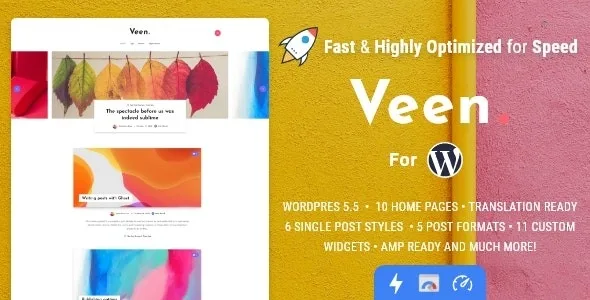
About Veen – Minimal & Lightweight Blog for WordPress
On a blog with no frills, the ad is what stands out most
You chose a clean design so people read what you write, and then comes the moment to earn something from the blog. With so little around it, a banner has nothing to compete with: it becomes the most visible element, and a bad spot spoils the very thing that made you choose that design.
That is why, on a minimal theme, where the ads go is a design decision worth making before you publish. Veen, by EstudioPatagon, treats it that way: a 1.5 MB blog theme with its ad slots already planned, so you do not have to open them by hand in the template.
The places where ads fit
Ads are set up under Theme Options, Advertising, and most sections display on their own:
- Below the header, plus an advertising area as a header layout with its image and URL.
- Before and after the content of each post.
- Between a number of paragraphs that you choose.
- Between posts in the grid.
- Advertising module on the custom home page.
- Your own shortcode: this one does not appear on its own, you create it and paste it into the post or page you want.
To lighten external scripts, Theme Options has lazy AdSense or async script options, plus lazy loading for iframes.
A module-based home page, no builder, and what comes with each article
Veen does not use a page builder by default. The custom home page is a page with the Home template, where you add and reorder modules by dragging them: grid, classic, with sidebar, posts carousel, slider and advertising. Article modules support an offset, and the lists and carousel can show posts in random order.
- Three post layouts: full width with sidebar, full width without it and classic, with the image inside the article.
- Sticky sidebar on posts and a no-sidebar style for posts and pages.
- Dedicated pages for tags, authors and the 404 error.
- 11 widgets, among them About Me, tag cloud and recent posts with a views filter.
- Lazy loading on lists, content and YouTube, Vimeo or SoundCloud embeds.
- Reading time with adjustable words per minute, and an AJAX views counter.
- Comments from Disqus and Facebook, custom galleries, Open Graph and breadcrumbs with Yoast SEO, NavXT or Rank Math.
The limits of AMP and social features
AMP works in transitional mode, needs the AMP plugin and is meant for mobile devices. In AMP scripts stop working, so any script-based ad or tool needs a separate check.
The Twitter widget is no longer compatible with the theme, and it is not a shop theme either: its features do not include a catalog or a cart. It also relies on the Veen Functions plugin, and each theme version needs the matching plugin version.
Installation and your first home page
In the wizard, only the plugins marked REQ are needed; Contact Form 7, for example, is optional. Setup follows this order:
- Install and activate the theme, and follow the wizard.
- Import the demo content in the last step, or later from the EstudioPatagon section, Import Demo Content.
- Create a page with the Home template, add your modules and set it as the front page under Settings, Reading.
- Arrange the advertising in Theme Options before you publish.
- For AMP, install its plugin, enable Transitional Mode, uncheck Serve all templates as AMP, turn it on in Theme Options and test a URL with ?amp.
With more volume, or finer ad control
If you publish at a news outlet's pace, JNews is geared to scale, with more than 150 home page demos and AMP. Gillion combines blog, magazine and shop with AMP.
If you need to rotate ads by weight or show them by device, Advanced Ads handles that as a separate plugin.
Spanish, Elementor, images and cache
Does it come in Spanish?
Yes. It includes English and Spanish, and it is ready to be translated into other languages.
Do I need Elementor?
No. The home page is built with the theme's modules; Elementor is a suggestion for basic pages.
What size should images be?
680 x 500 px for grid home pages and 850 x 450 px for classic home pages, preferably in JPG.
Do I need a cache plugin?
Try without one first. Autoptimize is suggested for sites with several unoptimized plugins, and W3 Total Cache for very large sites.
Topics
Version history
-
v
2.7.0 Current 6 Feb 2026
Customer reviews
Sign in to leave a review. Only people who have the product can review it.
No reviews for this product yet.
Frequently asked questions
-
GPL (General Public License) is the license under which WordPress and most premium plugins/themes are distributed. It grants you the right to use, modify and redistribute the software in as many projects as you want, with no domain restrictions.
-
Yes. With membership you get automatic updates via our GPLClub Updater plugin (installed on your WP, detects new versions and applies them). With individual purchase, you get one year of manual updates from your account.
-
Depends on the plan. Monthly: 3 domains. Semi-annual: 7. Annual and Lifetime: 15. Individual purchase: 1 domain.
-
GPLClub offers its own support for installation, configuration and compatibility. For direct support from the original author (feature requests, product-specific bugs), a license purchased from the author is required.