Weeland – Masonry Lifestyle WordPress Blog Theme
Antivirus scan
Powered by ClamAV
✅ Verified clean
This product file has passed our security filters.
Want to run a fresh ClamAV scan right now? Takes a few seconds and shows scanner version, signature DB and live result.
This can take 5 to 30 seconds.
Clean file Threat detected
No threats detected in this file.
- File
- Size
- Scanned
- ClamAV
- Signature database
⚡ Powered by ClamAV
Scan could not be completed
Report product
If you detected an issue (broken file, malware, inappropriate content, etc.) let us know and we'll review it ASAP.
Sign in to report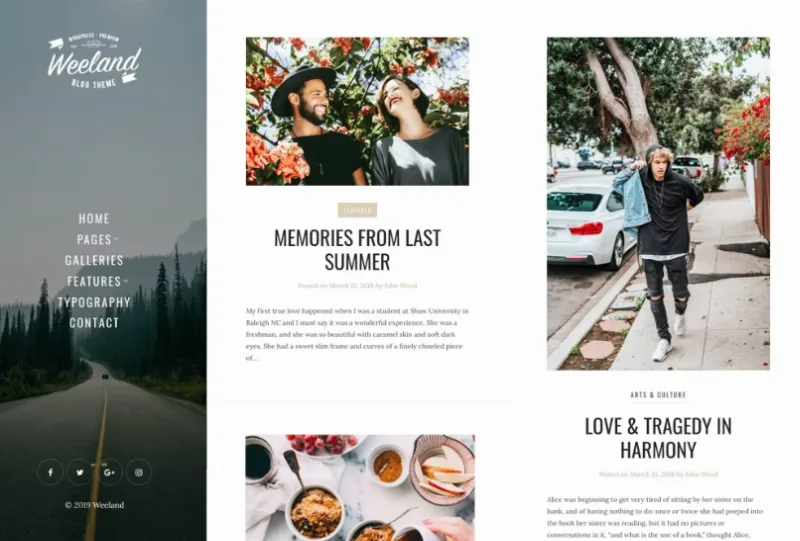
About Weeland – Masonry Lifestyle WordPress Blog Theme
On a wall of cards, every photo works as a headline
A list-style blog reads from top to bottom: the title leads and the image follows. In a masonry grid, pieces fit together by height and the eye jumps from one to the next. The first thing readers compare is your photos, and a post with a weak image sits right next to the best one you have.
Choosing a masonry theme also commits you to a way of taking photos. Weeland, by NordStudio, is a WordPress theme for personal blogs on lifestyle, cooking, travel, fashion, art and photography, built around that grid. If every post goes out with a carefully chosen image, the wall works for you. If many go out without a photo of their own, think about that before installing it.
Left-hand menu and masonry grid
Weeland takes navigation out of the top of the page and moves it to the side. That combination defines its look:
- Vertical navigation on the left side.
- Fixed left sidebar.
- Custom image and logo for that sidebar.
- Masonry layout based on a grid.
- Numeric pagination to move through the archive.
What goes with each post
- Design focused on reading and content.
- Galleries within the blog.
- Author description box.
- Social profiles and share buttons.
- Unlimited colors, adjustable from the WordPress Customizer.
- Retina ready and responsive.
- Child theme to keep your changes separate.
Five languages to start from
The theme comes translated into English, German, Dutch, Spanish and French. It is translation ready and compatible with WPML, so you can publish the blog in several languages or take the interface into another one.
Keep the difference between the two in mind: those translations cover the theme's own text. You write the posts yourself in each language.
A personal blog, not a magazine
Weeland is configured from the WordPress Customizer. Its approach is simple, and that sets its limits:
- Block editor: it is not optimized for Gutenberg. Test your posts if you rely on advanced blocks.
- Home pages: its approach is the blog grid. Modular magazine home pages are not among its features.
- Ads and newsletter: ad slots and subscription forms are not among its features.
- Store: if you plan to sell, test WooCommerce with the theme first.
Test the wall with ten real posts
Before changing anything, see how the wall looks with your real content:
- Install and activate Weeland; if you will touch code, use the child theme.
- Open the Customizer and place your logo and the sidebar image.
- Create the menu for the vertical navigation and check how it looks on mobile.
- Publish or review ten posts with their images, in varied formats.
- Look at the full wall and adjust the colors last.
Walls with submissions, ads or several builders, and short answers
If you want to open the blog to your readers, Pin combines a masonry wall with post submission from the public side. If you plan to live off ads, Veen brings its slots already planned and a modular home page. If you would rather choose your builder, Lemars supports several.
What kind of blog is Weeland for?
Personal blogs on lifestyle, cooking, travel, fashion, art, photography and similar topics.
Does the menu go at the top?
No. Navigation is vertical and sits on the left side.
Can I change the colors without code?
Yes, from the WordPress Customizer, with unlimited colors.
Is it available in Spanish?
Yes. It is one of its five languages, along with English, German, Dutch and French.
Is it suitable if I am new to WordPress?
It is designed to be easy to use even for beginners, and it comes with extensive documentation.
Topics
Version history
-
v
1.5 Current 16 Jun 2024
Customer reviews
Sign in to leave a review. Only people who have the product can review it.
No reviews for this product yet.
Frequently asked questions
-
GPL (General Public License) is the license under which WordPress and most premium plugins/themes are distributed. It grants you the right to use, modify and redistribute the software in as many projects as you want, with no domain restrictions.
-
Yes. With membership you get automatic updates via our GPLClub Updater plugin (installed on your WP, detects new versions and applies them). With individual purchase, you get one year of manual updates from your account.
-
Depends on the plan. Monthly: 3 domains. Semi-annual: 7. Annual and Lifetime: 15. Individual purchase: 1 domain.
-
GPLClub offers its own support for installation, configuration and compatibility. For direct support from the original author (feature requests, product-specific bugs), a license purchased from the author is required.