WooCommerce Pre-sale, Time offer & Expiring System
Antivirus scan
Powered by ClamAV
✅ Verified clean
This product file has passed our security filters.
Want to run a fresh ClamAV scan right now? Takes a few seconds and shows scanner version, signature DB and live result.
This can take 5 to 30 seconds.
Clean file Threat detected
No threats detected in this file.
- File
- Size
- Scanned
- ClamAV
- Signature database
⚡ Powered by ClamAV
Scan could not be completed
Report product
If you detected an issue (broken file, malware, inappropriate content, etc.) let us know and we'll review it ASAP.
Sign in to report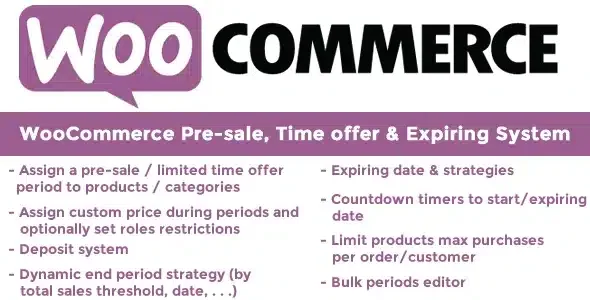
About WooCommerce Pre-sale, Time offer & Expiring System
A limited offer that closes itself, not whenever you remember
Launching a pre-sale or a weekend offer is easy. The hard part is closing it: someone has to remember to restore the regular price, pull the product or announce that it is over, and if they forget, you keep selling at a discount past the deadline. WooCommerce Pre-sale, Time offer & Expiring System is built for that ending, which matters as much as the start of a pre-sale.
You can choose how each product ends:
- By date: when the day arrives, the item goes back to its regular price or can no longer be bought (it becomes a draft).
- By sales goal: when the figure you set is reached, the offer is cut off even if there was time left.
- Goal checked only on the end date: the offer runs until the last day and, at that point, it is decided based on whether the goal was reached.
If you prefer the expired product to stay in view, you can show it without the option to buy and with a custom message in the shop and on the product page.
Pre-sale with a deposit: charge a little now and the rest later
With WooCommerce Pre-sale, Time offer & Expiring System you can keep a product visible but not purchasable until the period starts. You can also save it as a draft with a start date and let it publish itself on that day.
The most interesting option for pre-sales is the deposit with coupon deduction: the customer pays part of the price, and when the order is placed the plugin generates a one-time coupon for each item, included in the new order email. With that code the customer buys later, deducting what was already paid. Coupons are managed from the WooCommerce coupons area and are deleted if you delete the order.
You can also limit the quantity per order or per customer, restrict purchase to those who already bought during the pre-sale, and reserve the offer for certain user roles (even hiding the product from everyone else).
Countdowns, progress bar and labels so the customer sees what is happening
A pre-sale works better when the buyer understands the deadline and the progress. The plugin adds:
- A countdown to the start or end of the offer.
- A sales progress bar toward the goal, with an optional percentage and configurable colors.
- Custom text on the add to cart button and custom messages in the shop and on the product page.
- A sale badge with general or product-specific text, the old price crossed out, and a label such as (Pre-sale) next to the product in emails, cart, checkout and order details.
You can also assign a special status to orders containing pre-sale items, mark shipping as free during the offer (the item temporarily becomes virtual), edit periods in bulk and see on each product who bought it and how many sales it has. It includes shortcodes and functions to show dates, sales and goal on your own pages or in your theme.
Is this plugin right for you if you sell variable products or accept guests?
It depends on how you sell. These are the limits worth knowing before you decide:
- On variable products, the pre-sale is assigned to the product, not to each variation.
- Role restrictions, the per-customer limit and the restriction to those who already bought require the customer to be logged in.
- Custom order statuses must be created with another plugin; this one only assigns them.
Does the expiration notice arrive by email instantly?
No. You can receive an email (you or the addresses you specify) when a product expires, but the check is triggered when someone visits the site. In a shop with no traffic, the notice may be delayed.
Do the countdown and messages work with any theme?
They depend on some WooCommerce hooks that almost all themes use, but not all. Check in the demo with your theme whether the texts and the countdown appear.
Can I include pre-sale products in the sale products listing?
Yes, it is optional, and it affects shortcodes and widgets for sale products. It can slow down pages, so if you notice it, turn it off.
Is it useful for weekend or seasonal offers?
Yes: the same system of periods, special price and automatic closing works for pre-sales and for limited-time offers.
Topics
Version history
-
v
11.4 Current 8 Jan 2025
Customer reviews
Sign in to leave a review. Only people who have the product can review it.
No reviews for this product yet.
Frequently asked questions
-
GPL (General Public License) is the license under which WordPress and most premium plugins/themes are distributed. It grants you the right to use, modify and redistribute the software in as many projects as you want, with no domain restrictions.
-
Yes. With membership you get automatic updates via our GPLClub Updater plugin (installed on your WP, detects new versions and applies them). With individual purchase, you get one year of manual updates from your account.
-
Depends on the plan. Monthly: 3 domains. Semi-annual: 7. Annual and Lifetime: 15. Individual purchase: 1 domain.
-
GPLClub offers its own support for installation, configuration and compatibility. For direct support from the original author (feature requests, product-specific bugs), a license purchased from the author is required.