WooCommerce Quick View
Antivirus scan
Powered by ClamAV
✅ Verified clean
This product file has passed our security filters.
Want to run a fresh ClamAV scan right now? Takes a few seconds and shows scanner version, signature DB and live result.
This can take 5 to 30 seconds.
Clean file Threat detected
No threats detected in this file.
- File
- Size
- Scanned
- ClamAV
- Signature database
⚡ Powered by ClamAV
Scan could not be completed
Report product
If you detected an issue (broken file, malware, inappropriate content, etc.) let us know and we'll review it ASAP.
Sign in to report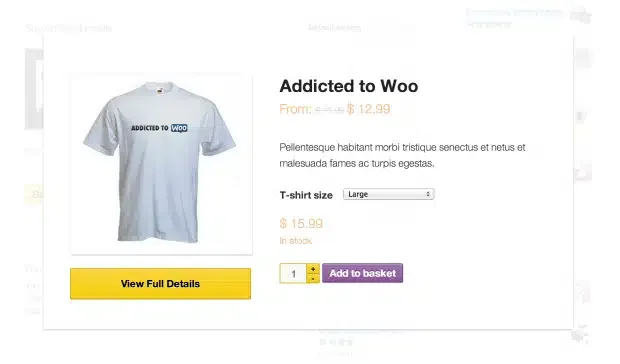
About WooCommerce Quick View
For the store with a long catalog and variations, not for those who want to design every detail
Opening a product page, checking a size or a price, going back and losing your place in a long catalog is one of the silliest ways to lose a sale. WooCommerce Quick View tackles exactly that: it adds a "Quick View" button to product listings and opens the product in a pop-up window (lightbox), without leaving the page.
It is especially useful if you sell variable products, because variations can be checked from the listing itself.
It is not for you if you need to control the look down to the pixel. Published reviews from other buyers agree on two complaints: there is hardly any configuration (one single option is mentioned) and styling the window with your own CSS is awkward. If your brand demands a fully custom modal, expect extra work or look for another route.
What the customer sees when clicking the button
The pop-up shows a preview of the chosen product: price, specifications and variations. It works with simple products as well as variable ones with several options.
- Add to cart from the window: the customer can add the product, including its variations, without opening the individual page.
- Fewer back-and-forths: the number of screens between viewing a product and buying it is reduced.
- Adaptable design: the windows adapt to mobile screens, and they are designed to blend in with most WooCommerce themes.
Why it matters in stores with variations
A product with colors and sizes normally forces you to open its page just to find out whether the combination you want exists. With Quick View, that check happens without interrupting browsing, and someone looking at twenty products keeps looking at twenty products instead of ending up on the tenth product page.
There is also a technical detail: if you configure the window to open with add-to-cart buttons that do not use AJAX, page reloads are reduced and buying feels smoother.
What to check in the demo before committing to Quick View
Public reviews mention two specific failures: in one case the button sent the page to the top without opening the window, and in another it did not work with WooCommerce product shortcodes. These are isolated cases and we do not know whether they still apply, but if your catalog is built with shortcodes or a page builder, test it on a staging site before going live.
Also check how the window looks with your theme, with your most complex variable products and on mobile, because customization options are few.
Frequently asked questions about WooCommerce Quick View
Can customers add to cart from the window?
Yes, including products with variations, without leaving the listing.
Does it work with variable products?
Yes, it shows the variations and the details of each one inside the window.
Does it look good on mobile?
The windows are adaptable, so the experience is the same on small screens. Still, check your theme.
Can I change its appearance a lot?
There is very little configuration. If you want your own design, you will have to adjust it with CSS and it may take more effort than expected.
Is it useful for stores with few products?
It adds little if you have a short catalog and light product pages. It shows most in long listings with many variations.
Topics
Version history
-
v
2.0.0 Current 9 Jul 2026
-
v
1.8.3 18 Nov 2025
Customer reviews
Sign in to leave a review. Only people who have the product can review it.
No reviews for this product yet.
Frequently asked questions
-
GPL (General Public License) is the license under which WordPress and most premium plugins/themes are distributed. It grants you the right to use, modify and redistribute the software in as many projects as you want, with no domain restrictions.
-
Yes. With membership you get automatic updates via our GPLClub Updater plugin (installed on your WP, detects new versions and applies them). With individual purchase, you get one year of manual updates from your account.
-
Depends on the plan. Monthly: 3 domains. Semi-annual: 7. Annual and Lifetime: 15. Individual purchase: 1 domain.
-
GPLClub offers its own support for installation, configuration and compatibility. For direct support from the original author (feature requests, product-specific bugs), a license purchased from the author is required.