WP Cerber Security Pro
Antivirus scan
Powered by ClamAV
✅ Verified clean
This product file has passed our security filters.
Want to run a fresh ClamAV scan right now? Takes a few seconds and shows scanner version, signature DB and live result.
This can take 5 to 30 seconds.
Clean file Threat detected
No threats detected in this file.
- File
- Size
- Scanned
- ClamAV
- Signature database
⚡ Powered by ClamAV
Scan could not be completed
Report product
If you detected an issue (broken file, malware, inappropriate content, etc.) let us know and we'll review it ASAP.
Sign in to report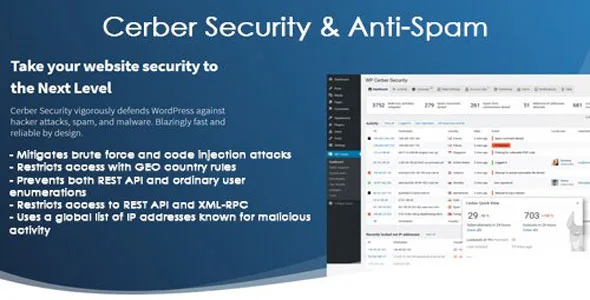
About WP Cerber Security Pro
When the problem isn't a hack, but background noise
Many site owners discover security through a silly symptom: the site is slow, the dashboard hangs, or hundreds of junk comments arrive, and behind it all are bots trying passwords nonstop. Most attacks on WordPress are neither personal nor sophisticated: they are automated, massive and cheap. That is why the real job of a security plugin is not just reacting after an incident, but cutting that constant trickle before it eats up resources and attention.
WP Cerber Security Pro works right there: it checks incoming requests for malicious code patterns and traffic anomalies, detects bots and mitigates brute force and code injection attacks.
What WP Cerber Security Pro does against each type of threat
- Traffic Inspector: an additional layer that examines suspicious requests and blocks them before they can harm the site.
- Country rules: you decide which countries can submit forms, post comments, log in, register or use the REST API and XML-RPC.
- User enumeration: it prevents usernames from being listed, both the usual way and through the REST API.
- Global IP list: it checks in real time addresses known for spreading spam, attempting intrusions or launching phishing, and blocks them.
- Activity log: it records what users do and HTTP requests, for authorized and non-authorized users, with a live traffic viewer that shows all fields.
What matters to each type of buyer
If you run a WooCommerce store
Registration, lost password and login forms and the checkout page are the favorite targets of spam bots and credential testing. The anti-spam covers those forms, including WooCommerce ones and the checkout.
If you manage client websites
The scanner checks files, folders, themes and plugins, warns about new or modified files and can be scheduled hourly or daily. Email alerts and scanner reports keep you informed without having to log into each dashboard. It is useful for detecting that something changed on a site you already handed over.
If your site only gets traffic from certain countries
A local business selling in a single market doesn't need to accept registrations or comments from half the world. Country rules let you restrict access and form submissions by country.
If you already have server-level security
It can coexist with tools such as fail2ban or a server firewall.
Malware and integrity scanner: what it watches and what is up to you
The scanner looks for malware, trojans and viruses, checks file integrity and can automatically remove what it detects and recover WordPress files. Even so, automatic removal does not replace a backup: if an infection was already deep, you should have a clean copy and review what happened. Use it as an early alarm: its greatest value is telling you a file changed when nobody should have touched it.
Frequently asked questions
Does it slow down the site?
It is designed to be fast, but any traffic logging and scanning uses resources. On very tight hosting, schedule scans for low-traffic hours.
Does it help against comment spam?
Yes: it detects bots with heuristic and content-based algorithms, checks the IP against a database of known addresses and automatically cleans up spam comments.
Can I block entire countries?
Yes, and per action: forms, comments, login, registration, REST API or XML-RPC, each with its own rule.
Does it alert me if something happens?
Yes, it sends email alerts for the events you choose and scanner reports.
Features that depend on the Cerber cloud
Real-time detection of malicious IPs relies on external Cerber servers, not only on what runs on your site. If you need a system that works completely isolated from external services, keep that in mind. Nor is it a backup system or a substitute for keeping WordPress, themes and plugins up to date.
Topics
Version history
-
v
9.10 Current 14 Oct 2026
-
v
9.9.5 5 Sep 2026
-
v
9.9.3 13 Aug 2026
-
v
9.7.3 27 Apr 2026
Customer reviews
Sign in to leave a review. Only people who have the product can review it.
No reviews for this product yet.
Frequently asked questions
-
GPL (General Public License) is the license under which WordPress and most premium plugins/themes are distributed. It grants you the right to use, modify and redistribute the software in as many projects as you want, with no domain restrictions.
-
Yes. With membership you get automatic updates via our GPLClub Updater plugin (installed on your WP, detects new versions and applies them). With individual purchase, you get one year of manual updates from your account.
-
Depends on the plan. Monthly: 3 domains. Semi-annual: 7. Annual and Lifetime: 15. Individual purchase: 1 domain.
-
GPLClub offers its own support for installation, configuration and compatibility. For direct support from the original author (feature requests, product-specific bugs), a license purchased from the author is required.