WP Debug Toolkit Pro
Antivirus scan
Powered by ClamAV
✅ Verified clean
This product file has passed our security filters.
Want to run a fresh ClamAV scan right now? Takes a few seconds and shows scanner version, signature DB and live result.
This can take 5 to 30 seconds.
Clean file Threat detected
No threats detected in this file.
- File
- Size
- Scanned
- ClamAV
- Signature database
⚡ Powered by ClamAV
Scan could not be completed
Report product
If you detected an issue (broken file, malware, inappropriate content, etc.) let us know and we'll review it ASAP.
Sign in to report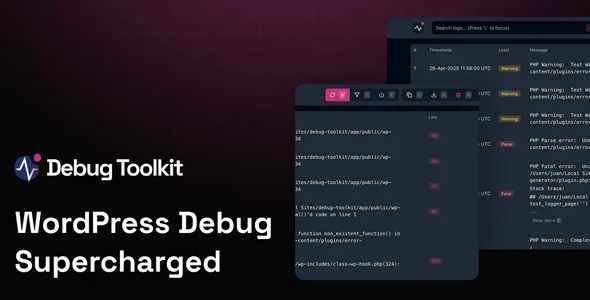
About WP Debug Toolkit Pro
When a site drops to a white screen, the usual routine is to open FTP, hunt for the log file, download it and hope the error is still there. If the client is waiting on the phone, every minute counts. WP Debug Toolkit Pro is built for that moment: reading errors without depending on the WordPress admin loading.
Whoever maintains other people's sites hears about failures too late
The hard part of managing client sites is not fixing errors, but finding out about them. Often the news arrives when the client has already seen it, or when their visitors have already left. This plugin is split into three tools that tackle that from different angles: an error viewer, a database query viewer and a monitor that alerts you by email.
An error viewer that stays alive when WordPress doesn't
The log viewer is a standalone app, separate from the WordPress login, so it works even if wp-admin won't load. What it offers:
- Search and filters to find the signal in the noise.
- Highlighting by level and real-time logs, with no refreshing or digging through directories.
- A file viewer: from an entry you jump to the file and line where the error originated and see the context of the call.
- Keyboard shortcuts and a theme switcher.
- Crash recovery system: disable plugins and themes from the tool and get back into the admin.
A practical detail: by seeing which plugins constantly throw errors, even if they haven't broken anything yet, you can decide to replace them before they give you a scare.
Query Viewer: slow queries get a name and a face
What it records
It stores the database queries of each page load and flags those that exceed the threshold you set, duplicate patterns and possible N+1 loops (the same query repeated hundreds of times). It attributes each query to core, a plugin or the theme, although that attribution is an estimate and won't always be exact. It also scores SQL complexity from 1 to 10 and exports to CSV, JSON or TSV.
Why it doesn't weigh on the database
Logs are saved in files on disk (JSON), not in WordPress tables, so the tool has little influence on the site it measures. A live dashboard lets you watch queries while you test, for example, a checkout process.
Site Monitor: email alerts even while the site is going down
It sends a notice as soon as a critical error occurs. It groups repeated errors so you get one useful email and not 5,000, and a locking system prevents 50 simultaneous visitors from triggering 50 emails. It reserves emergency memory so it can alert you even when the failure is memory exhaustion, and if standard email fails, it falls back to native PHP mail. The emails include a direct link to the viewer and to WordPress recovery.
If you work for clients, you can put your logo and colors on the alerts, add your own support links or instructions and decide which level triggers a notice: fatals only, or also warnings and notices on development sites.
Detecting and alerting is not the same as fixing
- What it already solves: reading and filtering errors, locating file and line, measuring queries, alerting by email and recovering access by disabling plugins or themes.
- What you or a professional will have to do: fix the failing code, optimize the slow query or decide which plugin to replace. The tool points to the source, it doesn't repair it.
- Worth knowing: it is aimed at people who understand what PHP and SQL logs are saying. A beginner will see things more clearly than in a text file, but will still need to interpret what they see.
Frequently asked questions
Is it useful if I'm not a developer?
Yes for viewing and sorting errors and for recovering access. Fixing them will take coding knowledge or outside help.
Does it work when the site is completely down?
The error viewer is independent of WordPress and keeps showing the logs. If the site is locked, the recovery system lets you disable plugins and themes.
Does it slow down a production site?
Query logging is done in files and not in the database, to limit the impact.
Can I customize the alerts for my clients?
Yes: logo, colors, your own links or instructions and severity thresholds.
Version history
-
v
1.1.0 Current 3 Mar 2026
Customer reviews
Sign in to leave a review. Only people who have the product can review it.
No reviews for this product yet.
Frequently asked questions
-
GPL (General Public License) is the license under which WordPress and most premium plugins/themes are distributed. It grants you the right to use, modify and redistribute the software in as many projects as you want, with no domain restrictions.
-
Yes. With membership you get automatic updates via our GPLClub Updater plugin (installed on your WP, detects new versions and applies them). With individual purchase, you get one year of manual updates from your account.
-
Depends on the plan. Monthly: 3 domains. Semi-annual: 7. Annual and Lifetime: 15. Individual purchase: 1 domain.
-
GPLClub offers its own support for installation, configuration and compatibility. For direct support from the original author (feature requests, product-specific bugs), a license purchased from the author is required.