WP Responsive Recent Post Slider Pro
Antivirus scan
Powered by ClamAV
✅ Verified clean
This product file has passed our security filters.
Want to run a fresh ClamAV scan right now? Takes a few seconds and shows scanner version, signature DB and live result.
This can take 5 to 30 seconds.
Clean file Threat detected
No threats detected in this file.
- File
- Size
- Scanned
- ClamAV
- Signature database
⚡ Powered by ClamAV
Scan could not be completed
Report product
If you detected an issue (broken file, malware, inappropriate content, etc.) let us know and we'll review it ASAP.
Sign in to report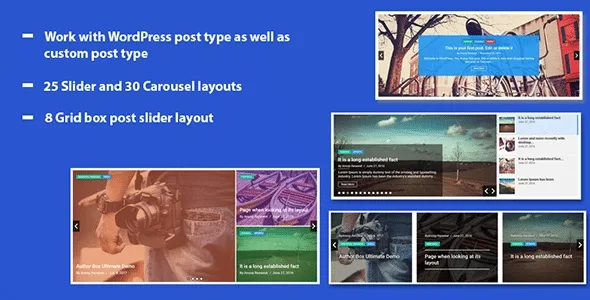
About WP Responsive Recent Post Slider Pro
What you published last is rarely the best you have
A recent posts slider looks like solved work: you publish and the home page renews itself. Until the holiday closing notice or yesterday's brief update takes the foreground, and your most carefully written article drops out of the rotation because it is already a few weeks old.
In an automatic slider, the date decides for you what the visitor sees first. What hands control back to a person are the filters: which categories get in, which posts stay out and in what order they appear. That is the part worth looking at in this plugin, more than the number of designs.
WP Responsive Recent Post Slider Pro, by Essential Plugin (WP OnlineSupport), shows your WordPress posts in sliders, carousels and sliding grids, through shortcodes.
Choosing what enters the rotation
These shortcode parameters do the editorial work:
- By category: category sets which get in, exclude_cat which stay out and include_cat_child controls child categories.
- By post: posts selects specific posts and hide_post hides the ones you do not want.
- By order: order and orderby change the sequence, so the date does not have to rule.
- By quantity: limit sets how many posts are loaded.
- By content type: it works with posts and with custom post types.
One way to use this is to create an internal featured category and point the slider only at it. That way the home page changes when you decide, and any editor can maintain it without touching the shortcode. It is worth testing on your site before settling on it.
Designs, cards and places to put it
The Pro version brings together 25 slider designs, 30 carousel designs and 8 grid box slider designs. Two of its shortcodes are [recent_post_slider] and [recent_post_carousel], and the design is chosen with the design parameter.
- Visible data: date, category, author, excerpt with a word limit and a read more button with your own text.
- Motion: dots, arrows, autoplay with interval and speed, and loop.
- Measures: slider height and, in the carousel, how many slides show and how many advance.
- Links: link_target defines how they open.
Besides the shortcode, it offers a Gutenberg block, support for WPBakery Page Builder and three widget designs for post sliders and lists in sidebars. If you need to change the markup, the plugin's templates can be overridden from your theme, so your changes stay outside its files. It also works in several languages.
It starts from your posts, not custom slides
This plugin shows content that already exists in WordPress. For a header with layers, animated text and hand-placed buttons, you need another kind of tool. It does not create the content either: a card will look as good as the title and image reaching it from each post.
First steps with the shortcode
Install and activate it like any WordPress plugin. After that, it helps to follow this order:
- Decide which posts deserve to appear and group them by category.
- Place [recent_post_slider] on a page, or the block if you use Gutenberg.
- Add the category parameter with your category and limit with the number of posts.
- Try several design values with your real images, not those of a demonstration.
- Adjust the speed and check the result on mobile.
Sliders with another starting point
To split a long article into several swipeable pages, rather than list posts, there is Theia Post Slider. If you build with Elementor, HT Slider Pro creates sliders that pull posts and WooCommerce products on their own. And to build magazine-style listings from the editor, PostX Pro adds post blocks and a query builder.
Fine-tuning the post slider
Can I exclude a specific post?
Yes, with the hide_post parameter. For whole categories there is exclude_cat.
Does it work with custom post types?
Yes, as well as with regular posts.
Can I use it in the sidebar?
Yes, with its three widget designs.
Can I have more than one slider?
Each shortcode carries its own parameters, so you can place one per category. Test the combination on your page.
Can I customize the HTML?
Yes, by overriding its templates from the theme.
Topics
Version history
-
v
1.4 Current 17 May 2024
Customer reviews
Sign in to leave a review. Only people who have the product can review it.
No reviews for this product yet.
Frequently asked questions
-
GPL (General Public License) is the license under which WordPress and most premium plugins/themes are distributed. It grants you the right to use, modify and redistribute the software in as many projects as you want, with no domain restrictions.
-
Yes. With membership you get automatic updates via our GPLClub Updater plugin (installed on your WP, detects new versions and applies them). With individual purchase, you get one year of manual updates from your account.
-
Depends on the plan. Monthly: 3 domains. Semi-annual: 7. Annual and Lifetime: 15. Individual purchase: 1 domain.
-
GPLClub offers its own support for installation, configuration and compatibility. For direct support from the original author (feature requests, product-specific bugs), a license purchased from the author is required.